IP address (Internet Protocol address)

What is an IP address (Internet Protocol address)?
An Internet Protocol (IP) address is a unique numerical identifier for every device or network that connects to the internet. Typically assigned by an internet service provider (ISP), an IP address is an online device address used for communicating across the internet.
There are two versions of IP addresses that are commonly used on the internet: IPv4 and IPv6. An IPv4 address is expressed as a set of four dotted decimal numbers, where each octet is separated by a period, such as 192.168.35.4. The three digits in the first octet represent a particular network on the internet while the rest of the digits represent the actual host address within the local network, such as a workstation or a server. An IPv6 address represents eight groups of four hexadecimal digits separated by colons, such as 2620:cc:8000:1c82:544c:cc2e:f2fa:5a9b.
Each internet protocol address can send information to other IP addresses through discrete chunks known as packets. Each network packet contains the data being transferred along with a header containing the metadata of the packet.
How do IP addresses work?
An IP address is part of the TCP/IP suite of protocols. It works behind the scenes, helping devices and websites connect with each other on the internet.
Every time a request is made to access a website, the requesting computer needs to know where the website resides and how to reach it. This is where the IP address comes into play. The requesting computer connects to the network router, which connects to the web server where the website lives. The web server then pulls the website information and sends it back to the requesting computer. Each device in this process -- including the computer, router and web server -- carries a uniquely identifiable IP address, without which the transfer of information will not take place.
IPv4 vs IPv6: What’s the difference?
Both IPv4 and IPv6 identify connected devices on the network. However, there are slight differences in the way they operate. IPv6 is the newer IP version and was introduced to address the limitations IPv4 posed on the availability of IP addresses.
The following is a list of differences between IPv4 and IPv6:
- IPv4 is 32-bit, whereas IPv6 is 128-bit.
- In IPv4, binary bits are separated by a dot (.); IPv6 separates binary bits by a colon (:).
- IPv4 follows the numeric addressing method and IPv6 is alphanumeric.
- IPv4 offers 12 header fields and IPv6 offers eight header fields.
- IPv4 has checksum fields but IPv6 doesn't.
- IPv4 supports broadcast address, which is a type of special address that transmits data packets to every node on the network. IPv6 doesn't support broadcast, but instead uses a multicast address, which is a logical identifier for a collection of hosts on a network.
- IPv4 supports Variable Length Subnet Mask, but IPv6 doesn't.
- When mapping to media access control addresses, IPv4 uses the Address Resolution Protocol. IPv6 uses the Neighbor Discovery Protocol, which uses stateless auto-configuration and address resolution.
Types of IP addresses
Here is a list of the five most common types of IP addresses:
1. Private IP addresses
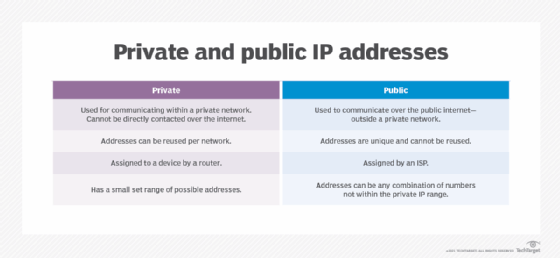
Each device connected to a home network or a private network carries a private IP address. Private IP addresses are non-internet facing and are only used on an internal network. Devices with private IP addresses might include computers, tablets, smartphones, Bluetooth devices, smart TVs and printers. With the increasing popularity of internet of things products, the use of private IP addressing is likely to keep growing.
2. Public IP addresses
An ISP assigns these addresses, which enable a router to communicate with the internet or an outside network. Public IP addresses cover the entire network, meaning multiple devices sharing the same internet connection will also share the same public IP address.
3. Dynamic IP addresses
These IP addresses are constantly changing and a new dynamic IP address is assigned to a device every time it connects to the internet. ISPs buy large pools of IP addresses to assign to their customers automatically. They revolve and reuse these addresses between different customers to generate cost savings and to provide easier network management. A dynamic IP address also offers security benefits, as it's harder for cybercriminals to hack into a network interface if its IP is constantly changing.
4. Static IP addresses
Unlike dynamic IP addresses, static IP addresses never change once they're assigned by the network. While most internet users and businesses don't require static IP addresses, they're a requirement for businesses that wish to host their own web servers. A static IP address ensures that all websites and email addresses associated with a certain web server will always have a consistent IP address so it can be reached on the internet.
5. Website IP addresses
These are IP addresses for website owners who don't host their websites on their own servers but rely on a hosting company to do so. Website IP addresses are composed of the following two types:
- Shared. This IP address is shared among many different websites and is mostly used by small businesses that use a managed hosting service, such as WordPress.
- Dedicated. This is a unique IP address assigned to an individual website. Dedicated IP addresses help website owners avoid getting blocked or blacklisted, something that owners of shared IP addresses might face when malicious behavior is exhibited by other websites sharing the same IP. Owners of dedicated IP addresses can access their websites while waiting for a domain transfer.
Looking up an IP address
There are many ways to look up the IP address of a device. However, the simplest way is to type what is my IP address? into an internet browser, such as Google Chrome. The returning address will be the public IP address of the requesting device.
Windows 10 and Windows 11
- Select Start>Settings>Network & internet>Wi-Fi and the Wi-Fi network you're connected to.
- Under Properties, look for your IP address listed next to IPv4 address.
Mac
- Go to System Preferences.
- Select network. This should show the IP address information.
iPhone
- Go to Settings.
- Select Wi-Fi and click on the information icon, which is the blue "I" in a circle to the right of the connected network.
- The IP address should be visible under the Dynamic Host Configuration Protocol (DHCP) tab.
Various websites, such as whatismyipaddress.com, also automatically find the IP address of a device.
IP address security
Cybercriminals can exploit an IP address in several ways. Once an IP address is exposed, it can be used for various malicious purposes. Therefore, it's best to keep it as private as possible. Hiding the IP address and accessing the internet securely through a virtual private network service is a great option and so is masking the IP address by using a proxy server or a browser, such as Tor, that anonymizes the web traffic.
Here are some ways cybercriminals can exploit a stolen IP address.
- Download illegal content. Cybercriminals often use stolen and unprotected IP addresses to access and download illegal content. This way they avoid being tracked, as the IP addresses are traced back to the IP address owners.
- Location tracking. Most public addresses can be used to narrow down someone's physical location, such as their city of residence. With some digging, criminals can even locate the actual home address of an IP address owner.
- Distributed denial-of-service attacks. By obtaining an IP address, criminals can carry out targeted DDoS attacks against a network. During these attacks, massive amounts of fake traffic is generally sent to a website to bring it down.
- Send spam. Advertisers can embed tracking programs in online activities and articles that can record IP addresses. The recorded IP addresses are used to generate spam and to target advertising based on a visitor's browsing history.
- Steal identity. Identity theft is on the rise and cybercriminals are always on the lookout for personally identifiable information (PII), such as social security numbers or mailing addresses. While an IP address isn't technically PII, it can help a cybercriminal gain access to other information. For example, if a cybercriminal obtains a person's IP address, they can easily track down their ISP and attempt to impersonate them through vishing attacks that can cause the ISP to divulge personal data.
When configuring a network, network administrators must choose between a static or a dynamic IP address. Learn what these IP addresses offer and also explore their pros and cons.