
Andrea Danti - Fotolia
What's the difference between half-duplex and full-duplex?
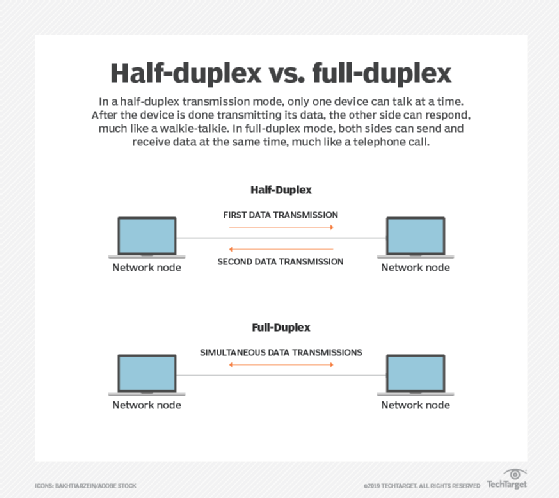
A half-duplex transmission could be considered a one-way street between sender and receiver. Full-duplex, on the other hand, enables two-way traffic at the same time.
A communications channel can be used to communicate one way at a time or in both directions at once. The terms half-duplex and full-duplex describe these transmission modes. Let's dig deeper to explore the difference between half-duplex and full-duplex.
What is half-duplex?
On a channel that is half-duplex, only one thing on that channel -- a node -- can "talk" or transmit information at a time. Once one node has finished transmitting its data, another node can start transmitting data. If multiple nodes try to talk at the same time, a collision will occur on the network, resulting in transmission errors or data loss.
Half-duplex networks require a mechanism to avoid data collisions. Ethernet uses a method called carrier sense multiple access with collision detection, or CSMA/CD. In essence, an Ethernet device using half-duplex modes will first check to see if anything else is transmitting before trying to send. If something else is sending, it will wait a random amount of time before trying again.
What is full-duplex?
On the other hand, full-duplex is used to describe communication where two nodes talking to each other are able to send and receive data at the same time. In these cases, there is no danger of a collision, and therefore, the transfer of data for any given communication is completed more quickly.
What are the key differences between half-duplex and full-duplex?
The main difference between half-duplex and full-duplex is simply whether communication happens in one direction at a time or in both directions simultaneously. Beyond that, the differences center on use cases. Half-duplex, for example, can be used for media shared by more than two nodes, while full-duplex generally cannot.
On a shared medium, such as a coaxial cable with several nodes attached to it, all the nodes can share the channel because each knows to check if the channel is free before sending. The tradeoff is efficiency. The more nodes that share the channel, the lower the effective throughput for each node because of the increased time spent waiting for access.
When only two nodes are talking on a full-duplex channel, separate subchannels -- in a Cat 5 cable, for example, separate pairs of copper wire -- will carry traffic in each direction. When more than a pair of nodes are communicating, the full-duplex channel will have a hard time separating the data sent by the various nodes, which decreases efficiency and increases costs.
The most recent Ethernet standards, like 10G and up, are relaxing the requirement to support half-duplex modes.
Examples of half-duplex and full-duplex
The simplest example of a half-duplex channel is a standard walkie-talkie, as it can either transmit or receive communication. Organizations that rely on half-duplex voice communication develop procedures that speakers use to tell listeners they are done transmitting the current piece of information. For example, on a walkie-talkie, a user would say "over" when done talking or say "over and out" when getting off the line for a substantial amount of time.
In data networking, Ethernet hubs are half-duplex devices by nature, as they create a single shared channel of communication. Ethernet switches, on the other hand, can use a connection in either half- or full-duplex mode. Most networks are built around switches now, but hubs are still used as well. Also, some older Ethernet devices can only use half-duplex communications, even when connected to a full-duplex switch.
Lastly, Wi-Fi networks are half-duplex on a per-channel basis. Each radio channel, as with walkie-talkies, can send or receive -- but not both at the same time. Wi-Fi 6 standards enable the use of multiple channels simultaneously via multiple antennas, creating the potential for full-duplex communications between nodes.