pen testing (penetration testing)
What is a pen test?
A penetration test, also called a pen test or ethical hacking, is a cybersecurity technique that organizations use to identify, test and highlight vulnerabilities in their security posture. These penetration tests are often carried out by ethical hackers. These in-house employees or third parties mimic the strategies and actions of an attacker to evaluate the hackability of an organization's computer systems, network or web applications. Organizations can also use pen testing to evaluate their adherence to compliance regulations.
Pen testing is considered a proactive cybersecurity measure because it involves consistent, self-initiated improvements based on the reports the test generates. This differs from nonproactive approaches, which don't fix weaknesses as they arise. A nonproactive approach to cybersecurity, for example, would involve a company updating its firewall after a data breach occurs. The goal of proactive measures, such as pen testing, is to minimize the number of retroactive upgrades and maximize an organization's security.
What are the types of pen testing?
There are three main pen testing strategies, each offering pen testers a certain level of information they need to carry out their attack.
- White box testing provides testers with all the details about an organization's system or target network and checks the code and internal structure of the product being tested. White box testing is also known as open glass, clear box, transparent or code-based testing.
- Black box testing is a type of behavioral and functional testing where testers aren't given any knowledge of the system. Organizations typically hire ethical hackers for black box testing where a real-world attack is carried out to get an idea of the system's vulnerabilities.
- Gray box testing is a combination of white box and black box testing techniques. It provides testers with partial knowledge of the system, such as low-level credentials, logical flow charts and network maps. The main idea behind gray box testing is to find potential code and functionality issues.
What are the stages of pen testing?
Pen testing can be divided into the following six stages:
1. Reconnaissance and planning. Testers gather all the information related to the target system from public and private sources. Sources might include incognito searches, social engineering, domain registration information retrieval and nonintrusive network and vulnerability scanning. The information is vital for the testers, as it provides clues into the target system's attack surface and open vulnerabilities, such as network components, operating system details, open ports and access points.
2. Scanning. Based on the results of the initial phase, testers might use various scanning tools to further explore the system and its weaknesses. Pen testing tools -- including war dialers, port scanners, security vulnerability scanners and network mappers -- are used to detect as many vulnerabilities and loopholes as possible. The vulnerabilities are then shortlisted for exploitation.
3. Obtaining entry. During this stage, testers exploit vulnerabilities assessed in the previous phase by making a connection with the target. The testers conduct common web application security attacks -- including a denial-of-service (DoS) attack, SQL injections and backdoors, session hijacking and cross-site scripting -- to expose the system's vulnerabilities, which are then exploited through privilege escalations, traffic interception or data stealing techniques.
4. Maintaining access. This stage ensures that the penetration testers stay connected to the target for as long as possible and exploit the vulnerabilities for maximum data infiltration. This stage imitates an advanced persistent threat, which can stay active in a system for prolonged periods to steal sensitive data and cause further damage.
5. Analysis. The testers analyze the results gathered from the penetration testing and compile them into a report. The report details each step taken during the testing process, including the following:
- the vulnerabilities the testers exploited;
- the type of sensitive data the testers accessed; and
- the amount of time the testers stayed connected to the target.
6. Cleanup and remediation. Once the testing is complete, the pen testers should remove all traces of tools and processes used during the previous stages to prevent a real-world threat actor from using them as an anchor for system infiltration. During this stage, organizations should start remediating any issues found in their security controls and infrastructure.
Who performs pen tests?
Pen testing is typically performed by testers known as ethical hackers. These ethical hackers are IT experts who use hacking methods to help companies identify possible entry points into their infrastructure. By using different methodologies, tools and approaches, organizations can perform simulated cyber attacks to test the strengths and weaknesses of their existing security systems. Penetration, in this case, refers to the degree to which a hypothetical threat actor, or hacker, can penetrate an organization's cybersecurity measures and protocols.
Most pen testers are experienced developers or security professionals with advanced credentials and pen testing certifications. It's always best to hire testers that have little to no experience with the system they're trying to infiltrate. For example, a developer performing pen testing on their own source code might miss a few blind spots that a tester from outside can catch.
How often should pen tests be performed?
How frequently pen testing should be conducted depends on many factors, but most security experts recommend doing it at least once a year, as it can detect emerging vulnerabilities, such as zero-day threats. According to the MIT Technology Review, at least 66 zero-day vulnerabilities emerged in 2021.
Organizations should consider the following factors when scheduling pen testing:
- Company size. Larger organizations can suffer greater monetary and reputational losses if they fall prey to cyber attacks. Therefore, they should invest in regular security testing to prevent these attacks.
- Budget. Pen testing should be based on a company's budget and how flexible it is. For example, a larger organization might be able to conduct annual pen tests, whereas a smaller business might only be able to afford it once every two years.
- Regulations. Depending on the industry type and regulations, certain organizations within banking and healthcare industries are required to conduct mandatory penetration testing.
In addition to regularly scheduled pen testing, organizations should also conduct security tests when the following events occur:
- New network infrastructure or appliances are added to the network.
- Upgrades are performed on existing applications and equipment.
- Patches are installed for security.
- New office locations are established.
- End-user policies have been modified.
What happens after a pen test?
After the successful conclusion of a pen test, an ethical hacker shares their findings with the information security team of the target organization. Ethical hackers usually categorize their findings with a severity rating so that the issues with the highest rating are given precedence during remediation.
The organization uses these findings as a basis for further investigation, assessment and remediation of its security posture. The decision-makers and stakeholders also get involved at this stage and the organization's IT or security team creates deadlines to ensure all security issues are dealt with promptly.
How to do penetration testing
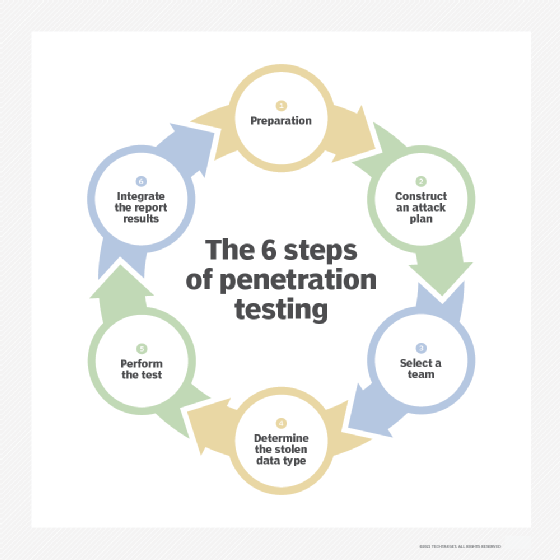
Pen testing is unique from other cybersecurity evaluation methods, as it can be adapted to any industry or organization. Depending on an organization's infrastructure and operations, it might want to use a certain set of hacking techniques or tools. These techniques and their methodologies can also vary based on the IT personnel and their company standards. Using the following adaptable six-step process, pen testing creates a set of results that can help organizations proactively update their security protocols:
- Preparation. Depending on the needs of the organization, this step can either be a simple or elaborate procedure. If the organization hasn't decided which vulnerabilities it wants to evaluate, a significant amount of time and resources should be devoted to combing the system for possible entry points. These in-depth processes are usually only necessary for businesses that haven't already conducted a complete audit of their systems. Once a vulnerability assessment has been conducted, however, this step becomes much easier.
- Construct an attack plan. Before hiring ethical hackers, an IT department designs a cyber attack, or a list of cyber attacks, that its team should use to perform the pen test. During this step, it's also important to define what level of system access the pen tester has.
- Select a team. The success of a pen test depends on the quality of the testers. This step is often used to appoint the ethical hackers that are best suited to perform the test. These decisions can be made by companies based on employee specialties. For example, if a company wants to test its cloud security, a cloud expert might be the best person to properly evaluate its cybersecurity.
- Determine the stolen data type. What is the team of ethical hackers stealing? The data type chosen in this step can have a profound effect on the tools, strategies and techniques used to acquire it.
- Perform the test. This is one of the most complicated and nuanced parts of the testing process, as there are many automated tools and techniques testers can use, including Kali Linux, Nmap, Metasploit and Wireshark.
- Integrate the report results. Reporting is the most important step of the process. The results the testers provide must be detailed so the organization can incorporate the findings.
Why is pen testing important?
A test run of a cyber attack, a penetration test offers insights into the most vulnerable aspects of a system. It also serves as a mitigation technique, enabling organizations to close the identified loopholes before threat actors get to them.
The following are four reasons why organizations should conduct pen testing:
- Risk assessment. The rate of distributed DoS, phishing and ransomware attacks is dramatically increasing, putting most companies at risk. Considering how reliant businesses are on technology, the consequences of a successful cyber attack have never been greater. A ransomware attack, for instance, could block a company from accessing the data, devices, networks and servers it relies on to conduct business. Such an attack could result in millions of dollars of lost revenue. Pen testing uses the hacker perspective to identify and mitigate cybersecurity risks before they're exploited. This helps IT leaders perform informed security upgrades that minimize the possibility of successful attacks.
- Security awareness. As technology continues to evolve, so do the methods cybercriminals use. For companies to successfully protect themselves and their assets from these attacks, they need to be able to update their security measures at the same rate. The caveat, however, is that it's often difficult to know which methods cybercriminals are using and how they might be used in an attack. But by using skilled ethical hackers, organizations can quickly and effectively identify, update and replace the parts of their systems that are particularly susceptible to modern hacking techniques.
- Reputation. A data breach can put a company's reputation at stake, especially if it goes public. Customers can lose confidence in the business and stop buying its products, while investors might be hesitant to invest in a business that doesn't take its cyberdefense seriously. Penetration testing protects the reputation of a business by offering proactive mitigation approaches.
- Compliance. Industries, including healthcare, banking and service providers, take compliance and regulation seriously and include pen testing as part of their compliance efforts. Common regulations, such as a Service Organization Control 2 (SOC 2), HIPAA and the Payment Card Industry Data Security Standard (PCI DSS), require pen tests to be compliant. Therefore, by performing regularly scheduled pen testing, organizations can stay on top of their compliance needs.
What is the difference between pen testing and vulnerability assessments?
Although pen tests aren't the same as vulnerability assessments, which provide a prioritized list of security weaknesses and how to amend them, they're often performed together.
The main characteristics of pen testing and vulnerability assessments are as follows:
Pen testing
- Pen testing is often conducted with a particular goal in mind. These goals typically fall under one of the following three objectives: identify hackable systems, attempt to hack a specific system or carry out a data breach.
- Each objective focuses on specific outcomes that IT leaders are trying to avoid. For example, if the goal of a pen test is to see how easily a hacker could breach the company database, the ethical hackers would be instructed to try to carry out a data breach.
- The results of a pen test will communicate the strength of an organization's current cybersecurity protocols, as well as present the available hacking methods that can be used to penetrate the organization's systems.
- Penetration testing is generally live and manual, making it more accurate.
- It takes longer to complete a pen test, typically a day to a few weeks.
- Pen testing can be expensive, and the price varies depending on the type of test conducted. According to RSI Security, on average, pen testing costs anywhere from $4,000 to $100,000.
Vulnerability assessments
- Vulnerability assessments search for known vulnerabilities in the system and report potential exposures.
- Scans are typically automated or scheduled.
- Vulnerability assessments can be completed in a few minutes to several hours.
- Vulnerability assessments are affordable and depending on the vendor, they can average $100 per Internet Protocol, annually.
- Vulnerability assessments sometimes generate false positives.
Automated pen testing is gaining momentum and provides an opportunity for organizations to perform frequent testing. Learn the pros and cons of manual vs. automated penetration testing.