Routing Information Protocol (RIP)

What is Routing Information Protocol (RIP)?
Routing Information Protocol (RIP) is a distance vector protocol that uses hop count as its primary metric. RIP defines how routers should share information when moving traffic among an interconnected group of local area networks.
In the enterprise, Open Shortest Path First (OSPF) routing has largely replaced RIP as the most widely used Interior Gateway Protocol. RIP has been supplanted mainly due to its simplicity and inability to scale to very large and complex networks. In contrast, Border Gateway Protocol (BGP) is a path vector routing protocol that is now used to transfer routing information across autonomous systems on the internet.
RIP was originally designed for Xerox PARC Universal Protocol and was called GWINFO in the Xerox Network Systems protocol suite in 1981. RIP, which was defined in RFC 1058 in 1988, is known for being easy to configure and easy to use in small networks.
How Routing Information Protocol works
RIP uses a distance vector algorithm to decide which path to put a packet on to get to its destination. Each RIP router maintains a routing table, which is a list of all the destinations the router knows how to reach. Each router broadcasts its entire routing table to its closest neighbors every 30 seconds. In this context, neighbors are the other routers to which a router is connected directly -- that is, the other routers on the same network segments as the selected router. The neighbors, in turn, pass the information on to their nearest neighbors, and so on, until all RIP hosts within the network have the same knowledge of routing paths. This shared knowledge is known as convergence.
If a router receives an update on a route, and the new path is shorter, it will update its table entry with the length and next-hop address of the shorter path. If the new path is longer, it will wait through a "hold-down" period to see if later updates reflect the higher value as well. It will only update the table entry if the new, longer path has been determined to be stable.
If a router crashes or a network connection is severed, the network discovers this because that router stops sending updates to its neighbors, or stops sending and receiving updates along the severed connection. If a given route in the routing table isn't updated across six successive update cycles (that is, for 180 seconds) a RIP router will drop that route and let the rest of the network know about the problem through its own periodic updates.
Versions of RIP
There are three versions of the Routing Information Protocol:
- RIPv1.
- RIPv2.
- RIPng.
RIPv1 -- standardized in 1988 -- is also called Classful Routing Protocol because it does not send subnet mask information in its routing updates. On the other hand, RIPv2 -- standardized in 1998 -- is called Classless Routing Protocol because it does send subnet mask information in its routing updates. RIPng is an extension of RIPv2 that was made to support IPv6.
In RIPv1, routes are decided based on the IP destination and hop count. RIPv2 advanced this method and started to include subnet masks and gateways. Furthermore, the routing table in RIPv1 is broadcast to every station on the attached network whereas RIPv2 sends the routing table to a Multicast address in an effort to reduce network traffic. Additionally, RIPv2 uses authentication for security -- a feature missing from RIPv1.
RIP configuration
RIP operates on the application layer of the OSI model. The configuration process for the Routing Information Protocol is fairly simple. Once IP addresses have been assigned to the involved computers and interfaces of routers, then developers can issue the router RIP command -- which tells the router to enable RIP. Then, developers can use the network command, which enables users to identify the networks with which they want to work. Only the networks directly associated with the router need to be specified.
Users can also configure any port to perform the following actions:
- Prevent RIP packets from being sent or received.
- Receive packets in various formats.
- Send packets formatted for each of the different RIP versions to the RIPv1 broadcast address.
Features of RIP
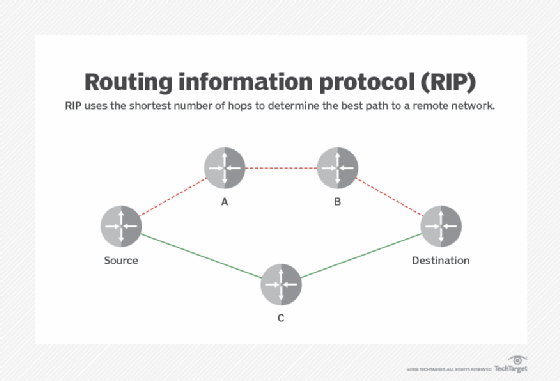
RIP uses a modified hop count as a way to determine network distance. A modified hop count reflects the fact that network engineers can assign paths a higher cost. By default, if a router's neighbor owns a destination network and can deliver packets directly to the destination network without using any other routers, that route has one hop. In network management terminology, this is described as a cost of one.
RIP supports only 15 hops in a path. If a packet can't reach a destination in 15 hops, the destination is considered unreachable. Paths can be assigned a higher cost (as if they involved extra hops) if the enterprise wants to limit or discourage their use. For example, a satellite backup link might be assigned a cost of 10 to force traffic to follow other routes when available.
RIP timers
Timers in RIP help regulate performance. They include the following:
- Update timer -- Frequency of routing updates. Every 30 seconds IP RIP sends a complete copy of its routing table, subject to split horizon. (Internetwork packet exchange RIP does this every 60 seconds.)
- Invalid timer -- Absence of refreshed content in a routing update. RIP waits 180 seconds to mark a route as invalid and immediately puts it into hold-down.
- Hold-down timers and triggered updates -- Assist with stability of routes in a Cisco environment. Hold-downs ensure that regular update messages do not inappropriately cause a routing loop. The router doesn't act on non-superior new information for a certain period of time. RIP's hold-down time is 180 seconds.
- Flush timer -- RIP waits an additional 240 seconds after hold-down before it actually removes the route from the table.
Other stability features to assist with routing loops include poison reverse. A poison reverse is a way in which a gateway node tells its neighbor gateways that one of the gateways is no longer connected. To do this, the notifying gateway sets the number of hops to the unconnected gateway to a number that indicates infinite, which in layman's terms simply means "You can't get there." Since RIP supports up to 15 hops to another gateway, setting the hop count to 16 is the equivalent of "infinite."
Advantages of RIP
Advantages of RIP include the following:
- Feasible configuration.
- Easy to understand.
- Predominantly loop-free.
- Guaranteed to support almost all routers.
- Promotes load balancing.
Additionally, RIP is preferred over static routes due to its simple configuration and the fact that it does not require an update every time the topology changes.
Disadvantages of RIP
Unfortunately, the disadvantage of RIP is its increased network and processing overhead when compared to static routing.
Other disadvantages of RIP include the following:
- Not always loop-free.
- Only supports equal-cost load balancing.
- Pinhole congestion can occur.
- Bandwidth-intensive and inefficient.
- Large networks lead to slow convergence.
Limitations of RIP
While using RIP, users may run into various limitations. For example, the Routing Information Protocol results in increased network traffic due to the checks and updates it performs on neighboring routers every 30 seconds. Furthermore, because RIP only updates neighboring routers, updates for non-neighboring routers can be forgotten since the information is not immediately accessible.
Another limitation of RIP is the enforcement of a maximum hop count of 15. As a result, remote routers in large networks might not be able to be accessed or reached. Furthermore, the closest path might not be the shortest path. This is because RIP does not take various factors into consideration when calculating the shortest path.
Editor's note: This definition was updated to improve reader experience.