computer network
What is a computer network?
A computer network is a group of interconnected nodes or computing devices that exchange data and resources with each other. A network connection between these devices can be established using cable or wireless media. Once a connection is established, communication protocols -- such as TCP/IP, Simple Mail Transfer Protocol and Hypertext Transfer Protocol -- are used to exchange data between the networked devices.
The first example of a computer network was the Advanced Research Projects Agency Network. This packet-switched network was created in the late 1960s by ARPA, a U.S. Department of Defense agency.
A computer network can be as small as two laptops connected through an Ethernet cable or as complex as the internet, which is a global system of computer networks.
How does a computer network work?
Devices attached to a computer network use IP addresses that are resolved into hostnames through a domain name system server to communicate with each other over the internet and on other computer networks. A variety of protocols and algorithms are also used to specify the transmission of data among endpoints.
Network systems must follow certain standards or guidelines to operate. Standards are a set of data communication rules required for the exchange of information between devices and are developed by various standards organizations, including IEEE, the International Organization for Standardization and the American National Standards Institute. For example, the Ethernet standard establishes a common communication language for wired or physical networks, and the 802.11 standard specifies connectivity for wireless local area networks (WLANs).
A computer network must be physically and logically designed in such a way that makes it possible for the underlying network elements to communicate with each other. This layout of a computer network is known as the computer network architecture.
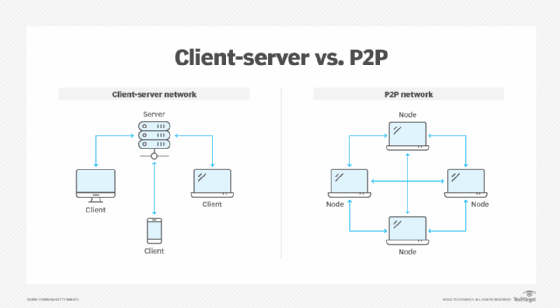
The following are the two most common computer network architectures:
- Client-server. This model consists of many clients -- or nodes -- where at least one network node acts as the central server. The clients in this model don't share resources, but request the central server, as all the resources are installed on it.
- Peer-to-peer (P2P). Each connected device on this network behaves as the client, as well as the server, and enjoys similar privileges. The resources of each peer are shared among the entire network, including memory, processing power and printing. Many companies use the P2P architecture to host memory-intensive applications, such as three-dimensional rendering, across multiple network devices.
A well-defined computer network also takes network capacity into account. A network's capacity is how much traffic the network can support at any given time, while still meeting service-level agreements. It's measured in terms of bandwidth, which is quantified by the theoretical maximum number of bits per second that can pass through a network device.
Core components of a computer network
The following building blocks -- network devices, links and communication protocols -- make computer network operations possible:
- Network devices. These physical devices or nodes are the data communication equipment that is connected inside a computer network. Examples of network devices include modems, routers, PCs, servers, firewalls, switches and gateways. Each device in a computer network is identified by a network address and often has easily identifiable hostnames.
- Links. A link is the transmission medium used for connecting the nodes and enabling them to transmit to each other. The links can be either wired, wireless or optical, such as an Ethernet cable or a Wi-Fi signal. The links can be configured in different ways, both physically and logically, and the network topology dictates the manner in which links and nodes relate to each other.
- Communication protocols. These are the rules or protocols that all nodes on a network must follow for information transfer. Common protocols include the TCP/IP suite, IEEE 802, Ethernet, WLAN and cellular standards.
TCP/IP is a conceptual model that suggests the following four functional layers for these communication links:
- Network access layer. This layer defines how the data is physically transferred through the network, as well as how hardware devices send bits through a network medium, such as coaxial, optical, fiber or twisted-pair cables.
- Internet layer. This is the layer where routing takes place. It packages data into packets and enables them to be sent and received over the network. The internet layer includes IP, Address Resolution Protocol and Internet Control Message Protocol.
- Transport layer. This layer ensures the stable, sequenced and error-free delivery of data packets. It achieves this by swapping acknowledgment of data reception and retransmitting lost or dropped packets. Typical protocols used at the transport layer include TCP and User Datagram Protocol.
- Application layer. Security protocols, such as Transport Layer Security, operate at this layer and play an integral part in ensuring network security. This is the abstraction layer that communicates directly with applications and defines how high-level apps should access the network to start a data transfer. For example, the application layer is used to define where, when and how much data should be sent at a specific rate.
The modern internet architecture is mostly built on the TCP/IP model, which is the simplified version of the more conceptual Open Systems Interconnection model.
Advantages of using a computer network
Computer networks are ideal for the quick exchange of information and the efficient use of resources.
The following are benefits of using a computer network:
- Resource sharing. Enterprises of all sizes can use a computer network to share resources and critical assets. Resources for sharing can include printers, files, scanners and photocopy machines. Computer networks are especially beneficial for larger and globally spread-out organizations, as they can use a single common network to connect with their employees.
- Flexibility. Today's computer networks enable people to use flexible communication and resource-sharing methods based on their needs and preferences. For example, some people might use email or instant messaging to communicate, while others might prefer using an app such as WhatsApp.
- Higher connectivity. Thanks to computer networks, people can stay connected regardless of their location. For example, video calling and document-sharing apps, such as Zoom and Google Docs, enable employees to connect and collaborate remotely.
- Data security and management. In a computer network, data is centralized on shared servers. This helps network administrators to better manage and protect their company's critical data assets. They can perform regular data backups and enforce security measures, such as multifactor authentication, across all devices collectively.
- Storage capacity. Most organizations scale over time and have an abundance of data that needs storage. Computer networks, especially those that employ cloud-based technologies, can store massive amounts of data and backups on a centralized remote server that's accessible to everyone, at any given time.
- Entertainment. Computer networks, especially the internet, offer various sources of entertainment, ranging from computer games to streaming music and videos. Multiplayer games, for example, can only be operated through a local or home-based LAN or a wide area network (WAN), such as the internet.
Types of computer networks
There are several types of computer networks. Which network an organization uses depends on factors such as the number of devices, types of operating systems, transmission medium used, network topology, the distance between each device and their geographic scale.
Some examples of computer networks are the following:
- LANs. LANs interconnect endpoints in a single domain. Examples of LANs include schools, hospitals and office buildings.
- WANs. WANs interconnect multiple LANs and span larger geographical areas, such as big cities, states and countries.
- Metropolitan area networks (MANs). A MAN connects computer resources in a large geographic area, such as a city.
- Storage area networks (SANs). SANs are specialized and dedicated networks that connect multiple high-performance data storage devices and resources. They provide built-in security and block-level access. A SAN provides disaster recovery because it includes different storage devices, such as disk drives, magnetic tapes and optical storage.
- Personal area networks (PANs). A PAN is used by one person to connect multiple devices, such as printers and scanners.
- WLANs. This is a group of colocated devices that use radio transmission instead of wired connections.
- Campus area networks (CANs). A CAN is a collection of interconnected LANs that are commonly used by larger organizations, such as governments and universities.
- Virtual private networks (VPNs). A VPN extends a private network over a public network to improve the privacy and security of a network connection.
- Passive optical networks (PONs). A PON is a fiber optic network that delivers broadband access to end users.
- Service provider networks. These are network providers that lease network capacity and functionality to customers. Providers typically consist of telecommunication companies, data carriers, internet service providers and cable television providers.
- Cloud networks. This is a type of WAN, but its infrastructure is delivered by a cloud-based service, such as Amazon Web Services. Cloud networks are a standard approach for modern networks.
Networks can be divided into subnetworks, also called subnets.
What are the different types of network topologies?
A network topology is the physical and logical arrangement of a network. All topologies come with different pros and cons. Organizations should consider the scope of a network -- including its size, scaling needs and business goals -- before selecting a particular topology.
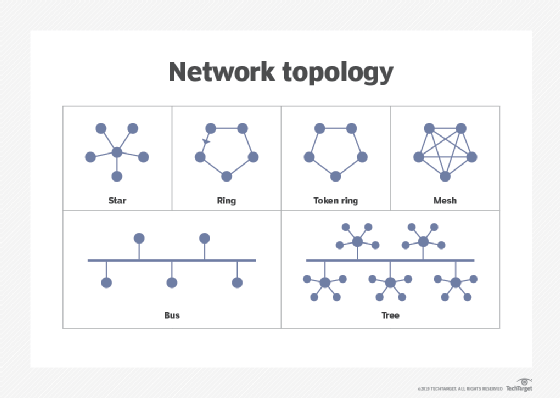
Network topologies include the following types:
- Star network. A star network topology connects all nodes to a common central computer.
- Ring network. Network devices are connected to two other devices on either side through a coaxial cable or an RJ-45 cable.
- Full mesh network. All nodes in a full mesh network are connected directly to other nodes.
- Partial mesh network. Only some nodes connect directly to one another, while others are only connected to one or two other nodes in the network.
- Point-to-point network. This network provides a dedicated connection between two endpoints.
- Bus network. A bus network follows the LAN topology, where devices in a single LAN are attached directly to a transmission line known as a bus. All signals pass through all devices, and the recipient device recognizes the signals intended for it.
- Tree network. This is a hybrid network topology where two or more star networks are connected.
Computer networks come in all shapes and sizes. Explore the seven common types of networks, along with their pros and cons.