Windows Management Instrumentation (WMI)

What is Windows Management Instrumentation (WMI)?
Windows Management Instrumentation (WMI) is a set of specifications from Microsoft for consolidating the management of devices and applications in a network from Windows computing systems. WMI provides users with information about the status of local or remote computer systems.
The purpose of WMI is to help administrators manage different Windows operational environments, including remote systems. One big advantage of WMI is that it reduces maintenance and the cost of managing enterprise network components.
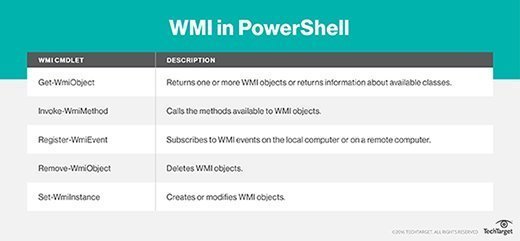
WMI comes pre-installed on Microsoft's newest operating systems. The vendor provided a command-line interface (CLI) for WMI known as WMI Command Line (WMIC) in OSs before Windows 10. WMIC is compatible with existing shells and utility commands in these previous versions of Windows.
WMI as an implementation of WBEM
WMI is Microsoft's implementation of the Web-Based Enterprise Management (WBEM) initiative for supported Windows platforms. WBEM is an industry-wide initiative to develop management infrastructure standards to access and combine information from various hardware and software management systems in an enterprise IT environment.
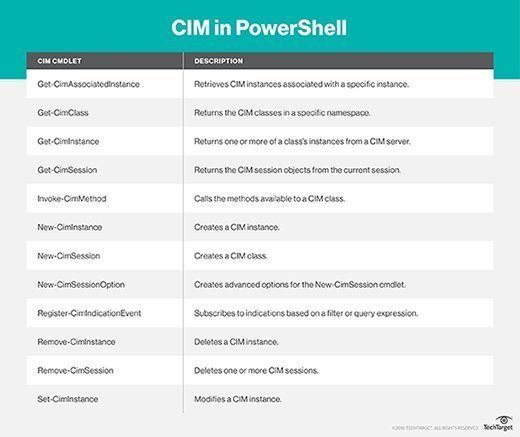
WBEM is built on the Common Information Model (CIM) schema, a computer industry standard for defining device and application characteristics. CIM enables system administrators and management programs to control devices and applications from multiple manufacturers or sources. It is driven by DMTF (formerly known as the Distributed Management Task Force).
A deep dive into WMI
WMI provides users with a consistent model of Windows operation, configuration and status in enterprise networks. It provides a COM API that allows access to management information about the status of local or remote computer systems. Remote WMI connections are made through the Distributed Component Object Model (DCOM).
A WMI toolkit provides different extensions of the Windows Driver Model. This model provides an operating system interface for crucial information and different types of notifications.
Developers and IT administrators can write WMI scripts or applications to automate administrative tasks on remote computers. There is no need to download or install a specific software development kit (SDK) to create these scripts or applications. Management applications or scripts can perform operations or get data through WMI in a variety of programming languages.
In addition to supporting scripts, WMI also supplies management data to other parts of the operating system and products, including Microsoft System Center Operations Manager (SCOM) and Windows Remote Management (WinRM).
WMI supports actions such as the:
- Configuration of security settings
- Setting and changing system properties
- Setting and changing permissions for authorized users and user groups
- Assigning and changing drive labels
- Scheduling processes to run at specific times
- Backing up the object repository
- Enabling or disabling error logging
Windows Management Instrumentation architecture
WMI provides a uniform interface so that WMI client applications and scripts do not have to call multiple system APIs. Also, its flexible and extensible architecture provides support for new devices, applications, and other enhancements.
The three core elements of the WMI architecture are:
- Management infrastructure
- CIM Object Manager (CIMOM), which provides applications with a uniform way to access management data
- CIMOM object repository, a central storage area for management data
- WMI providers
- Intermediaries between CIMOM and managed objects
- Key functions:
- WMI APIs supply CIMOM with data from managed objects
- Handles requests on behalf of management applications
- Generates event notifications
- WMI consumers
- Management application, script interacting with WMI infrastructure to:
- Query, enumerate data
- Run provider methods
- Subscribe to events
Windows Management Instrumentation components
Key WMI components are:
- Managed objects: Objects are any physical entity/component or service that are managed via WMI, such as a hard disk drive, network adapter or OS.
- WMI provider: Component Object Model (COM) objects that monitor one or more managed objects for WMI.
- WMI infrastructure: A Windows operating system component that consists of the WMI Core and WMI Repository.
- WMI Repository: A central storage area managed by CIMOM and organized by WMI namespaces that stores static data about objects, such as the classes the WMI provider defines.
- WMI service: Serves as an intermediary between the management applications (providers) and the WMI Repository.
- WMI consumers: A management application or script that sends queries by calling the COM API for WMI or the scripting API for WMI.
How do admins use WMI?
Administrators can use WMI in all Windows-based applications. It is especially effective in enterprise applications and administrative scripts. Popular uses of WMI include:
- Managing remote computers
- Sharing management information between applications
- Accessing management data from any source in a uniform manner
- Monitoring Windows-based systems and networks
- Monitoring activities across an enterprise network as part of a user entity behavior analytics (UEBA) system
- Monitoring anomalous events and potentially suspicious behaviors, and checking for insider threats
Running a WMI query
The easiest way to run a WMI query is to run WMIC in the standard Windows command prompt:
- Open the command prompt.
- Type WMIC and press enter to invoke the program.
- Once the WMIC command prompt opens, run different WMI queries and get the required information as output.
- The results will be displayed in the command prompt.
Starting and stopping a WMI service
The winmgmt.exe service allows WMI to run on a local computer. WMI is initiated automatically at system startup or it starts automatically when the first management/monitoring application or script seeks a connection to the WMI namespace.
To start a WMI service:
- Navigate to the command prompt
- Enter net start winmgmt[/<switch>]
- Depending on the WMI service, some services will not start automatically
To stop a WMI service:
- Navigate to the command prompt
- Enter net stop winmgmt
Note: By stopping the WMI service, all dependent services will also stop.
Windows Management Infrastructure
The current generation of WMI is known as Windows Management Infrastructure (MI). The MI API contains the interfaces, enumerations, structures and unions that developers need to create native WMI providers and clients. According to Microsoft, WMI is fully compatible with previous versions of WMI, which means newer version written using the MI framework can be accessed using WMI scripts and applications.