unified threat management (UTM)

What is unified threat management (UTM)?
Unified threat management (UTM) describes an information security (infosec) system that provides a single point of protection against threats, including viruses, worms, spyware and other malware, and network attacks. It combines security, performance, management and compliance capabilities into a single installation, making it easier for administrators to manage networks.
Unlike antivirus tools, a UTM system does not just protect personal computers (PCs) and servers. It protects an entire network and individual users by scanning all network traffic, filtering potentially dangerous content and blocking intrusions. Many small and medium-sized businesses (SMBs) have adopted UTM systems, finding it easier to handle their infosec with a single system, rather than several smaller ones.
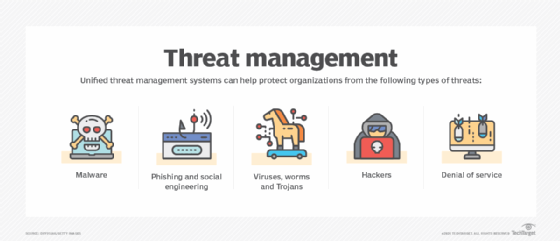
UTM systems combine multiple security features into a single device or software program. This can help because there are five primary kinds of threats that organizations need to protect against:
- malware
- phishing and social engineering
- viruses, worms and Trojans
- hackers
- denial of service (DoS)
When dealing with these threats, a separate technology is typically required to resolve each issue. That ends up being more complicated than it needs to be, which is why UTM systems exist.
UTM and next-generation firewalls (NGFWs) are both firewall technologies serving similar purposes, but they're also different in some key areas. NGFWs were originally developed to fill network security gaps left by traditional firewalls and include application intelligence and an intrusion prevention system (IPS), as well as DoS protection. UTM refers to the ability of a single device to perform the functions of an NGFW, firewall and virtual private network (VPN), while an NGFW is a network security platform that provides a gateway between internal and external networks. The major difference between these two firewall types is that a UTM system typically offers more features than an NGFW, such as an intrusion detection system (IDS) and spam filtering, since it is able to monitor and protect internal networks from intruders.
Learn more about the differences between unified threat management and next-generation firewalls here.
How UTM works
Understanding threats and identifying weaknesses to an organization's network are critical for security. A UTM system can help accomplish this by using two inspection methods that address different types of threats:
- Flow-based inspection. Flow-based inspection, also known as stream-based inspection, samples data that enters a network security device, such as a firewall or IPS. The devices inspect the data for malicious activity, such as viruses, intrusions and other hacking attempts.
- Proxy-based inspection. Proxy-based inspection is a network security technique that can be used to examine the contents of packets that pass into and out of a network security device, such as a firewall, IPS or VPN server. By using a proxy server to inspect these packets, the network security device can act as a proxy to reconstruct the content entering the device.
Unified threat management devices
UTM devices are hardware or software that tie together network security features into one simple-to-use, easy-to-manage appliance. In addition to having a firewall, VPN and IPS, every UTM appliance supports network- or cloud-based centralized management. For example, Cisco Meraki appliances use a cloud-based management tool that can be deployed remotely on a per-device basis.
Unified threat management features
UTMs typically include the following security features.
Antispam services
Antispam services or spam filters are designed to block or tag incoming email-based attacks by scanning inbound and outbound email traffic for signs of a possible attack. Antispam systems use algorithms to detect spam by scanning message content for patterns that are associated with spam. Some systems look for certain words, others for specific language patterns and others for whole word patterns using a process called Bayesian analysis. If the message appears to be spam or malware, the contents are tagged or quarantined.
URL filtering and application control
UTM devices can perform many functions that help secure a corporation or other organization's network, including Uniform Resource Locator (URL) filtering and application control. With application control, a UTM device can put specific applications on an allowlist so they can connect to the internet without dealing with spam content filtering or other security measures. Application control is usually combined with a UTM device's firewall and other features to ensure that all traffic entering the corporate network is protected.
Firewalls
A firewall is a hardware- or software-based security measure that restricts access to a private network by monitoring incoming and outgoing traffic between different networks. It keeps unauthorized -- or malicious -- users from gaining access to data or resources such as file servers, printers and web servers. There are three main types of firewalls: packet filtering, circuit-level gateway and application-level gateway.
Intrusion detection systems and intrusion prevention systems
An IDS monitors the network for signs of a cyber attack, while an IPS takes action to stop attacks by neutralizing malicious traffic.
The goal of an IDS is to detect abnormal behavior so that it can be analyzed, recorded and reported. It can't actually block any incoming threats, but it can notify an administrator about an intrusion and log the activity for later analysis. An IPS, on the other hand, is a type of security technology that can alter network traffic to block malicious activities. An IPS feature can be added to an existing IDS or firewall.
VPN
The role of a VPN is to create a secure connection between two computers over a public network. This enables file sharing securely between co-workers, accessing data remotely or using any number of other services without fear that an outside party will intercept the data. VPNs work by using encryption to protect data from unauthorized access when crossing between public and private networks, thereby creating a secure connection that is encrypted within a tunnel over the public internet.
Content filtering
Web content filtering is a method of controlling what types of information can pass into or out of a network, using various filtering methods, such as by Internet Protocol (IP) address, port number or media access control (MAC) address. Content filtering is used on networks to block unwanted content and to protect against data loss by filtering outgoing data to prevent sensitive information from being transmitted.