OSI model (Open Systems Interconnection)
What is OSI model (Open Systems Interconnection)?
OSI (Open Systems Interconnection) is a reference model for how applications communicate over a network. This model focuses on providing a visual design of how each communications layer is built on top of the other, starting with the physical cabling, all the way to the application that's trying to communicate with other devices on a network.
A reference model is a conceptual framework for understanding relationships. The purpose of the OSI reference model is to guide technology vendors and developers so the digital communications products and software programs they create can interoperate and to promote a clear framework that describes the functions of a networking or telecommunications system that's in use.
Most vendors involved in telecommunications try to describe their products and services in relation to the OSI model. This helps them differentiate among the various transport protocols, addressing schemes and communications packaging methods. And, although it's useful for guiding discussion and evaluation, the OSI model is theoretical in nature and should be used only as a general guide. That's because few network products or standard tools keep related functions together in well-defined layers, as is the case in the OSI model. The Transmission Control Protocol/Internet Protocol (TCP/IP) suite, for example, is the most widely used network protocol, but even it doesn't map cleanly to the OSI model.
History of the OSI model
In the 1970s, technology researchers began examining how computer systems could best communicate with each other. Over the next few years, several competing models were created and published to the community. However, it wasn't until 1984 when the International Organization for Standardization (ISO) took the best parts of competing networking reference models to propose OSI as a way to finally create a framework that technology companies around the world could use as the basis of their networking technologies.
From ISO's perspective, the easiest way to create a conceptual model was to organize the models into different abstraction layers required to organize and send data between computing systems. Looking inside each abstracted layer to see the details shows one part of this network communication process. Each layer can be thought of as a separate communication module or piece of the puzzle. But, to actually accomplish the goal of sending data from one device to another, each module must work together.
How the OSI model works
Information technology (IT) networking professionals use OSI to model or conceptualize how data is sent or received over a network. Understanding this is a foundational part of most IT networking certifications, including the Cisco Certified Network Associate (CCNA) and CompTIA Network+ certification programs. As mentioned, the model is designed to break down data transmission standards, processes and protocols over a series of seven layers, each of which is responsible for performing specific tasks concerning sending and receiving data.
The main concept of OSI is that the process of communication between two endpoints in a network can be divided into seven distinct groups of related functions, or layers. Each communicating user or program is on a device that can provide those seven layers of function.
In this architecture, each layer serves the layer above it and, in turn, is served by the layer below it. So, in a given message between users, there will be a flow of data down through the layers in the source computer, across the network and then up through the layers in the receiving computer. Only the application layer at the top of the stack doesn't provide services to a higher-level layer.
The seven layers of function are provided by a combination of applications, operating systems (OSes), network card device drivers, networking hardware and protocols that enable a system to transmit a signal over a network through various physical mediums, including twisted-pair copper, fiber optics, Wi-Fi or Long-Term Evolution (LTE) with 5G.
7 layers of the OSI model
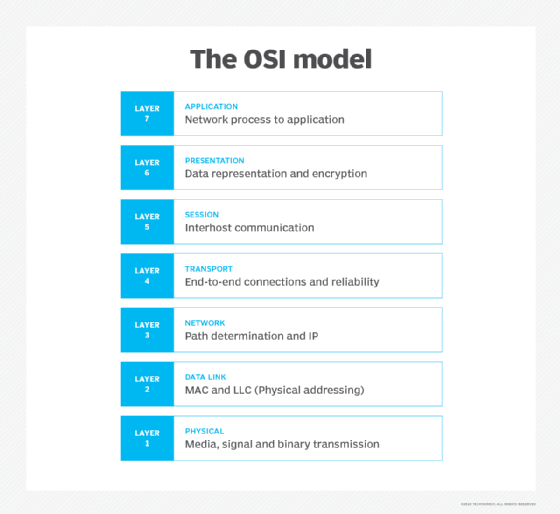
What is the function of each layer of the OSI model? The seven Open Systems Interconnection layers are the following.
Layer 7. The application layer
The application layer enables the user -- human or software -- to interact with the application or network whenever the user elects to read messages, transfer files or perform other network-related tasks. Web browsers and other internet-connected apps, such as Outlook and Skype, use Layer 7 application protocols.
Layer 6. The presentation layer
The presentation layer translates or formats data for the application layer based on the semantics or syntax the application accepts. This layer also handles the encryption and decryption that the application layer requires.
Layer 5. The session layer
The session layer sets up, coordinates and terminates conversations between applications. Its services include authentication and reconnection after an interruption. This layer determines how long a system will wait for another application to respond. Examples of session layer protocols include X.225 and Zone Information Protocol (ZIP).
Layer 4. The transport layer
The transport layer is responsible for transferring data across a network and provides error-checking mechanisms and data flow controls. It determines how much data to send, where it gets sent and at what rate. TCP within the TCP/IP suite is the best-known example of the transport layer. This is where the communications select TCP port numbers to categorize and organize data transmissions across a network.
Layer 3. The network layer
The primary function of the network layer is to move data into and through other networks. Network layer protocols accomplish this by packaging data with correct network address information, selecting the appropriate network routes and forwarding the packaged data up the stack to the transport layer. From a TCP/IP perspective, this is where IP addresses are applied for routing purposes.
Layer 2. The data-link layer
The data-link, or protocol layer, in a program handles moving data into and out of a physical link in a network. This layer handles problems that occur as a result of bit transmission errors. It ensures that the pace of the data flow doesn't overwhelm the sending and receiving devices. This layer also permits the transmission of data to Layer 3, the network layer, where it's addressed and routed.
The data-link layer can be further divided into two sublayers. The higher layer, which is called logical link control (LLC), is responsible for multiplexing, flow control, acknowledgement and notifying upper layers if transmit/receive (TX/RX) errors occur.
The media access control sublayer is responsible for tracking data frames using MAC addresses of the sending and receiving hardware. It's also responsible for organizing each frame, marking the starting and ending bits and organizing timing regarding when each frame can be sent along the physical layer medium.
Layer 1. The physical layer
The physical layer transports data using electrical, mechanical or procedural interfaces. This layer is responsible for sending computer bits from one device to another along the network. It determines how physical connections to the network are set up and how bits are represented into predictable signals as they're transmitted either electrically, optically or via radio waves.
Cross-layer functions
Cross-layer functions, or services that may affect more than one layer, include the following:
- security service telecommunication as defined by the International Telecommunication Union Standardization Sector (ITU-T) X.800 recommendation;
- management functions that enable the configuration, instantiation, monitoring and terminating of the communications of two or more entities;
- Multiprotocol Label Switching (MPLS), which operates at an OSI model layer that lies between the Layer 2 data-link layer and the Layer 3 network layer -- MPLS can carry a variety of traffic, including Ethernet frames and IP packets;
- Address Resolution Protocol (ARP) translates IPv4 addresses (OSI Layer 3) into Ethernet MAC addresses (OSI Layer 2); and
- domain name system (DNS), which is an application layer service that's used to look up the IP address of a domain name.
Pros and cons of the OSI model
The OSI model has a number of advantages, including the following:
- It's considered a standard model in computer networking.
- The model supports connectionless, as well as connection-oriented, services. Users can take advantage of connectionless services when they need faster data transmissions over the internet and the connection-oriented model when they're looking for reliability.
- It has the flexibility to adapt to many protocols.
- The model is more adaptable and secure than having all services bundled in one layer.
The disadvantages of the OSI model include the following:
- It doesn't define any particular protocol.
- The session layer, which is used for session management, and the presentation layer, which deals with user interaction, aren't as useful as other layers in the OSI model.
- Some services are duplicated at various layers, such as the transport and data-link layers.
- Layers can't work in parallel; each layer must wait to receive data from the previous layer.
OSI model vs. TCP/IP model
The OSI reference model describes the functions of a telecommunication or networking system, while TCP/IP is a suite of communication protocols used to interconnect network devices on the internet. TCP/IP and OSI are the most broadly used networking models for communication.
The OSI and TCP/IP models have similarities and differences. The main similarity is in their construction, as both use layers, although the OSI model consists of seven layers, while TCP/IP consists of just four layers.
Another similarity is that the upper layer for each model is the application layer, which performs the same tasks in each model but may vary according to the information each receives.
The functions performed in each model are also similar because each uses a network and transport layer to operate. The OSI and TCP/IP model are mostly used to transmit data packets, although they each use different means and paths to reach their destinations.
Additional similarities between the OSI and TCP/IP models include the following:
- Both are logical models.
- Both define standards for networking.
- They each divide the network communication process in layers.
- Both provide frameworks for creating and implementing networking standards and devices.
- They enable one manufacturer to make devices and network components that can coexist and work with the devices and components made by other manufacturers.
- Both divide complex functions into simpler components.
Differences between the OSI and TCP/IP models include the following:
- OSI uses three layers -- application, presentation and session -- to define the functionality of upper layers, while TCP/IP uses only the application layer.
- OSI uses two separate layers -- physical and data-link -- to define the functionality of the bottom layers, while TCP/IP uses only the link layer.
- OSI uses the network layer to define the routing standards and protocols, while TCP/IP uses the internet layer.
Next: Explore 12 common network protocols all network engineers should know here.






