WavebreakMediaMicro - Fotolia
How to calculate a subnet mask from hosts and subnets
IP addressing and subnetting are important and basic elements of networks. In this article, learn how to calculate a subnet mask based on the required number of subnets and hosts.
In this article, we explore IP addressing and subnetting and show how to apply this valuable information to real-world scenarios. We address how to calculate a subnet mask by using host and subnet formulas. Before we move on, though, we should answer two key questions.
What is subnetting?
ISPs allocate IP address ranges to organizations based on the potential number of networks and hosts, or endpoints, that organizations require. Today, the allocations follow the Classless Inter-Domain Routing (CIDR) assignment method. The organization then subdivides the allocated address space into smaller allocations for each subnetwork within the organization, using a process called subnetting. The result of subnetting is the number of subnetworks increases, while the number of usable host IP addresses decreases. Each subnetwork is known as an IP subnet.
Why use subnetting?
Subnetting enables assigned network addresses to be broken into smaller, efficient allocations that are more suitable for each network within the organization. For example, a point-to-point WAN link between two routers only needs two addresses, while a LAN segment may need to support many hosts, such as servers, workstations, laptops and Wi-Fi-connected mobile devices.
Subnetting and route summarization work together to make routers more efficient by reducing the size of routing tables. Routers far away from a destination don't need much addressing detail, so routes can be summarized to a large degree. But, as packets get closer to the destination network, routers will need more local routing information, such as the local subnet mask. By applying the mask to a packet's destination address, routers can determine which specific network segment contains the destination host and properly deliver the packet.
Next, let's review some background information, including what network administrators need to know about IP addressing and subnetting. We recommend starting with a review of some basic elements of IP addressing and subnetting:
- IP addresses must be unique on the internet when using public IP addresses and on a private network when using private IP addresses.
- IPv4 addresses are 32 bits made up of four octets of 8 bits each. To calculate the subnet mask, convert an IP address to binary, perform the calculation and then convert back to the IPv4 decimal number representation known as a dotted quad. The same subnetting procedure works for IPv6 addresses.
- A subnet mask tells the computer what part of the IP address is the network portion of the address and what part identifies the host address range, which are addresses that are assigned to host computers on that network. A longer subnet mask -- meaning more 1 bits in the mask -- creates more IP subnets that have a smaller host address block size.
- Subnetting breaks a large network into smaller networks by extending the length of the subnet mask. This increases the number of subnetworks, while reducing the number of hosts per subnet. Organizations will typically use several different subnet masks for different sizes of networks. For example, a point-to-point link with only two devices would use a 31-bit mask. An office LAN or data center LAN, however, would use a shorter subnet mask that allows more hosts. Determining the tradeoff between the number and size of subnets is explained below.
- Today, classless IP addresses with variable-length subnet masks are used almost exclusively, and classful IP addresses -- known as either Class A network, Class B network or Class C network -- are used only for certification testing or older routing protocols. A Class D network is used for multicast, and there is an experimental allocation known as Class E.
- A default gateway is a device, typically a router, where hosts send packets that are destined for a device not on the local LAN. Again, the device knows what is and what is not on the local LAN by using its assigned subnet mask to compare its local IP address and subnet with the destination's IP address and subnet.
- Private IP addresses, also known as Request for Comment 1918 addresses, are used by most networks today. These special IP addresses are not routable over the internet and must be translated to public IP addresses when those devices need to talk to the internet, either through a proxy server or through Port Address Translation.
Now, let's learn more about IP addressing and subnetting and how they apply to your real-world network.
Download our Subnets vs. VLANs Exclusive Guide
We want you to have a copy of our subnet vs. VLAN guide available here that clearly explains the OSI model, key differences between subnets and VLANs, and how network administers can put both in practice.
Using the host's formula
A common, real-world question when laying out your network is: "What subnet mask do I need for my network?" To answer this question, let's learn how to use the host's formula.
The host's formula will tell you how many hosts will be allowed on a network that has a certain subnet mask. The host's formula is 2h - 2. The h represents the number of 0s in the subnet mask, if the subnet mask were converted to binary. The first and last addresses are reserved: the first to identify the network and the last to be used as the broadcast address.
Step 1. Find host range
To use the host's formula, let's first look at a simple example. Say you plan to use the IP address space 192.168.0.0. Currently, you have a small network subnet with 20 hosts. This network will grow to 300 hosts within the next year, however, and you plan to have multiple locations of a similar size in the future and need to enable them to communicate using this address space.
With a single network subnet and only 20 hosts, the simplest thing to do would be to use 255.255.255.0 as your subnet mask. This would mean you would have 192.168.0.1 through 192.168.0.254 for your hosts. The address 192.168.0.0 is reserved as the network subnet identifier, and 192.168.0.255 is reserved for the network broadcast address.
Step 2. Convert to binary
Before you decide to use this subnet mask, however, let's apply the host's formula to it. To use the host's formula in this scenario, you take the subnet mask 255.255.255.0 and convert it to binary. This would give you: 111111111 11111111 11111111 00000000.
As you can see, there are eight 0s in the subnet mask. To use this with the host's formula, you would calculate 28 - 2. This comes to 256 minus the 2 reserved addresses, or 254. So, with the subnet mask specified, you will get 254 usable hosts. This would suit your 20-user network now but won't support your future network expansion to 300 hosts.
Step 3. Calculate the total number of hosts per subnet
You should plan ahead and choose the best subnet mask the first time. This prevents you from having to go back later and change all the IP addresses on this network. Adding 1s to the subnet mask means you get fewer hosts per network subnet but more network subnets. If you remove 1s from the subnet mask, you get more hosts per network but fewer networks. The latter is what we need to do.
To do this, let's take away one of the 1s to make our subnet mask:
11111111 11111111 11111110 0000000
In decimal number, or dotted quad representation, this is 255.255.254.0.
This means you have nine 0s in the host portion of the subnet mask. To apply the host's formula with this subnet mask, we'd calculate 29 - 2. The number of usable host IP addresses is 512 minus 2, or 510. This would definitely suit a 20-user network now and future network and host expectations of 300 hosts.
Considering that information, we know the most efficient subnet mask for the network is 255.255.254.0. The valid host address range for each subnet must be written as two ranges, due to the limitations of writing the addresses as dotted quads. The first IP subnet would be 192.168.0.1 through 192.168.0.255 and 192.168.1.0 through 192.168.1.254. Note that 192.168.0.0 identifies the subnet, and 192.168.1.255 is the network broadcast address.
That is how you arrive at the total of 510 usable hosts.
Step 4. Calculate the number of subnets
Now that you understand the host's formula, you should also know the subnet's formula, which will ensure you have the right subnet mask for the number of subnets that you have. Just because you determine you have the right number of hosts for your LAN using the host's formula doesn't mean you'll have enough subnets for your network. Let's see how the subnet's formula works.
The subnet's formula is 2s, where s is the number of 1s added to the subnet mask, from whatever the subnet mask was. Let's take the same example as above, but build on it.
Using network 192.168.0.0, we expect to have 100 remote sites with 300 PCs each. What subnet mask should we use? In our last example, we found the 255.255.254.0 subnet mask provided 510 hosts per subnet. That was more than adequate to support 300 PCs, but does that same subnet mask provide networks for at least 100 remote sites? Let's find out.
Step 5. Verify the total number of subnets
The number of subnets is found by counting the number of bits by which the initial mask was extended, also known as the subnet bits. Our initial address allocation was 192.168.0.0 with a mask of 255.255.0.0. Using the host's formula, we selected a subnet mask of 255.255.254.0. Let's compare the two masks and count the subnet bits.
Let's convert to binary:
255.255.0.0   = 11111111 11111111 00000000 00000000
255.255.254.0 = 11111111 11111111 11111110 00000000
The new mask uses seven subnet bits. Using the subnet's formula, this would give us 27 = 128 networks. This is at least 100, so we have enough subnets for 100 remote networks. This means we have found the right subnet mask for our network. We convert our subnet mask from binary back to decimal and get 255.255.254.0.
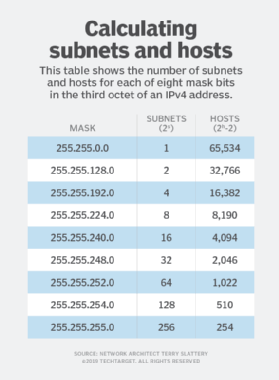
As you add subnet bits, the number of subnets increases by a factor of two, and the number of hosts per subnet decreases by a factor of two. The table below shows the number of subnets and hosts for each of eight mask bits in the third octet of an IPv4 address.
Variable-length subnetting
Most networks require subnets of several different sizes, sometimes called variable-length subnet masks. This is easily accomplished by taking one of the larger subnets -- a subnet with a shorter mask -- and applying the subnetting algorithm to it. This is known as variable-length subnetting since the network will have subnet masks of several different lengths.
Extending the example from above, let's say that most of the 100 sites also require two point-to-point WAN links or 200 subnets with two hosts each -- a router on each end of the link. We are starting with a subnet mask of 255.255.254.0. Using the host's formula, we need two host bits (22 - 2 = 4 - 2 = 2). Extending the subnet mask results in the following in binary:
255.255.254.0   = 11111111 11111111 11111110 00000000
255.255.255.252 = 11111111 11111111 11111111 11111100
The subnet mask was extended by seven bits. Using the subnet's formula of 2s, we have 27 = 128 subnets. This isn't enough for all our WAN links, so we do the same thing with another large subnet. If we reserved the top two large subnets to be sub-subnetted for WAN links, we would have enough capacity for 256 point-to-point links.
192.168.252.0 through 192.168.253.254: WAN subnets 0 through 127
192.168.254.0 through 192.168.255.254: WAN subnets 128 through 255
The same process can be used if we have many small remote sites that have few hosts at each site, such as in a retail business.
It is important to assign subnets to sites in a way that enables address summarization that reduces routing table size and increases router efficiency.
Support for 31-bit masks
Modern routers also support using a 31-bit subnet mask (255.255.255.254) for point-to-point links because a broadcast address is not needed on a point-to-point link. This configuration is an exception to the rule that reserves two addresses: one address to identify the subnet and another for the broadcast address.
Classless Inter-Domain Routing
CIDR eliminates the original classful designation of IPv4 addresses. It enables a single network prefix and mask to represent an aggregation of multiple networks. This is also called supernetting. CIDR address representation simplifies the representation of an address and mask. CIDR also supports network aggregation and address summarization.
CIDR notation appends the number of subnet mask bits to the network address. Instead of writing the address and mask using dotted notation, we append a forward slash (/) and the number of bits in the subnet mask. In our previous example of 100 subnets that support over 300 hosts each, we find that the subnet mask contains 23 bits.
192.168.0.1                                 255.255.254.0
11000000 10101000 00000000 00000001         11111111 11111111 11111110 00000000
=
192.168.0.1/23
Calculating the subnet prefix
Routers calculate the subnet address as part of the process to determine which interface to use to forward packets to their destination. In this process, a binary AND operation is performed on an address and its mask. The result is the subnet prefix, which removes all the host bits. The router uses the network prefix to find the routing table entry that best matches the prefix -- the longest match or the default route. The packet is forwarded out the interface that is associated with the best match prefix.
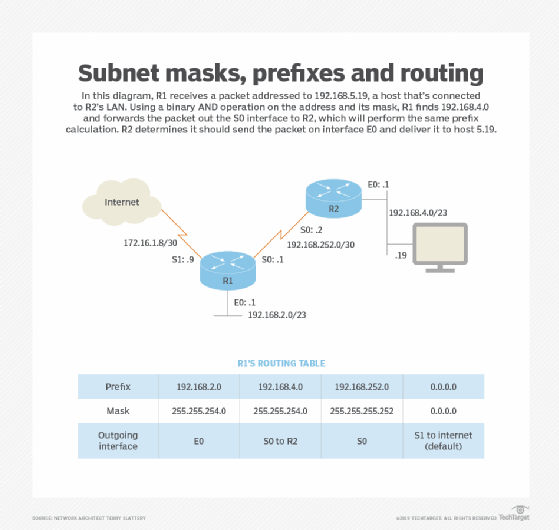
In the above network diagram and chart, let's say R1 receives a packet addressed to 192.168.5.19, a host that is connected to R2's LAN. Use the binary AND operation between the mask and the address to determine the route prefix to look up in the routing table:
192.168.5.19  = 11000000 10101000 00000101 00010011
255.255.254.0 = 11111111 11111111 11111110 00000000
192.168.4.0   = 11000000 10101000 00000100 00000000
R1 finds 192.168.4.0 in the routing table and forwards the packet out the S0 interface to R2. R2 will do the same prefix calculation and determine that it should send the packet on interface E0 and that it is a local delivery to host 5.19.
Large-scale network design
In the real world, you'll probably never have the chance to design a large network such as this from scratch. However, large-scale network design skills are valuable for various reasons:
- understanding the subnetting of a large-scale network that is already implemented;
- understanding what effect making changes to a network, its IP addressing and its subnetting will have; and
- to prove in a certification test that you understand IP addressing and subnetting and can apply them -- certifications like Cisco Certified Network Associate require you to apply these skills and calculate IP addressing without a calculator.
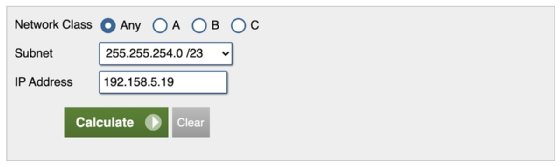
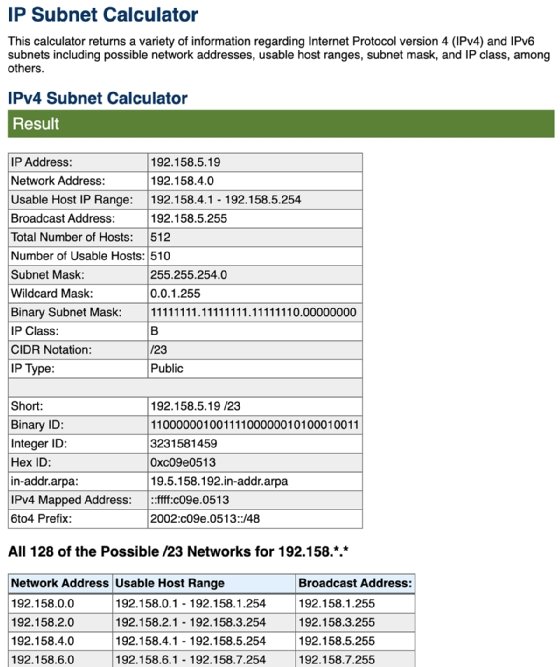
It is important to understand subnetting and be able to calculate masks, host ranges and subnets longhand, but we frequently verify our calculations with a subnet calculator.