coaxial cable

What is coaxial cable?
Coaxial cable is a type of copper cable specially built with a metal shield and other components engineered to block signal interference.
A coaxial -- or coax -- cable is primarily used by cable TV companies to connect their satellite antenna facilities to customer homes and businesses. Telephone companies also sometimes use coax cable to connect central offices to telephone poles near customers. Some homes and offices use coaxial cable, but twisted pair cabling has largely supplanted coax's widespread use as an Ethernet connectivity medium in enterprises and data centers.
Coaxial cable received its name because it includes one physical channel that carries the signal surrounded by another concentric physical channel, both running along the same axis. The innermost channel is typically a copper wire, which is then surrounded by a layer of insulation between it and the outer channel. The outer channel serves as a ground, typically as copper mesh. Another layer of insulation surrounds both the inner and outer channels. Many of these cables or pairs of coaxial tubes can be placed in a single outer sheathing and, with repeaters, can carry information for a great distance.
Coaxial cable was invented in 1880 by English engineer and mathematician Oliver Heaviside, who patented the invention and design that same year. AT&T established its first cross-continental coaxial transmission system in 1940. Depending on the carrier technology used and other factors, twisted pair copper wire and optical fiber are alternatives to coaxial cable.
How coaxial cables work
Coaxial cables have concentric layers of electrical conductors and insulating material. This construction ensures signals are enclosed within the cable and prevents electrical noise from interfering with the signal.
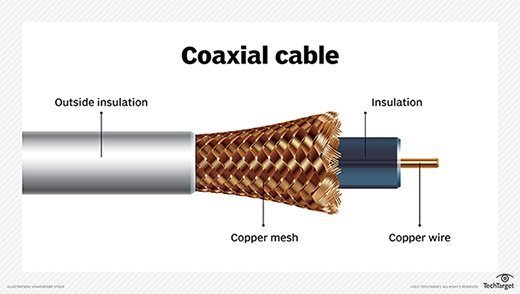
The center conductor layer is a thin conducting wire, either solid or braided copper. A dielectric layer made of an insulating material with well-defined electrical characteristics surrounds the wire. A shield layer then surrounds the dielectric layer with metal foil or braided copper mesh. The whole assembly is wrapped in an insulating jacket. The outer metal shield layer of the coaxial cable is typically grounded in the connectors at both ends to shield the signals and as a place for stray interference signals to dissipate.
Coaxial cable design depends on the control of cable dimensions and materials. Controlling these factors helps create a fixed value for the characteristic impedance of a coax cable. High-frequency signals are partially reflected at impedance mismatches, causing errors.
Characteristic impedance is sensitive to signal frequency. Above 1 GHz, the cable maker must use a dielectric that does not attenuate the signal too much or change the characteristic impedance in a way that creates signal reflections.
Electrical characteristics of coax are application-dependent and crucial for good performance. Two standard characteristic impedances are the following:
- 50 ohms, used in moderate power environments.
- 75 ohms, common for connections to antennas and residential installations.
Types of coaxial cables
There are numerous types of coaxial cables, some of which include the following:
- Hard-line coaxial cable relies on round copper tubing and a combination of metals as a shield, such as aluminum or copper. These cables are commonly used to connect a transmitter to an antenna.
- Triaxial cable has a third layer of shielding that is grounded to protect signals transmitted down the cable.
- Rigid-line coaxial cables are made up of twin copper tubes that function as unbendable pipes. These lines are designed for indoor use between high-power radio frequency (RF) transmitters.
- Radiating cable mimics many components of the hard-line cable, but with tuned slots in the shielding matched to the RF wavelength at which the cable operates. It is commonly used in elevators, military equipment and underground tunnels.
Types of connectors
There are many different types of coaxial cable connectors separated by two styles: male and female connectors. Connector types include the following:
- Bayonet Neill-Concelman (BNC). This connector is used with television, video signal and radio below a frequency of 4 GHz.
- Threaded Neill-Concelman (TNC). This connector is a threaded version of the BNC connector and is used in cellphones. TNC connectors operate up to 12 GHz.
- SubMiniature version A (SMA). This connector is used with cellphones, Wi-Fi antenna systems, microwave systems and radios. SMA connectors operate up to 18 GHz.
- SubMiniature version B (SMB). This connector can be used with telecommunications hardware.
- QMA. QMA connectors are a quick-locking variant of SMA connectors used with industrial and communications hardware.
- Radio Corporation of America (RCA). These connectors are used in audio and video. These are the grouped yellow, white and red cables used with older televisions. RCA connectors are also called A/V jacks.
- F connectors. Also called F-type connectors, these are used in digital and cable televisions. These commonly use RG-6 or RG-59 cables.
Uses of coaxial cables
In the home and small offices, short coaxial cables are used for cable television, home video equipment, amateur radio equipment and measuring devices. Historically, coaxial cables were also used as an early form of Ethernet, supporting speeds of up to 10 Mbps. Since then, twisted pair cabling has largely supplanted the use of coax.
However, coax cables remain widely in use for cable broadband internet. Coaxial cables are also used in automobiles, aircraft, military and medical equipment, as well as to connect satellite dishes, radio and television antennae to their respective receivers.
Coax standards
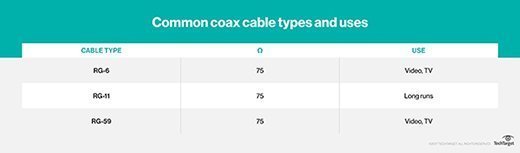
Most coaxial specifications have an impedance of 50, 52, 75 or 93 ohms. Because of widespread use in the cable television industry, RG-6 cables with double or quad shields and impedance of 75 ohms have become a de facto standard for many industries.
Nearly 50 distinct standards exist for coaxial cable, often designed for specific use cases in amateur radio or low-loss cable television. Other examples include RG-59/U -- used for carrying broadband signal from closed-circuit TV systems -- and RG-214/U for high-frequency signal transmission.
Coax connectors range from simple single connectors used on cable TV systems to complicated combinations of multiple thin coax links, mixed with power and other signal connections, housed in semi-custom bodies. These are commonly found in military electronics and avionics.
Mechanical stiffness can vary tremendously, depending on the internal construction and intended use of the coaxial cabling. For example, high-power cables are often made with thick insulation and are very stiff.
Some cables are deliberately made with thick center wires, resulting in skin-effect resistance. This resistance results from high-frequency signals traveling on the surface of the conductor, not throughout. A larger center conductor creates a stiff cable with low loss per meter.
Interference issues with coax
Coaxial cables can experience a variety of different forms of interference. Signal leakage occurs when the electromagnetic field passes through the shielding on the outside of the cable. In other cases, an outside signal can leak through the insulation.
Straight-line feeds to commercial radio broadcast towers have the least leakage and interference because these cables have smooth, conductive shields with few gaps in them. Interference is most significant in nuclear reactors, where special shielding is needed.
Difference between RG-59 and RG-6
RG-59 and RG-6 cables are commonly used in satellite television and cable modems. Older installations used the RG-59 cable before the implantation of the RG-6 cable. The RG-59 cable is thinner at a 20 American Wire Gauge (AWG) and has a copper center conductor. This cable is more likely to be found in older buildings and is better for CCTV and analog video systems.
The RG-6 cable is a larger 18 AWG cable and also has a copper center conductor. The RG-6 cable is used with high-bandwidth and high-frequency hardware, where internet and satellite signals can run at a higher frequency compared to traditional analog video.
Which cable an individual might need largely depends on the frequency. For requirements above 50 MHz, an individual should use an RG-6 cable.
Editor's note: This definition was updated to improve the reader experience.