network disaster recovery plan
What is a network disaster recovery plan?
A network disaster recovery plan is a set of procedures designed to prepare an organization to respond to an interruption of network services during a natural or humanmade catastrophe.
Voice, data, internet access and other network services often share the same network resources. A network disaster recovery (DR) plan ensures that all resources and services that rely on the network are back up and running in the event of an interruption within certain a certain specified time frame.
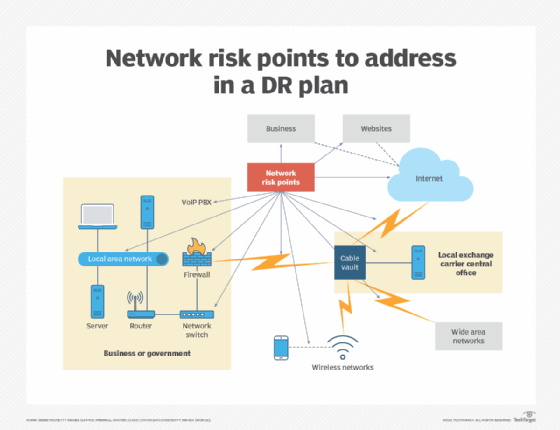
These DR plans usually include procedures to recover an organization's local area networks, wide area networks and wireless networks. It may cover network applications and services, servers, computers and other devices, along with the data at issue.
Get started with a network DR plan
Network services are critical to ensure uninterrupted internal and external communication and data sharing within an organization. A network infrastructure can be disrupted by any number of disasters, including fire, flood, earthquake, hurricane, carrier issues, hardware or software malfunction or failure, human error, and cybersecurity incidents and attacks.
Any interruption of network services can affect an organization's ability to access, collect or use data and communicate with staff, partners and customers. Interruptions put business continuity (BC) and data at risk and can result in huge customer service and public relations problems. A contingency plan for dealing with any sort of network interruption is vital to an organization's survival.
Some tips to consider with a network disaster recovery plan are the following:
- Use business continuity standards. There are nearly two dozen BCDR standards and they are a useful place to start when creating a contingency plan.
- Determine recovery objectives. Before starting on a plan, the organization must determine its recovery time objective (RTO) and recovery point objective (RPO) for each key service and data type. RTO is the time an organization has to make a function or service available following an interruption. RPO determines the acceptable age of files that an organization can recover from its backup storage to successfully resume operations after a network outage. RPO will vary for each type of data.
- Stick to the basics. A network DR plan should reflect the complexity of the network itself and should include only the information needed to respond to and recover from specific network-related incidents.
- Test and update regularly. Once complete, a network DR plan should be tested at least twice a year and more often if the network configuration changes. It should be reviewed regularly to ensure it reflects changes to the network, staff, potential threats, as well as the organization's business objectives.
- Stay flexible. No one approach to creating a network disaster recovery plan will work for every organization. Check out different types of plan templates and consider whether specialized network DR software or services might be useful.
Elements of a network disaster recovery plan
A network disaster recovery plan outlines resources needed to perform network recovery procedures, such as equipment suppliers and information on data storage. It describes how off-site backups are maintained, and it identifies key staff members and departments and outlines their responsibilities in an emergency. The plan spells out responses unique to specific types of worst-case scenarios, such as a fire, flood, earthquake, and terrorist attack or cyberattack.
A network disaster recovery plan also identifies specific issues or threats related to an organization's network operations. These can include interruptions caused by loss of voice or data connectivity as a result of network provider problems or disasters caused by nature or human activities.
Like any other disaster recovery plan, this one should include contact information for key staff members if an emergency occurs after business hours, such as late at night or on weekends.
Some specific sections that should be included in a network disaster recovery plan include the following:
- Emergency contacts and actions. List the IT network emergency team members and their contact information at the front of the plan for fast access. A list of initial emergency response actions should also be up front.
- Purpose and scope. Outline the purpose of the plan and its scope, along with assumptions, team descriptions and other background information.
- Instructions for activating the plan. Describe the circumstances under which the contingency plan will be activated, including outage time frames, who declares a disaster, who is contacted and all communication procedures to be used.
- Policy information. Include any relevant IT BC/DR policies, such as data backup policies.
- Emergency management procedures. Provide step-by-step procedures on how networks will be reconfigured and data accessed, what outside help might be needed and how staff will be accommodated for each different kind of potential disaster.
- Checklists and diagrams. Include checklists that prioritize hardware and software restoration and network flow diagrams that make it easy for technical support staff to quickly access information they may need.
- Data collection. Describe the information that might be needed before officially declaring a network disruption, including network performance data and staff and first responder reports.
- Disaster declaration. Identify actions to take once the network emergency team determines it's necessary to declare a network disaster, including how the decision is communicated, who is contacted and what additional damage assessments are needed.
- Disaster recovery. Provide instructions on restoring network operations, connectivity, devices and related activities.
- Appendices. Provide names and contact information of IT and non-IT emergency teams, as well as information on internet service providers and other key vendors, alternate network configuration data, forms that emergency response teams will need and other relevant information.
Creating and implementing a plan
An organization's network administrator works closely with network managers and other IT staff to create a network disaster recovery plan. Get other IT staff to get involved early in the process, including IT operations, data center and data processing managers.
Loop in finance and budget managers to ensure the financial implications of the plan are fully understood.
Consult business managers to determine any RTO and RPO relevant to their part of the business. They can also contribute valuable information on how their staffs work and communicate. That information could become critical in the event of a disaster. The needs of support staff must also be considered when creating a network disaster recovery plan.
Outside vendors, service providers and suppliers should be consulted to understand how their operations might be affected by certain types of disasters. Will their local operations be functional in the event of a local disaster? What sorts of disaster recovery plans do they have in place? They can provide valuable information on how they can contribute to the organization's recovery.
Once a plan is drafted, it must be reviewed and approved by senior management. It's critical that all financial aspects of the plan be discussed at this point to minimize surprises in the middle of a disaster situation.
Common network DR mistakes
Creating a network disaster recovery plan is a complex, time-consuming effort with lots of different pieces and people involved and many ways for it to go wrong. Common mistakes include the following.
Foregoing regular reviews. A network DR plan is not a one-and-done effort. Instead, it's a living document that must be reviewed and updated regularly to take into account changes in the organization, including more reliance on data and computers, new products and technologies in use, and changing processes and business objectives. The threats an organization faces also change over time and must be regularly reviewed.
Inadequate funding. Cutting budgetary corners in the planning process is a huge mistake. Taking time to educate senior management on the value of having a plan can help ensure adequate funds are allocated both for the planning process and for the implementation of the plan should it ever be needed.
Skipping the drills. Practicing the network DR plan is critical to its success. Staff members must know where to go and what to do each step of the way before they have to do it in an emergency. Again, this is another place where it's tempting to save money and time, but that could turn out to be a costly mistake in the long run.
New technology replaces DR planning. Vendors tout resiliency, high availability and cloud-based disaster recovery as technologies that cut back on the need for DR planning. However, they are not the same, don't apply to the full scope of a network infrastructure and don't make business continuity planning irrelevant. The vendor hype is often just that: hype that won't help in a disaster situation.
Overlooking the details. The more detailed a network DR plan, the better. Documenting all network hardware, including model, serial numbers and vendor support contact information will save time if replacements or repairs are needed. Include configuration settings for all the networking hardware in your data center as backup in case imported settings don't work with replacement equipment after a disaster.
Backups key to network recovery
The network disaster recovery plan doesn't exist in a vacuum, but rather is part of an organization's broader IT disaster recovery plan. Data backup is a key part of both the overall IT plan and the network plan, and information on an organization's backup policies and procedures should be included in DR planning.
Options for data backup range from having dual data centers in different locations, each of which can handle all of an organization's data processing needs. The data centers run in parallel and synchronize or mirror data between them. Operations can be shifted from one data center to another in an emergency. Dual data centers are not an option open to every organization. Leased colocation facilities are an alternative.
Other options include backing up data to dedicated backup disk appliances with management software that's either integrated in the appliance or run on a separate server. The backup software runs the data copying process and enforces backup policies for an organization. A backup appliance is an effective option as long as it's located where it won't be hit by the same disasters as an organization's original data.
Cloud backup and cloud-based disaster recovery are other options, either in-house or through a cloud data backup service. Cloud storage as a service provides low-cost, scalable capacity and eliminates the need to buy and maintain backup hardware. However, cloud providers fees vary depending on the types of services and accessibility required. And cloud services can require organizations to encrypt data and take other steps to secure the information they're sending to the cloud.
Cloud-to-cloud data backup is one alternative. It uses software as a service (SaaS) platforms, such as Salesforce and Microsoft Office 365, to protect data. This data often exists only in the cloud. Backed up SaaS data is copied to another cloud from where it can be restored in an emergency.