Home > Networking Tips > > Duplex mismatch: Why duplex conflicts plague the network, part 1
Networking Tips:
EMAIL THIS
 TIPS & NEWSLETTERS TOPICS 


Duplex mismatch: Why duplex conflicts plague the network, part 1


Loki Jorgenson
07.05.2006
Rating: -4.56- (out of 5)


Digg This!    StumbleUpon Toolbar StumbleUpon    Bookmark with Delicious Del.icio.us   


Duplex conflicts simply will not go away. After a decade of plaguing IP networks, duplex conflicts still seem to be the single worst source of performance degradation. Part of the 10 Mbps Ethernet legacy, this problem is trivial to fix but ridiculously hard to identify and localize. And it recurs frequently, as interfaces go up and down over time and network hosts are updated and changed.

It is a rare network administrator (or one new to Ethernet technologies) who does not have firsthand experience of diagnosing duplex conflict (otherwise known as "duplex mismatch"). It can have devastating effects on all sorts of applications. It is highly transient in its symptoms, sometimes showing no loss when using ping (see What Ping Doesn't Tell You) and at other times causing upward of 60% loss on a 100 Mbps path. It is typically triggered by heavy data transfers and can affect VoIP even when VLANs and QoS are employed.

Down-level NIC drivers are the most common form of performance degradation (see Numbers lie: Your NIC could be killing your network performance), but duplex issues are nearly as pervasive and typically have a much more dramatic impact on end-user experience. In 2001, a study at NASA concluded that more than 50% of trouble tickets were attributable to duplex conflicts. Internet2 ranks duplex issues as one of the top three most common problems (the others being incorrectly set TCP buffers and NIC drivers). In a 2005 real-world study based on 20,000 support calls received by Veritas (now Symantec) for network-dependent products such as NetBackup, nearly 38% of the calls were attributed to network issues. Of those involving the network, 20% were caused by poorly performing NIC drivers, while nearly 6% were identified as caused by duplex conflicts.

Why is it such a problem, particularly when auto-negotiation should be the solution?

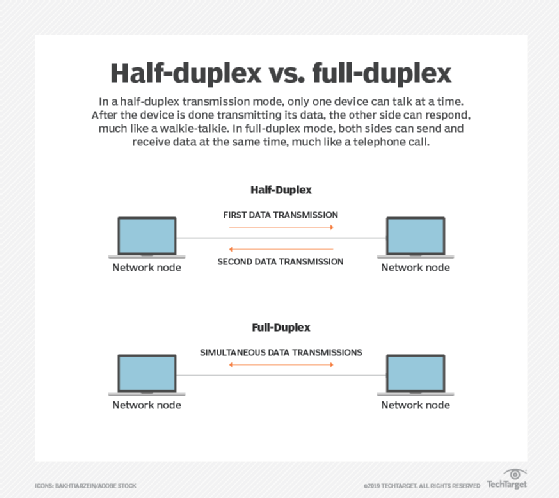
Most Ethernet NICs from the last 10 years have come equipped with a mix of speeds and duplex modes that are intended to ensure compatibility among devices. The most common speeds are 10 Mbps (Ethernet/802.3i/10BASE-T) and 100 Mbps (Fast Ethernet/802.3u/100BASE-TX), with 1000 Mbps (Gigabit/802.3ab/1000BASE-T) becoming more typical. Duplex modes include half-duplex and full-duplex. Half-duplex supports communications among devices sharing the same media for both transmission and reception (e.g., one pair of copper wires); full-duplex assumes separate connections for each (e.g., two pairs of wires).


The simplest case of duplex conflict is where two interfaces -- for example, a port on a switch and an NIC on a workstation -- are manually set to different duplexes (but the same speed). (In the figure, the switch is set to half duplex and the workstation to full duplex.) While the switch uses collision detection (CSMA/CD) to avoid transmitting when the workstation is sending, the workstation sends whenever necessary, without regard to the switch. Consequently, packets sent by the workstation may collide with packets from the switch -- the switch attempts to re-transmit those it sent when collisions occurred; the workstation does not re-transmit.

To the application user, the network feels "slow," even though the application will typically start without any difficulty. The classic symptom is an FTP client that establishes a connection and begins transfer but then crawls along, taking many minutes to transfer a relatively small file. In this case, TCP is constantly backing down its transfer rate as it incorrectly interprets packets lost to collisions as congestion.

At the network level, duplex conflicts can be manifested as severe packet loss, particularly as the rate of two-way traffic increases. Ping, usually sending one packet at a time, may not see any loss at all, unless some other application is using the same link. On the switch, the interface will show high collision counts (of the type "late collisions," resulting in frame corruption), and the interface on the workstation will record high numbers of CRC errors.

Properly configured, these same interfaces will function at the selected speed without any loss at all. Manually setting interfaces can be problematic for naïve users, as well as unmanageable in enterprises where there are thousands of interfaces to configure. It is therefore preferable to have the interfaces discover the best choice of speed and duplex for themselves.

When two Ethernet interfaces configured for auto-negotiation initially become active (and at some other times), they will attempt to negotiate with each other to establish a common configuration. Auto-negotiation and auto-sensing provide mechanisms by which two interfaces can properly select the optimal configuration under a variety of circumstances, including when one of the interfaces does not know how to auto-negotiate.

Automated speed selection, or auto-sensing, tends to be reliable, resulting in no connection at all when it fails. Thus, speed mismatch happens rarely, and when it does happen, it is relatively obvious. Auto-negotiation for duplex selection, on the other hand, has not been nearly as reliable, resulting in connections that are functional but highly degraded under certain conditions. In fact, it is not usually auto-negotiation itself that is at fault; rather, one interface has been set for auto-negotiation and the other has been configured for a specific speed/duplex setting, effectively disabling auto-negotiation.

In particular, the auto-negotiation protocol requires that the interface fall back to half-duplex mode when it is not successful in negotiation. Thus, if one side is set for 100 Mbps full duplex and the other side for auto-negotiation, a duplex conflict is almost certain. A classic blunder occurs when the naïve user installs a hub between a workstation and switch in order to add a printer or other Ethernet device. The IT administrator may have opted to use a fixed configuration (such as 100 Mbps full-duplex) between the workstation and switch to avoid problems with auto-negotiation. Consequently, as all hubs are by nature half-duplex, the user instantly causes a duplex conflict.

In part 2 of our series on duplex mismatch, the implications of duplex conflict for Gigabit and QoS, as well as auto-negotiation best practices is explored.

References:
Internet2
Auto-sensing, Auto-negotiation, and Duplexing (NASA)
Auto-negotiation basics
Ethernet History and Review

NetworkingChief Scientist for Apparent Networks, Loki Jorgenson, PhD, has been active in computation, physics and mathematics, scientific visualization, and simulation for over 18 years. Trained in computational physics at Queen's and McGill universities, he has published in areas as diverse as philosophy, graphics, educational technologies, statistical mechanics, logic and number theory. Also, he acts as Adjunct Professor of Mathematics at Simon Fraser University where he co-founded the Center for Experimental and Constructive Mathematics (CECM). He has headed research in numerous academic projects from high-performance computing to digital publishing, working closely with private sector partners and government. At Apparent Networks Inc., Jorgenson leads network research in high performance, wireless, VoIP and other application performance, typically through practical collaboration with academic organizations and other thought leaders such as BCnet, Texas A&M, CANARIE, and Internet2. www.apparentnetworks.com

Rate this Tip
To rate tips, you must be a member of SearchNetworking.com.
Register now to start rating these tips. Log in if you are already a member.


Digg This!    StumbleUpon Toolbar StumbleUpon    Bookmark with Delicious Del.icio.us   


RELATED CONTENT
Network Performance
Application acceleration cements concrete co.'s consolidation project
Streaming Olympics video will drain corporate bandwidth
College IT department transforms itself with network management tools
How to prioritize wireless traffic
WAAS accelerates collaboration, increases revenue at engineering firm
Network management frameworks: FCAPS and ITIL
Governance, compliance, security: How are these network problems?
Network pros spend months on troubleshooting
Open source network monitoring reaches for the enterprise
Server virtualization and the network: Site consolidation's impact on latency

Network Monitoring
Networking data visualization not just for pointy-headed bosses
What network security threat does a QM FSM error pose in IPsec VPNs?
Juniper updates Network and Security Manager to manage full portfolio
Network management software vendors readying IPv6
DNS management becoming critical to businesses but poorly understood
SolarWinds adds enterprise scalability to its network monitoring tool
Network forensics appliance gets storage boost and 10 GbE support
Tracking NetFlow over MPLS helps airline with compliance
When it comes to data loss prevention, networking should be part of the conversation
Network management takes interface tips from gaming industry, Google
Network Monitoring Research

RELATED GLOSSARY TERMS
Terms from Whatis.com − the technology online dictionary
baseboard management controller  (SearchNetworking.com)
fault management  (SearchNetworking.com)
loose coupling  (SearchNetworking.com)
M2M  (SearchNetworking.com)
maximum segment size  (SearchNetworking.com)
maximum transmission unit  (SearchNetworking.com)
network coding  (SearchNetworking.com)
packet loss  (SearchNetworking.com)
round-trip time  (SearchNetworking.com)
throttled data transfer  (SearchNetworking.com)

RELATED RESOURCES
2020software.com, trial software downloads for accounting software, ERP software, CRM software and business software systems
Search Bitpipe.com for the latest white papers and business webcasts
Whatis.com, the online computer dictionary

DISCLAIMER: Our Tips Exchange is a forum for you to share technical advice and expertise with your peers and to learn from other enterprise IT professionals. TechTarget provides the infrastructure to facilitate this sharing of information. However, we cannot guarantee the accuracy or validity of the material submitted. You agree that your use of the Ask The Expert services and your reliance on any questions, answers, information or other materials received through this Web site is at your own risk.


Networking Solutions for Business
IT Management Solutions and Services Directory.
HomeNewsTopicsITKnowledge ExchangeTipsAsk the ExpertsMultimediaWhite PapersNetworking Product Trials
About Us  |  Contact Us  |  For Advertisers  |  For Business Partners  |  Site Index  |  RSS
SEARCH 
TechTarget provides enterprise IT professionals with the information they need to perform their jobs - from developing strategy, to making cost-effective IT purchase decisions and managing their organizations' IT projects - with its network of technology-specific Web sites, events and magazines.

TechTarget Corporate Web Site  |  Media Kits  |  Reprints  |  Site Map


All Rights Reserved, Copyright 2000 - 2008, TechTarget | Read our Privacy Policy
  TechTarget - The IT Media ROI Experts