Part of:Wi-Fi 6 business benefits abound, but limitations lurk
Wi-Fi 6 explained: Speed, range, latency, frequency and security
Wi-Fi 6 is more than just another wireless upgrade, boasting substantial gains over Wi-Fi 5. Learn how frequency, speed, range, latency and security change with the new standard.
The Gaylord Family Oklahoma Memorial Stadium -- also known as Owen Field or Palace on the Prairie -- is one of the 20 largest college football stadiums in the nation. Its passionate fan base all but guarantees sold-out home games at the University of Oklahoma, with as many as 89,000 people in the stadium at a time.
Still, David Payne, senior technology strategist in the university's athletics department, wasn't surprised when Sooner fans began filing out during the third quarter of an early-season game last fall. Victory was all but certain -- OU was leading South Dakota by 42 points -- and the big LSU-Texas matchup had just gotten underway on ESPN. He was startled, however, to see the exodus coincide with a spike in activity on the stadium's new wireless network -- one of the earliest large-scale deployments of Wi-Fi 6 technology.
"We were like, 'That's interesting. Activity should be going down because the number of users is going down,'" Payne said. That's when he started getting text messages from friends and colleagues still sitting in the stadium. "They said, 'Hey, this is great. I'm sitting here watching [OU] and streaming the Texas game with no lag or interruption.'"
Payne's team checked the network logs. Sure enough, users were headed to the ESPN website.
Wi-Fi 5 vs. Wi-Fi 6 technology
High-speed, low-latency connectivity capable of supporting live video streaming in such a dense environment was hard to imagine with previous generations of wireless. But OU's experience suggests Wi-Fi 6 technology lives up to its hype. Billed as "high-efficiency wireless," IEEE designed Wi-Fi 6, also known as 802.11ax, to work faster but also smarter -- combining higher data rates with new and improved transmission technologies that optimize the available throughput.
I've helped businesses deploy Wi-Fi 6, and it is a substantial leap from Wi-Fi 5.
Andrew FroehlichPresident, West Gate Networks
"I've helped businesses deploy Wi-Fi 6, and it is a substantial leap from Wi-Fi 5," said Andrew Froehlich, president at consultant firm West Gate Networks. "It's noticeable. The benefits are there."
With Wi-Fi 6 technology tailor-made for high-density environments, like Owen Field, Payne was intent on implementing it as part of a massive, long-scheduled stadium renovation project.
"We don't get to spend that kind of money on infrastructure very often," he said. "We wanted to do it right."
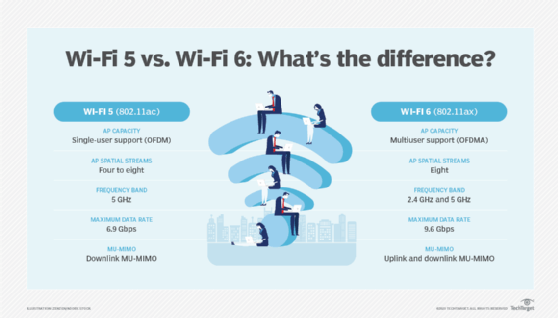
Wi-Fi 5 vs. Wi-Fi 6: Wi-Fi 6's enhanced feature set enables better efficiency and greater capacity than Wi-Fi 5's.
They had a tight schedule, however, as the network needed to be deployed and operational by the first game of the 2019 season. Payne's team kept a close eye on vendors' anticipated Wi-Fi 6 ship dates, hoping they would align with the stadium's strict deployment timeline -- aware that delays could force them to go with older Wi-Fi 5 Wave 2 technology instead.
"I held off on making the decision until the 11th hour," Payne said. Ultimately, the university became one of the first adopters of Aruba Networks' Wi-Fi 6 gear, and he said it was worth the wait. By the end of the season, as more Wi-Fi 6 devices started appearing on the end-user side -- around 30% to 40% of total endpoints, Payne estimated -- the stadium network's average speeds were already surpassing the theoretical maximum data rates for Wi-Fi 5 Wave 2.
"That gave us a good amount of confidence in our decision," he said.
How does Wi-Fi 6 work?
Wi-Fi 6 technology enables the fastest wireless networks to date, with theoretical maximum speeds of around 10 Gbps versus Wi-Fi 5 Wave 2's peak data rates of around 7 Gbps. Experts caution, however, that max wireless speeds are typically unattainable except in perfect, laboratory-like conditions. That's why Wi-Fi 5 -- advertised as "gigabit wireless" -- failed to smash the gigabit barrier in actual practice, according to Zeus Kerravala, founder and principal analyst of ZK Research.
"If you were sitting at your desk by yourself and no one else was attached to the network, you might have gotten a gigabit of connectivity from Wave 2," Kerravala said. "But I haven't talked to any company that did."
He expects Wi-Fi 6 will be the first standard to consistently exceed 1 Gbps in real-world implementations. But more important than its raw increase in throughput, experts agreed, is Wi-Fi 6 technology's efficiency gains, which result in higher capacity and lower latency overall.
"Wi-Fi 6 is not as much about getting better device performance," independent analyst John Fruehe said. "It really does a better job of managing larger numbers of clients at the router level." That's important because the problem with an underperforming wireless network usually isn't speed, but congestion, he added.
Imagine a two-lane highway at rush hour. No matter how high the speed limit, the road can only handle so many vehicles without suffering gridlock and delays. Three key Wi-Fi 6 features -- multiuser multiple input, multiple output (MU-MIMO), orthogonal frequency-division multiple access (OFDMA) and dual-band support -- work together to widen the highway, redirect the flow of traffic and fundamentally change the rules of the road. In high-density network environments, like Owen Field, these updates have far greater influence than faster wireless speeds alone.
1. Spatial streams and MU-MIMO. The first several generations of Wi-Fi used a single-user single input, single output (SU-SISO) system, with just one transmitting antenna and one receiving antenna per access point (AP). With SU-SISO, an AP communicates with an endpoint on a one-to-one basis via a single spatial stream, with stations queuing to engage with the AP. The 802.11n standard (Wi-Fi 4) introduced SU-MIMO, with multiple antennas enabling up to three spatial streams per AP, all supporting faster and more reliable communication with one node at a time.
Wi-Fi 5 Wave 2 debuted the use of downlink MU-MIMO, with transmitting and receiving antennas supporting up to four spatial streams per AP -- in a 4x4 configuration -- and enabling the AP to multitask by broadcasting to a different client on each channel. The MU-MIMO upgrade essentially took the two-lane highway that existed between the AP and client in previous wireless generations and added three new southbound, or downstream, lanes, thereby decreasing traffic congestion.
Wi-Fi 6 technology ups the ante even further, enabling an 8x8 spatial stream variation that doubles the number of concurrent connections possible with Wi-Fi 5. In other words, what was once a two-lane highway becomes an eight-lane expressway.
For now, Wi-Fi 6 uplink MIMO remains single-user, with clients still queuing to send transmissions to the AP one by one. IEEE's wireless standard committee prioritized downlink MU-MIMO over uplink MU-MIMO because the latter is more technically challenging.
Historically, most network traffic also flowed from AP to device or from network to user. In the age of Snapchat, Instagram, cloud sharing and video streaming, however, the amount of upstream traffic has increased dramatically, particularly in dense environments.
Networking professionals anticipate the second wave of Wi-Fi 6 technology will make MU-MIMO a two-way street by introducing support for uplink traffic -- enabling multiuser transmissions from client to AP, as long as the client has the necessary number of transmitting and receiving antennas on its end as well.
2. OFDMA. Widely acknowledged as one of the most noteworthy Wi-Fi 6 technology achievements, OFDMA is an advanced version of orthogonal frequency-division multiplexing and is already deployed in LTE networks. The feature, which complements MU-MIMO, enables an AP to intelligently and dynamically subdivide bandwidth into smaller resource units (RUs). The AP can then flexibly allocate those RUs across client nodes, thereby engaging with many devices simultaneously -- the precise number depends on which channel and how the AP intelligently divides it.
Particularly useful for small packet transmissions, like those created by IoT devices, and in environments prone to huge bursts of traffic, like stadiums, OFDMA also lets the AP strategically divide and bundle discrete transmissions to optimize bandwidth. By grouping packets in a carpool-like model, APs can minimize packet overhead and contention, which means lower latency and jitter, faster data rates, greater capacity and better performance -- particularly in high-density networks. The Wi-Fi 6 standard includes both uplink and downlink OFDMA.
3. Frequency. Unlike 802.11ac -- which operates only in the 5 GHz band -- 802.11ax supports both 2.4 Ghz and 5 GHz wireless LAN frequencies. It also adds support for downlink MU-MIMO in 2.4 GHz.
While 5 GHz offers better throughput and more capacity, 2.4 GHz has longer signal range and may better support the growing number of IoT nodes, which often need to transmit tiny amounts of data at a distance in regularly scheduled intervals. Offloading small transmissions with low bandwidth needs to 2.4 GHz will theoretically free up space on 5 GHz for latency-sensitive applications.
Support for 2.4 GHz, combined with expanded beamforming capabilities, could slightly increase Wi-Fi 6's range, but overall, analysts anticipate it will be similar to Wi-Fi 5's. That said, the new standard's greater overall efficiency -- thanks to features like OFDMA, additional spatial streams and more sophisticated MU-MIMO -- will likely make faster data rates possible at the outer limits of the network's footprint. In that case, Wi-Fi 6 range will be superior in effect, if not necessarily on paper.
Despite the widespread fanfare of Wi-Fi 6, Lee Doyle, principal at Doyle Research, said the new Wi-Fi standard is hardly a universal panacea for all wireless woes.
"Wi-Fi 6 isn't really a revolution," he said. "It's a continued evolution and enhancement of Wi-Fi capabilities."
It does, however, appear likely to feed end users' insatiable appetite for connectivity, particularly in high-density environments. At Owen Field, for example, Payne noticed Wi-Fi 6 users consuming about 20% more data per game -- around 100 Mbps -- than Wi-Fi 5 users.
"That could be because those were the people with new iPhones, and they were trying them out," he said. "Or it could be those phones were performing better in the environment, leading them to use them more."