cache poisoning

What is cache poisoning?
Cache poisoning is a type of cyber attack in which attackers insert fake information into a domain name system (DNS) cache or web cache for the purpose of harming users.
In DNS cache poisoning or DNS spoofing, an attacker diverts traffic from a legitimate server to a malicious/dangerous server. The perpetrator enters false information -- such as a doctored website address -- into the DNS cache, which results in the redirection of users to a wrong, unexpected or dangerous website.
DNS cache poisoning is a highly deceptive attack that not only diverts traffic from legitimate websites, but also leaves users vulnerable to many risks, including malware infections and data theft. In web cache poisoning, an attacker exploits a web server and cache to serve a malicious Hypertext Transfer Protocol (HTTP) response to users.
What is the domain name system (DNS)?
To grasp DNS cache poisoning fully, it's important to understand the fundamentals behind DNS and how it works.
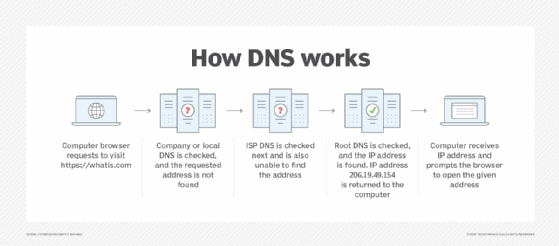
DNS is like the internet's vast directory. When human users want to access a particular website, they enter the website URL/domain name in their browser window; -- for example, https://www.techtarget.com/searchsecurity/. DNS then translates the human-friendly domain name into a machine-friendly IP address, such as 193.167.2.1. These IP addresses are unique for each device connected to the internet.
To locate and load the resources -- for example, a website -- requested by the user, DNS converts what the user types into their browser into an IP address the computer can understand.
In addition to learning how DNS works and performs queries, it is essential to understand the role of the DNS cache, how cache poisoning occurs and why it creates problems in the modern internet economy.
What is DNS caching?
A DNS resolver provides a web user with the IP address associated with a particular domain name. The user's web browser then takes this address and loads the requested website.
DNS caching, or simply caching, occurs when the resolver temporarily saves responses to IP address queries in a cache.
Caching enables the DNS resolver to respond to future queries faster and improve performance without having to communicate with the multiple servers involved in the DNS resolution process. Usually, DNS data can be cached in different locations for a fixed time frame known as time-to-live (TTL).
What is DNS cache poisoning?
DNS cache poisoning occurs when a threat actor feeds false information into the DNS cache, thereby making a user's web browser return an incorrect response.
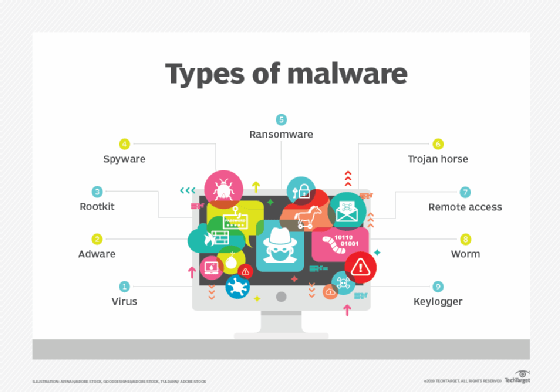
This response usually redirects users to a website other than the one they intended to view. Once this happens, a worm, spyware, web browser hijacking program or other kind of malware can be downloaded to the user's computer from the rogue location.
DNS resolvers cannot verify the data stored in their caches, which means that the incorrect information remains in the cache until the TTL expires or until the issue is resolved manually. Although cache poisoning does not disconnect the real website from its real IP address, if the incorrect information remains in the DNS cache, users will continue to be led to the rogue website, which can lead to further compromise.
How does cache poisoning occur?
An attacker adds fraudulent IP address information in the DNS cache, thereby making the DNS resolver call up the malicious site instead of the original one. This attack is possible for many reasons. One is that DNS was built for a smaller internet and not designed with security in mind. Also, it was based on a principle of trust since there was no reason to expect or assume that anyone would try to spread false DNS information, much less redirect users to malicious websites.
Due to these inherent and longstanding weaknesses, it's easy for attackers to hijack a DNS lookup for malicious purposes, such as to poison the DNS cache.
Additionally, DNS servers use User Datagram Protocol (UDP) instead of Transmission Control Protocol (TCP). Typically, when a server uses TCP, it requires the communicating parties to perform a handshake, both to initiate the two-way communication and to verify the identity of the devices involved in the communication. UDP does not use such a handshake mechanism, so there's no guarantee senders are who they say they are.
This vulnerability enables an attacker to poison the DNS cache.
Why is DNS cache poisoning dangerous?
DNS cache poisoning is a type of pharming attack in which malicious code is installed on a device. Since the URL is legitimate, users think they're on a legitimate site.
The browser automatically resolves the domain address without any user intervention, so the user has no reason to be suspicious. This is one reason DNS cache poisoning is such a sneaky type of cyber attack.
Further, if an attacker is successful at inserting a single fake entry into a caching server -- which means that the server has accepted the fake record -- hundreds or thousands of users can be redirected to the attacker's rogue website. If the domain originally requested by users is already popular, then such an attack could be perpetrated on a large scale to do the following:
- install malware on a user's computer;
- steal user data, including personal or financial information; or
- steal user credentials, like passwords.
Risks associated with DNS cache poisoning
The following are some risks that are involved with DNS cache poisoning:
- Malware infection. DNS cache poisoning redirects visitors to a fraudulent site, which enables attackers to install malware on user systems, for instance, via automated drive-by downloads, which can install malware even if the user doesn't click on a link, download anything or open a malicious email attachment.
- Data theft. Redirecting to an unknown phishing website can also lead to the compromise of users' personal data, like passwords and credit card information. Users may not even realize their information has been compromised.
- Hampering security updates. Cache poisoning can hamper or halt important security updates, leaving user systems susceptible to harmful viruses or Trojans.
How to prevent DNS cache poisoning
It's difficult to completely eliminate the problem of DNS cache poisoning because, even if an infected server is cleaned, individual desktops or mobile devices can still return to the spoofed site and cause problems for users. However, it is possible to increase the chances of preventing cache poisoning. Prevention comes with a twofold responsibility for website owners/DNS service providers and end users.
Website owners and DNS service providers can prevent DNS cache poisoning. Popular prevention strategies include the following:
- Using the DNS Security Extensions (DNSSEC) protocol. DNSSEC implements a hierarchical digital signing policy at every level of the DNS lookup process to prevent cache poisoning attacks.
- Implementing end-to-end encryption (E2EE). Making systems more extensive and resilient, E2EE can keep attackers at bay by sending encrypted DNS requests that only the intended recipients can decrypt.
- Deploying DNS spoofing detection tools. Tools like dnstraceroute can verify if a DNS request is answered by the correct DNS server or whether an attacker has spoofed or hijacked the DNS reply.
To protect themselves from DNS cache poisoning, users should do the following:
- never click on unknown links;
- regularly scan their device for malware, viruses, Trojans, worms and keyloggers;
- regularly flush the DNS cache; and
- use a virtual private network when possible.
What is web cache poisoning?
Web cache poisoning is a more recent type of cache poisoning attack. In this advanced technique, an attacker exploits the behavior of a web server and cache to serve a harmful or malicious HTTP response to unsuspecting users. The attackers often abuse unkeyed inputs to take control of web caches and manipulate platforms, such as Drupal and Mozilla's Firefox browser.
Attackers can use a poisoned web cache to distribute and scale many types of attacks by exploiting vulnerabilities, such as the following:
- cross-site scripting
- JavaScript injection
- open redirection
How to prevent web cache poisoning
Web administrators play a significant role in preventing web cache poisoning attacks. To prevent websites from having their caches used as exploit delivery systems, admins must properly set the HTTP response header configuration files on their servers.
Web developers should also avoid using input from HTTP request headers and cookies, and they should validate and cleanse all inputs. They should also use the Param Miner extension to audit their applications to see if there are any unkeyed inputs that have been introduced by in-use frameworks or third-party components and ensure that they're managed properly.
Understanding the security implications of third-party components before integrating them into the website is also crucial.