
Sergey Nivens - Fotolia
BGP tutorial: How the routing protocol works
Border Gateway Protocol is the complex routing protocol that literally makes the internet work. This tutorial walks you through how BGP functions and offers troubleshooting options.

Service providers working with IP networks are clear that the Border Gateway Protocol is the most complex and difficult-to-configure internet protocol. Its emphasis on security and scalability makes it essential, however.
This tutorial gives beginners and experts a detailed look at how BGP works, and offers simple and advanced BGP troubleshooting options. Follow along with these basic steps and commands so your BGP-enabled routers can exchange information securely with several hundred thousand IP prefixes and keep the internet running.
What is BGP?
If you have to explain what BGP is to someone new to the service provider environment, the best definition is it's the routing protocol that makes the internet work. The protocol exchanges routing information across the internet, using BGP-speaking routers and routing tables.
Because address allocation in the internet isn't as hierarchical as it is in the telephone dialing plan, most of the routers in service providers' core networks need to exchange information about several hundred thousand IP prefixes. BGP is still able to accomplish that task, which is proof it's a highly scalable routing protocol.
BGP routing information is usually exchanged between competing business entities in the form of internet service providers (ISPs) in an open, hostile environment -- the public internet. BGP is very security-focused. For example, all adjacent routers have to be configured manually based on routing policies. Decent BGP implementations provide a rich set of route filters that enable ISPs to defend their networks and control what they advertise to their competitors.
How BGP works
In BGP terminology, an independent routing domain -- which almost always means an ISP network -- is called an autonomous system. BGP is always used as the routing protocol of choice between different ISPs, which is known as external BGP. Large ISPs also use BGP as the core routing protocol within their own networks, which is called internal BGP.
To permit the transfer of routing information between neighboring ISPs, BGP requires Peering agreements, which comprise the necessary terms and conditions for exchanging traffic. The protocol adheres to these agreements, while also evaluating routing tables and information along multiple routes between ISPs. It does this using a selection algorithm that determines the best path to direct traffic based on specified commands and attributes. The best path might not always be the shortest path, however.
All other routing protocols are concerned solely with finding the optimal path toward all known destinations. BGP can't take this simplistic approach because the peering agreements between ISPs almost always result in complex routing policies. To help network operators implement these policies, BGP carries a large number of attributes with each IP prefix, including the following:
- Autonomous system (AS) path is the complete path documenting which autonomous systems a packet would have to travel through to reach the destination.
- Local preference is the internal cost of a destination, which is used to ensure AS-wide consistency.
- Multi-exit discriminator gives adjacent ISPs the ability to prefer one peering point over another.
- Communities is a set of generic tags that can signal various administrative policies between BGP routers.
Because BGP takes these factors and more into consideration, it might direct traffic to take one path from the destination and another path on its return trip, resulting in asymmetric routing. This isn't too problematic in terms of basic routing, but could cause complications in routes with firewalls and VPNs.
The focus of BGP design and implementation was always on security and scalability, so it is harder to configure than other routing protocols. It is also more complex -- more so when you start configuring various routing policies and network commands -- and one of the slowest converging routing protocols.
The slow BGP convergence dictates a two-protocol design of an ISP network:
- An internal routing protocol -- most often, Open Shortest Path First (OSPF) or Intermediate System to Intermediate System (IS-IS) -- is used to achieve fast convergence for internal routes, including IP addresses of BGP routers.
- BGP is used to exchange internet routes.
The fast convergence of OSPF or IS-IS would help quickly bypass a failure within the core network, while BGP on top of an internal routing protocol would meet the scalability, security and policy requirements. Even more, if you migrate all your customer routes into BGP, the customer problems -- for example, link flaps between your router and customer's router -- will not affect the stability of your core network.
Because of BGP's inherent complexity, customers and small ISPs often deploy BGP only where needed -- for example, on peering points and on a minimal subset of core routers, the ones between the peering points, as shown in the following diagram.
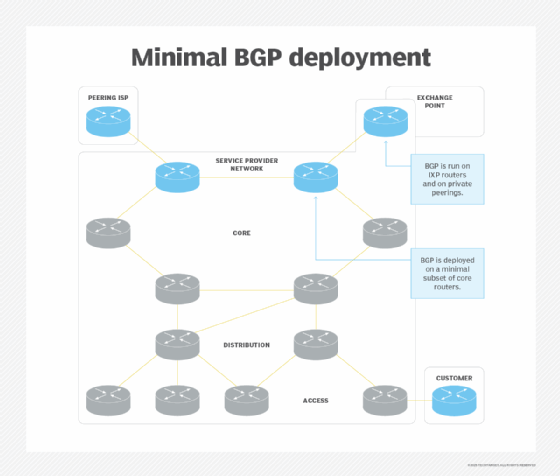
The BGP-speaking routers would also have to generate a default route into the internal routing protocol to attract the traffic for internet destinations unknown to other routers in your network.
Why is BGP used?
As your ISP business grows, however, your customers will start to require BGP connectivity. Any customer who wants to achieve truly redundant internet access has to have its own autonomous system and exchange BGP information with its ISPs.
As such, you'll need to deploy BGP on more and more core and edge routers, so it's best to include BGP on those routers as part of your initial network design (see the following diagram). Even though you might not deploy BGP everywhere with the initial network deployment, having a good blueprint will definitely help when you have to scale the BGP-speaking part of your network.
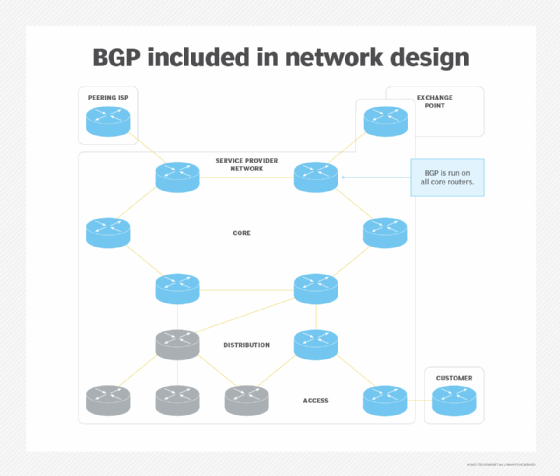
BGP requires a full mesh of internal BGP sessions -- sessions between routers in the same autonomous system. You could use BGP route reflectors or confederations to make your network scalable.
Another reason why you'd want to deploy BGP throughout your network is because MPLS-based VPNs, large-scale quality of service deployments or large-scale differentiated web caching implementations rely on BGP to transport the information they need.
BGP is, without doubt, the most complex IP routing protocol currently deployed in the internet. Its complexity is primarily due to its focus on security and routing policies. Competing service providers use it to exchange cooperative information about internet routes, and the protocol also has to implement whatever has been agreed upon in interprovider peering agreements. These agreements often have little to do with technically optimum services.
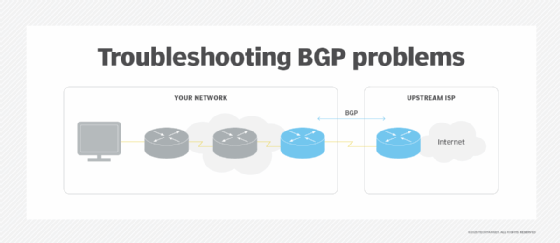
A structured approach to BGP troubleshooting, however, as illustrated in this and the next section, can lead you from the initial problem diagnosis to the solution. Here, we focus on a simple scenario with a single BGP-speaking router in your network (see the following diagram). Similar designs are commonly used by multi-homed customers and small ISPs that don't offer BGP connectivity to their customers.
Identifying a BGP problem
Before jumping into BGP troubleshooting, you have to identify the source of the connectivity problem you're debugging. Usually, you suspect BGP might be involved if a customer reports limited or no internet connectivity beyond your network. Here are quick steps to find the source:
- Perform a traceroute from a workstation on the problematic LAN. If the trace reaches the first BGP-speaking router -- or, even better, if it gets beyond the edge of your network -- you're probably dealing with a BGP issue.
- Check whether the BGP-speaking router advertises a default route into your network. Without a default route, other routers in your network cannot reach the internet destinations.
If you don't have access to a LAN-attached workstation, you can perform the traceroute from the customer-premises router. Be sure the source IP address used in the traceroute packets is the router's LAN address.
Troubleshooting adjacent BGP router issues
BGP has to establish a TCP session between adjacent BGP routers before they can exchange routes. Thus, the first step is to check the status of the BGP sessions between the routers.
The BGP neighbors are configured manually, and these are the two most probable configuration errors:
- Neighbor IP address mismatch. The destination IP address configured on one BGP neighbor has to match the source IP address -- or the IP address of the directly connected interface -- configured on the other.
- AS number mismatch. The neighbor AS number configured on one side of the BGP session has to match the actual AS number used by the neighbor.
You could also have a problem with packet filters deployed on the BGP-speaking router. These filters have to allow packets to and from TCP port 179.
Troubleshooting BGP route propagation
If your users want to receive traffic from the internet, the IP prefix assigned to your network must be visible throughout the internet. To get there, you need to follow these three steps:
- Your BGP router must insert your IP prefix into its BGP routing table.
- The IP prefix must be advertised to its BGP neighbors.
- The IP prefix must be propagated throughout the internet.
Is the route inserted into BGP? Most routing protocols automatically insert directly connected IP subnets into their routing tables or databases. Due to security requirements, BGP is an exception. It will originate an IP prefix only if it's manually configured to do so. For example, Cisco routers use the network statement to configure advertised IP prefixes.
Another option is route redistribution, which enables the network to direct traffic from a different protocol. This is highly discouraged in the internet environment.
Furthermore, to avoid attracting unroutable traffic, BGP will announce a configured IP prefix only if the IP routing table has a matching route. You could generate the matching IP route through route summarization, but it's usually best to configure a static route that points to a null interface -- or its equivalent.
To check whether your IP prefix is in your BGP routing table, use a BGP show command -- for example, show ip bgp prefix mask on a Cisco router.
Is the route advertised to your neighbors? By default, all IP prefixes residing in the BGP table are announced to all neighbors. Owing to security and routing policy requirements, the default behavior is usually modified with a set of output and input filters.
If you have applied output filters toward your BGP neighbors, you have to check whether these filters allow your IP prefix to be propagated to the external neighbors. The command to display routes advertised to a BGP neighbor on a Cisco router is show ip bgp neighbor ip-address advertised.
Is the route visible throughout the internet? Even if you have successfully announced your IP prefix to your BGP neighbors, it still might not be propagated throughout the internet. It's hard to figure out exactly what is propagated beyond the boundaries of your network. The tools that can help you are called BGP looking glasses. Using these tools, you can inspect BGP tables at various points throughout the internet and check whether your IP prefix has made it to those destinations.
A few factors could block your IP prefix within the internet. The most common one is BGP route flap dampening: If an IP prefix flaps -- or disappears and reappears -- too often in a short period of time, the prefix gets blocked for an extended period of time -- by default, up to an hour. This might happen, for example, if you clear your BGP sessions or change your configuration. If your IP prefix is dampened, you can't do anything except wait it out.
You could also have an invalid, or missing, entry in the IP routing registries, or the upstream ISPs may have inbound filters. In all these cases, it's best if your upstream ISP can help you resolve the problem -- which is, at this point, beyond the scope of technical BGP troubleshooting.
Advanced BGP troubleshooting
So far, we've addressed how to identify whether a routing problem is a BGP problem, how to troubleshoot BGP sessions and how to troubleshoot IP route origination and propagation.
Now, let's focus on a more advanced scenario: transit ISP networks (see diagram below).
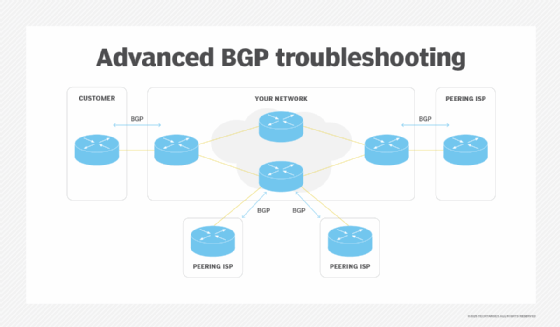
To establish end-to-end connectivity across a service provider network, the ISP has to receive customers' IP prefixes via BGP and announce them to other ISPs. The same process has to happen in reverse direction -- or, at least, the default route has to be announced to the customer.
Network-wide BGP troubleshooting includes three steps:
- Receive the IP prefix.
- Propagate the IP prefix across your network.
- Send the IP prefix to external BGP neighbors at the other edge of the network.
Have you received the prefix? Troubleshooting inbound BGP problems is the toughest part of troubleshooting you'll encounter. The two potential reasons an IP prefix isn't in your BGP table as you might expect are the neighbor is not sending the prefix or your inbound filters are blocking the prefix.
The only tool that can help you identify the problem is the debugging facility on your edge router -- as you normally don't have access to the other BGP neighbor. When debugging, be aware, a BGP neighbor can send you several hundred thousand routes. You have to ensure the debugging output produced by the troubleshooting session doesn't overwhelm the router.
Furthermore, the BGP prefixes are sent only when they change, not on a periodic basis, like Routing Information Protocol updates or OSPF link-state advertisement floods. Your debugging tool will thus not show you an IP prefix until it has actually changed, or you've cleared the BGP session with your neighbor.
Some BGP routers have the ability to store a separate copy of all routes a neighbor sends in a parallel BGP table. To enable this functionality on Cisco IOS, you have to configure soft-reconfiguration in for a BGP neighbor.
With the parallel per-neighbor table, you can pinpoint exactly what the neighbor has sent, or the content of the parallel table. You can also see the routes that have passed your input filters, or the contents of the main BGP table. But, of course, the parallel per-neighbor table consumes a large amount of memory.
Is the IP prefix propagated across your network? Even when an edge router receives an IP prefix via BGP, it may not be propagated to the other end of your network. To start with, internal BGP -- again, BGP within a single autonomous system -- requires a full mesh of BGP sessions among all routers. Every router between every pair of edge routers has to run BGP, otherwise, the network might drop the traffic. So the number of BGP sessions could become excessively large.
The following diagram illustrates the BGP sessions needed in a small four-router network.
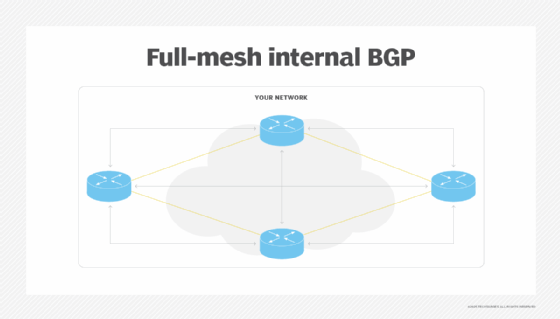
Two tools -- BGP route reflectors and BGP confederations -- can help you keep the number of sessions to a sensible level, with route reflectors being the most commonly used.
The BGP route reflector rules are quite simple:
- Whatever is received from a route-reflector client or an external BGP peer will be sent to every other peer.
- Whatever is received from a router that is not a route-reflector client will be sent only to clients and external BGP peers.
With these rules in hand, it's time to step through the graph of BGP sessions in your network, checking every BGP router on the way and ensuring they don't violate the route-reflector rules. Using these rules, the BGP prefixes get from every edge router to all other routers.
Another common reason an IP prefix isn't propagated across your network is the external subnets on the edge of your network are not advertised to your core routers.
The IP address of the next-hop router isn't changed when an IP prefix is sent to an internal BGP neighbor. The IP next-hop of an external route is thus always the IP address of a router one hop beyond the edge of your autonomous system.
The IP subnets that connect your edge routers to their external neighbors must be inserted into your internal routing protocol -- for example, OSPF or IS-IS. Otherwise, some internal BGP router will decide the BGP next-hop is not reachable and ignore the IP prefix. It will appear in the BGP table, but will not be used or propagated to other BGP peers.
Is the prefix sent to external neighbors? As the last step in troubleshooting BGP route propagation, you have to check whether the IP prefixes transported across your network are announced to your external BGP peers. The techniques for troubleshooting outbound BGP route propagation are explained in this article.
Is the traffic traversing the network? Even if your BGP route propagation works flawlessly, the IP packets may not be able to traverse your network. Remember, we're talking about pure IP networks here. Things change a bit if you add MPLS to the mix.
The most common cause of a black hole in your network is a router in the transit path that doesn't run BGP and consequently has no idea how to route the received IP packet toward the destination network. IP routing works hop by hop. Even though the ingress edge router knows exactly which egress edge router to use and how to get there, it cannot pass that information to the intermediate routers. All of them must, therefore, run BGP as well.
To identify a black hole in your network, perform a traceroute from your customer's network to a destination in the internet. The last router responding to the traceroute is one hop before the black hole.
Even though all core routers in your network have to run BGP, the internal BGP sessions don't have to follow the physical structure of the network. For example, you could have a few central routers acting as route reflectors for all BGP routers in your network.