
What is a Server?

A server is a computer program or device that provides a service to another computer program and its user, also known as the client. In a data center, the physical computer that a server program runs on is also frequently referred to as a server. That machine might be a dedicated server or it might be used for other purposes.
In the client/server programming model, a server program awaits and fulfills requests from client programs, which might be running in the same, or other computers. A given application in a computer might function as a client with requests for services from other programs and as a server of requests from other programs.
How servers work
The term server can refer to a physical machine, a virtual machine or to software that is performing server services. The way that a server works varies considerably depending on how the word server is being used.
Physical and virtual servers
A physical server is simply a computer that is used to run server software. The differences between a server and a desktop computer will be discussed in detail in the next section.
A virtual server is a virtual representation of a physical server. Like a physical server, a virtual server includes its own operating system and applications. These are kept separate from any other virtual servers that might be running on the physical server.
The process of creating virtual machines involves installing a lightweight software component called a hypervisor onto a physical server. The hypervisor's job is to enable the physical server to function as a virtualization host. The virtualization host makes the physical server's hardware resources -- such as CPU time, memory, storage and network bandwidth -- available to one or more virtual machines.
An administrative console gives administrators the ability to allocate specific hardware resources to each virtual server. This helps dramatically drive down hardware costs because a single physical server can run multiple virtual servers, as opposed to each workload needing its own physical server.
Server software
At a minimum, a server requires two software components: an operating system and an application. The operating system acts as a platform for running the server application. It provides access to the underlying hardware resources and provides the dependency services that the application depends on.
The operating system also provides the means for clients to communicate with the server application. The server's IP address and fully qualified domain name, for example, are assigned at the operating system level.
Desktop computers vs. servers
There are both similarities and differences between desktop computers and servers. Most servers are based on X86/X64 CPUs and can run the same code as an X86/X64 desktop computer. Unlike most desktop computers, however, physical servers often include multiple CPU sockets and error correcting memory. Servers also generally support a far greater quantity of memory than most desktop computers.
Because server hardware typically runs mission-critical workloads, server hardware manufacturers design servers to support redundant components. A server might be equipped with redundant power supplies and redundant network interfaces. These redundant components allow a server to continue to function even if a key component fails.
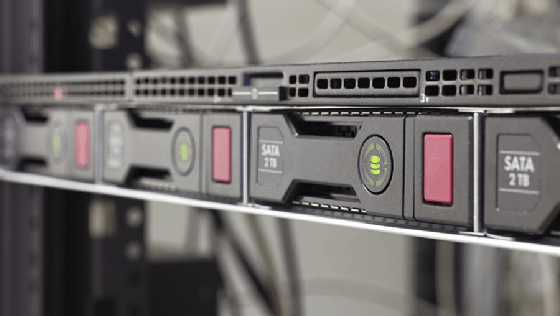
Server hardware also differs from desktop hardware in terms of its form factor. Modern desktop computers often exist as mini towers, designed to be placed under a desk. Although there are still some vendors that offer tower servers, most servers are designed to be rack mounted. These rack mount systems are described as having a 1U, 2U or 4U form factor, depending on how much rack space they occupy -- a 2U server takes up twice as much rack space as a 1U server.
Another key difference between a desktop computer and a server is the operating system. A desktop operating system might be able to perform some server-like functionality but isn't designed or licensed to take the place of a server operating system. Windows 10, for example, is a desktop operating system.
Some Windows 10 editions include Hyper-V, Microsoft's virtual machine platform. Even though both Windows 10 and Windows Server can run Hyper-V, Windows 10's hypervisor is intended to be primarily used for development purposes, whereas the version of Hyper-V included with Windows Server is designed for running production virtual servers.
Although an organization could conceivably run a virtual server on top of Windows 10 Hyper-V, there are licensing issues to consider. Additionally, Windows Server Hyper-V includes resiliency features that aren't found in the Windows 10 version. For example, Windows Server supports failover clustering and virtual machine replication.
Similarly, the Windows 10 operating system can make files available to devices on a local network. However, Windows 10 was never designed for large-scale file sharing. Windows Server, however, can be configured to act as a fully featured file server. In large organizations, a distributed file system can be created across an entire server farm for the purpose of providing better performance, scalability and resiliency than what one physical server would be able to provide by itself.
Types of servers
Servers are often categorized in terms of their purpose. A few examples of the types of servers available are as follows:
- Web server: a computer program that serves requested HTML pages or files. In this case, a web browser acts as the client.
- Application server: a program in a computer in a distributed network that provides the business logic for an application program.
- Proxy server: software that acts as an intermediary between an endpoint device, such as a computer, and another server from which a user or client is requesting a service.
- Mail server: an application that receives incoming emails from local users -- people within the same domain -- and remote senders and forwards outgoing emails for delivery.
- Virtual server: a program running on a shared server that is configured in such a way that it seems to each user that they have complete control of a server.
- Blade server: a server chassis housing multiple thin, modular electronic circuit boards, known as server blades. Each blade is a server in its own right, often dedicated to a single application
- File server: a computer responsible for the central storage and management of data files so that other computers on the same network can access them.
- Policy server: a security component of a policy-based network that provides authorization services and facilitates tracking and control of files.
- Database server: this server is responsible for hosting one or more databases. Client applications perform database queries that retrieve data from or write data to the database that is hosted on the server.
- Print server: this server provides users with access to one or more network-attached printers -- or print devices as some server vendors call them. The print server acts as a queue for the print jobs that users submit. Some print servers can prioritize the jobs in the print queue based on the job type or on who submitted the print job.
Server components
Hardware
Servers are made up of several different components and subcomponents. At the hardware level, servers are typically made up of a rack mount chassis containing a power supply, a system board, one or more CPUs, memory, storage, a network interface and a power supply.
Most server hardware supports out-of-band management through a dedicated network port. Out-of-band management enables low-level management and monitoring of the server, independently of the operating system. Out-of-band management systems can be used to remotely power the server on or off, to install an operating system, and to perform health monitoring.
Operating systems
Another component is the server operating system. A server operating system, such as Windows Server or Linux, acts as the platform that enables applications to run. The operating system provides applications access to the hardware resources that they need and enables network connectivity.
The application is what enables the server to do its job. For example, a database server would run a database application. Likewise, an email server would need to run a mail application.
Choosing the right server
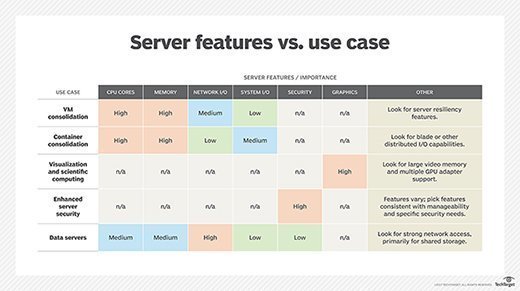
There are many factors to consider in the midst of a server selection, including virtual machine and container consolidation. When choosing a server, evaluate the importance of certain features based on the use cases.
Security capabilities are also important and there are a number of protection, detection and recovery features to consider, including native data encryption to protect data in flight and data at rest, as well as persistent event logging to provide an indelible record of all activity.
If the server will rely on internal storage, the choice of disk types and capacity is also important because it can have a significant influence on input/output (I/O) and resilience.
Many organizations are shrinking the number of physical servers in their data centers as virtualization enables fewer servers to host more workloads. The advent of cloud computing has also changed the number of servers an organization needs to host on premises.
Packing more capability into fewer boxes can reduce overall capital expenses, data center floor space and power and cooling demands. Hosting more workloads on fewer boxes, however, can also pose an increased risk to the business because more workloads will be affected if the server fails or needs to be offline for routine maintenance.
A server maintenance checklist should cover physical elements, as well as the system's critical configuration.
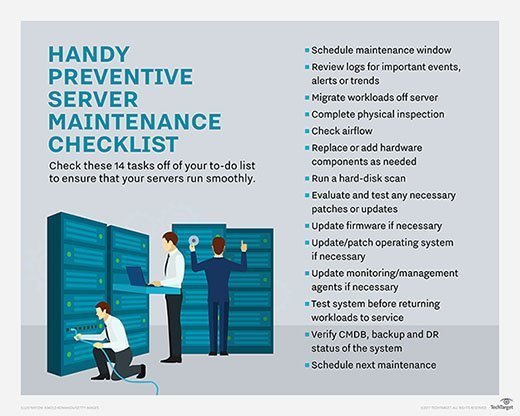
Download a PDF of this server maintenance checklist.