preboot execution environment (PXE)

What is preboot execution environment (PXE)?
Preboot execution environment (PXE), pronounced pixie, is a set of standards that enables a computer to load an operating system (OS) over a network connection. PXE can be used to quickly install an OS and is commonly used for both servers and clients. It may also be called PXE boot, boot from network, network boot or local area network boot.
PXE can greatly simplify large deployments of computers. It replaces using a compact disc (CD) or Universal Serial Bus (USB) drive to install an OS. A single OS image can be quickly installed on many computers simultaneously.
How PXE works?
PXE requires several standards for the client and server to successfully boot. The client must support PXE in Unified Extensible Firmware Interface (UEFI) or network interface card (NIC) firmware. The network must have a configured Dynamic Host Configuration Protocol (DHCP) server and a Trivial File Transfer Protocol (TFTP) server. There is generally also another imaging server.
The DHCP server uses options 66 and 67 to advertise the PXE boot server Internet Protocol (IP) address. The client then contacts the boot server and downloads and boots the Network Bootstrap Program (NBP) using TFTP. The NBP is a small OS that contains just a kernel, basic drivers and basic programs that can download the remaining OS components. Windows Preinstallation Environment or a small Linux OS are the most common OSes loaded by a network boot.
A proxyDHCP server can be used to handle PXE requests.
How does the PXE boot process work?
Here are the steps in the PXE boot process:
- The client basic input/output system (BIOS) initiates PXE boot. This may be selected by the client operator or may be a fallback option when other boot media fails.
- The client broadcasts a DHCP request and a PXE request.
- The DHCP server responds with the DHCP response so the client can set an IP address, and it replies with the IP address of the TFTP server and the file name of the NBP.
- The client downloads and boots the NBP.
Many modern computers support PXE boot using both IPv4 and IPv6. Some vendor-specific implementations of network boot over Wi-Fi exist, but there is no Wi-Fi PXE standard.
Network boot is a client feature. The code to PXE is contained on the motherboard UEFI BIOS or in the NIC firmware read-only memory (ROM). It is a standard feature on enterprise computers and servers but may be omitted on some consumer hardware. On some computers, it needs to be activated in the computer's BIOS configuration. The most used implementation of PXE is using Intel drivers.
Apple macOS computers do not support PXE. They use a similar but incompatible system called Boot Server Discovery Protocol (BSDP). BSDP uses a NetBoot client to access an Apple deployment server.
How PXE is used?
PXE is a powerful tool that can greatly simplify the work of all information technology staff. It is useful for clients, servers, virtual machines (VM) and embedded internet of things (IoT) devices.
The primary use of PXE is to install a fresh OS on new or malfunctioning computers. This can be a client OS, such as Windows 10 or Ubuntu Linux, or a server OS, like Windows Server 2019 or Arch Linux. PXE can replace using USB drives or CD-ROMs as installation media.
Installing an OS from PXE instead of from physical media often has many advantages:
- PXE is more convenient as network access is usually more available than a dedicated boot device.
- Modern networks can be faster than CD or USB drives.
- Loading an image from a central network location ensures that the latest OS image is used.
PXE is supported by most VM frameworks. This way, a new VM can be generated and then quickly imaged over a network connection.
A PXE deployment can also be used to host troubleshooting and maintenance tools. During the PXE boot process, the NBP can present the operator a choice of OS to load. An organization can host a simple Linux distribution that can perform hardware tests and have tools that can perform advanced client maintenance, such as Disk cloning, disk partitioning, secure disk erase or password resets.
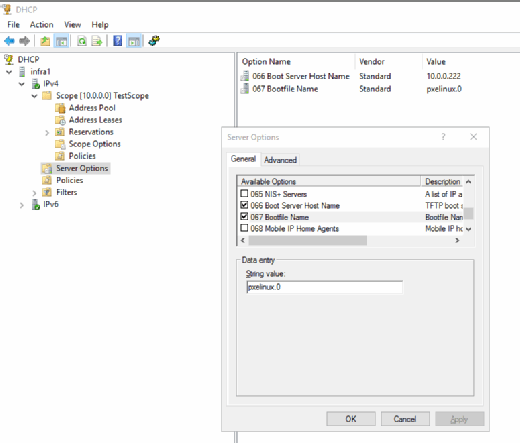
Diskless or thin client computers may use PXE to load an OS at each boot. A diskless computer does not have fixed storage on a hard disk drive or solid-state drive. A thin client may be configured without fixed storage, and it loads its small OS at each power-on. This ensures no data is saved to the client. IoT devices may also contact a PXE server to automatically load their OS.
Using diskless servers that load an OS from PXE at each boot is popular for high-security servers or high-performance computing (HPC) clusters. A high-security server may handle sensitive customer data but be located in a public server colocation. If the server were to be removed or seized, a diskless server would have no customer data saved to it.
HPC clusters usually have hundreds or thousands of compute node servers that are identical and need to operate together. Using PXE to load the OS image at boot ensures that these servers have exactly the same software configuration and that they can be quickly reset in the case of failure.
Using PXE to deploy an OS image is supported by many deployment systems. These include the following:
- Microsoft Windows Deployment Services;
- Microsoft Deployment Toolkit (MDT);
- Microsoft Windows Assessment and Deployment Kit;
- Microsoft System Center Configuration Manager; and
- all major Linux distributions, including Red Hat, Ubuntu and Proton.