Server Message Block protocol (SMB protocol)
What is the Server Message Block protocol?
The Server Message Block protocol (SMB protocol) is a client-server communication protocol used for sharing access to files, printers, serial ports and other resources on a network. It can also carry transaction protocols for interprocess communication. Over the years, SMB has been used primarily to connect Windows computers, although most other systems -- such as Linux and macOS -- also include client components for connecting to SMB resources.
A group at IBM developed the SMB protocol in the 1980s. The protocol has since spawned multiple variants, also known as dialects, to meet evolving network requirements over the years. Throughout that time, SMB has been widely implemented and continues to be one of the most popular solutions for file sharing in the workplace.
How does the SMB protocol work?
The SMB protocol enables applications and their users to access files on remote servers, as well as connect to other resources, including printers, mailslots and named pipes. SMB provides client applications with a secure and controlled method for opening, reading, moving, creating and updating files on remote servers. The protocol can also communicate with server programs configured to receive SMB client requests.
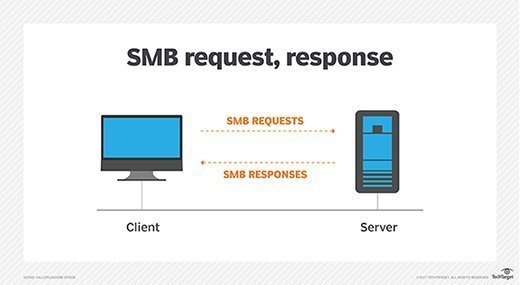
Known as a response-request protocol, the SMB protocol is one of the most common methods used for network communications. In this model, the client sends an SMB request to the server to initiate the connection. When the server receives the request, it replies by sending an SMB response back to the client, establishing the communication channel necessary for a two-way conversation.
The SMB protocol operates at the application layer but relies on lower network levels for transport. At one time, SMB ran on top of Network Basic Input/Output System over Transmission Control Protocol/Internet Protocol (NetBIOS over TCP/IP, or NBT) or, to a lesser degree, legacy protocols such as Internetwork Packet Exchange or NetBIOS Extended User Interface. When SMB was using NBT, it relied on ports 137, 138 and 139 for transport. Now, SMB runs directly over TCP/IP and uses port 445.
Today, communications with devices that do not support SMB directly over TCP/IP require the use of NetBIOS over a transport protocol such as TCP/IP.
Microsoft Windows operating systems (OSes) since Windows 95 have included client and server SMB protocol support. The Linux OS and macOS also provide built-in support for SMB. In addition, Unix-based systems can use Samba to facilitate SMB access to file and print services.
A client and server can implement different SMB dialects. If they do, the systems must first negotiate the differences between editions before starting a session.
What are SMB protocol dialects?
Since the SMB protocol was introduced, a number of SMB dialects have been released that have improved on the original implementation, delivering greater capabilities, scalability, security and efficiency. Here is a brief overview of the most notable dialects:
- SMB 1.0 (1984). SMB 1.0 was created by IBM for file sharing in DOS. It introduced opportunistic locking (OpLock) as a client-side caching mechanism designed to reduce network traffic. Microsoft would later include the SMB protocol in its LAN Manager product.
- CIFS (1996). CIFS is a Microsoft-developed SMB dialect that debuted in Windows 95. Short for Common Internet File System, CIFS added support for larger file sizes, direct transport over TCP/IP, and symbolic links and hard links.
- SMB 2.0 (2006). SMB 2.0 was released with Windows Vista and Windows Server 2008. It reduced chattiness to improve performance, enhanced scalability and resiliency, and added support for wide area network (WAN) acceleration.
- SMB 2.1 (2010). SMB 2.1 was introduced with Windows Server 2008 R2 and Windows 7. The client OpLock leasing model replaced OpLock to enhance caching and improve performance. Other updates included large maximum transmission unit support and improved energy efficiency, which enabled clients with open files from an SMB server to enter sleep mode.
- SMB 3.0 (2012). SMB 3.0 debuted in Windows 8 and Windows Server 2012. It added several significant upgrades to improve availability, performance, backup, security and management. Noteworthy new features included SMB Multichannel, SMB Direct, transparent failover of client access, Remote Volume Shadow Copy Service support, SMB Encryption and more.
- SMB 3.02 (2014). SMB 3.02 was introduced in Windows 8.1 and Windows Server 2012 R2. It included performance updates and the ability to disable CIFS/SMB 1.0 support, including removal of the related binaries.
- SMB 3.1.1 (2015). SMB 3.1.1 was released with Windows 10 and Windows Server 2016. It added support for advanced encryption, pre-authentication integrity to prevent man-in-the-middle (MitM) attacks and cluster dialect fencing, among other updates.
Is the SMB protocol safe?
In 2017, the WannaCry and Petya ransomware attacks exploited a vulnerability in SMB 1.0 that made it possible to load malware on vulnerable clients and then propagate the malware across networks. Microsoft subsequently released a patch, but experts have advised users and administrators to disable SMB 1.0/CIFS on all systems.
SMB 3.0 and later are far more secure than previous dialects, having introduced a number of protections. For example, SMB 3.0 added end-to-end data encryption, while protecting data from eavesdropping. SMB 3.0 also offered secure dialect negotiation, which helps protect against MitM attacks.
SMB 3.1.1 improved on security even further by updating the encryption capabilities, adding pre-authentication integrity. It also included a mechanism for negotiating the crypto-algorithm on a per-connection basis.
CIFS vs. SMB
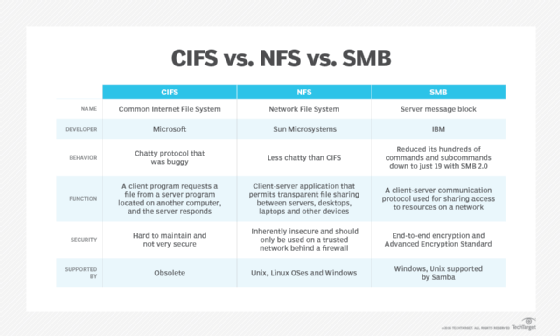
As noted above, CIFS is an early dialect of the SMB protocol developed by Microsoft. Although the terms SMB and CIFS are sometimes used interchangeably, CIFS refers specifically to a single implementation of SMB. That said, application interfaces and technical documentation often refer to them as one and the same, particularly SMB 1.0 and CIFS, using labels such as SMB 1.0/CIFS.
However, the distinction between dialects is important to recognize. For example, SMB 1.0 and CIFS do not have the same level of security protections found in later dialects, as demonstrated by the WannaCry ransomware. SMB 3.0 provides far more advanced security protections. For this reason, most modern systems use the newer SMB dialects. For example, Windows 10 currently supports SMB 3.1.1, the most recent SMB dialect.
Dialects also make a difference when it comes to performance. For instance, CIFS was noted for being a chatty protocol that bogged WAN performance due to the combined burdens of latency and numerous acknowledgments. The dialect to follow, SMB 2.0, improved the protocol's efficiency by drastically reducing its hundreds of commands and subcommands down to just 19.
Samba vs. SMB
Released in 1992, Samba is an open source implementation of the SMB protocol for Unix systems and Linux distributions. The Samba platform includes a server that enables various client types to access SMB resources.
The server supports file sharing and print services, authentication and authorization, name resolution, and service announcements (browsing) between Linux/Unix servers and Windows clients. For example, Samba can be installed on a Unix server to provide file and print services to Windows 10 desktops.
In addition, Samba makes it possible to integrate Linux/Unix servers and desktops in an Active Directory environment.