
Sergey Nivens - Fotolia
The 5 different types of firewalls explained
Read up on the five different firewalls' similarities and differences, the three firewall deployment models and tips for choosing the firewall that best meets your company's needs.
More than 30 years after the concept of the network firewall entered the security conversation, the technology remains an essential tool in the enterprise network security arsenal. A mechanism to filter out malicious traffic before it crosses the network perimeter, the firewall has proven its worth over the decades. But, as with any essential technology used for a lengthy period of time, developments have helped advance both the firewall's capabilities and its deployment options.
The firewall traces back to an early period in the modern internet era when systems administrators discovered their network perimeters were being breached by external attackers. There was destined to be some sort of process that looked at network traffic for clear signs of incidents.
Steven Bellovin, then a fellow at AT&T Labs Research and currently a professor in the computer science department at Columbia University, is generally credited -- although not by himself -- with first using the term firewall to describe the process of filtering out unwanted network traffic. The name was a metaphor, likening the device to partitions that keep a fire from migrating from one part of a physical structure to another. In the networking case, the idea was to insert a filter of sorts between the ostensibly safe internal network and any traffic entering or leaving from that network's connection to the broader internet.
The term has grown gradually in familiar usage to the point that no casual conversation about network security can take place without at least mentioning it. Along the way, the firewall has evolved into different types of firewalls.
This article somewhat arbitrarily argues that there are five key types of firewalls that use different mechanisms to identify and filter out malicious traffic, but the exact number of options is not nearly as important as the idea that different kinds of firewall products do rather different things. In addition, enterprises may need more than one of the five firewalls to better secure their systems. Or one single firewall may provide more than one of these firewall types. There are also three different firewall deployment options to consider, which we will explore in further detail.
Five types of firewall include the following:
- packet filtering firewall
- circuit-level gateway
- application-level gateway (aka proxy firewall)
- stateful inspection firewall
- next-generation firewall (NGFW)
Firewall devices and services can offer protection beyond standard firewall function -- for example, by providing an intrusion detection or prevention system (IDS/IPS), denial-of-service (DoS) attack protection, session monitoring, and other security services to protect servers and other devices within the private network. While some types of firewalls can work as multifunctional security devices, they need to be part of a multilayered architecture that executes effective enterprise security policies.

What is Firewall-as-a-Service?
Here you’ll find an introduction to firewall as a service (FWaaS). Explore4 features and benefits to help you determine if FWaaS should be on your list of possibilities.
Download now
How do the different types of firewalls work?
Firewalls are traditionally inserted inline across a network connection and look at all the traffic passing through that point. As they do so, they are tasked with telling which network protocol traffic is benign and which packets are part of an attack.
Firewalls monitor traffic against a set of predetermined rules that are designed to sift out harmful content. While no security product can perfectly predict the intent of all content, advances in security technology make it possible to apply known patterns in network data that have signaled previous attacks on other enterprises.
All firewalls apply rules that define the criteria under which a given packet -- or set of packets in a transaction -- can safely be routed forward to the intended recipient.
Here are the five types of firewalls that continue to play significant roles in enterprise environments today.
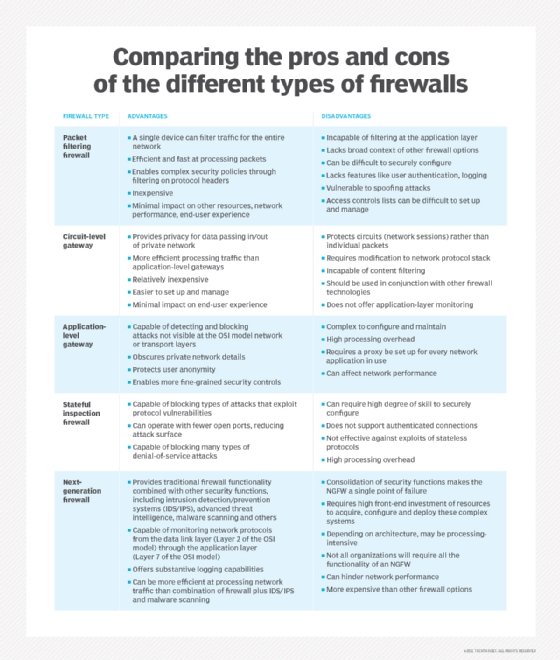
1. Packet filtering firewall
Packet filtering firewalls operate inline at junction points where devices such as routers and switches do their work. However, these firewalls don't route packets; rather they compare each packet received to a set of established criteria, such as the allowed IP addresses, packet type, port number and other aspects of the packet protocol headers. Packets that are flagged as troublesome are, generally speaking, unceremoniously dropped -- that is, they are not forwarded and, thus, cease to exist.
Packet filtering firewall advantages
- A single device can filter traffic for the entire network
- Extremely fast and efficient in scanning traffic
- Inexpensive
- Minimal effect on other resources, network performance and end-user experience
Packet filtering firewall disadvantages
- Because traffic filtering is based entirely on IP address or port information, packet filtering lacks broader context that informs other types of firewalls
- Doesn't check the payload and can be easily spoofed
- Not an ideal option for every network
- Access control lists can be difficult to set up and manage
Packet filtering may not provide the level of security necessary for every use case, but there are situations in which this low-cost firewall is a solid option. For small or budget-constrained organizations, packet filtering provides a basic level of security that can provide protection against known threats. Larger enterprises can also use packet filtering as part of a layered defense to screen potentially harmful traffic between internal departments.
2. Circuit-level gateway
Using another relatively quick way to identify malicious content, circuit-level gateways monitor TCP handshakes and other network protocol session initiation messages across the network as they are established between the local and remote hosts to determine whether the session being initiated is legitimate -- whether the remote system is considered trusted. They don't inspect the packets themselves, however.
Circuit-level gateway advantages
- Only processes requested transactions; all other traffic is rejected
- Easy to set up and manage
- Low cost and minimal impact on end-user experience
Circuit-level gateway disadvantages
- If they aren't used in conjunction with other security technology, circuit-level gateways offer no protection against data leakage from devices within the firewall
- No application layer monitoring
- Requires ongoing updates to keep rules current
While circuit-level gateways provide a higher level of security than packet filtering firewalls, they should be used in conjunction with other systems. For example, circuit-level gateways are typically used alongside application-level gateways. This strategy combines attributes of packet- and circuit-level gateway firewalls with content filtering.
3. Application-level gateway
This kind of device -- technically a proxy and sometimes referred to as a proxy firewall -- functions as the only entry point to and exit point from the network. Application-level gateways filter packets not only according to the service for which they are intended -- as specified by the destination port -- but also by other characteristics, such as the HTTP request string.
While gateways that filter at the application layer provide considerable data security, they can dramatically affect network performance and can be challenging to manage.
Application-level gateway advantages
- Examines all communications between outside sources and devices behind the firewall, checking not just address, port and TCP header information, but the content itself before it lets any traffic pass through the proxy
- Provides fine-grained security controls that can, for example, allow access to a website but restrict which pages on that site the user can open
- Protects user anonymity
Application-level gateway disadvantages
- Can inhibit network performance
- Costlier than some other firewall options
- Requires a high degree of effort to derive the maximum benefit from the gateway
- Doesn't work with all network protocols
Application-layer firewalls are best used to protect enterprise resources from web application threats. They can both block access to harmful sites and prevent sensitive information from being leaked from within the firewall. They can, however, introduce a delay in communications.
4. Stateful inspection firewall
State-aware devices not only examine each packet, but also keep track of whether or not that packet is part of an established TCP or other network session. This offers more security than either packet filtering or circuit monitoring alone but exacts a greater toll on network performance.
A further variant of stateful inspection is the multilayer inspection firewall, which considers the flow of transactions in process across multiple protocol layers of the seven-layer Open Systems Interconnection (OSI) model.
Stateful inspection firewall advantages
- Monitors the entire session for the state of the connection, while also checking IP addresses and payloads for more thorough security
- Offers a high degree of control over what content is let in or out of the network
- Does not need to open numerous ports to allow traffic in or out
- Delivers substantive logging capabilities
Stateful inspection firewall disadvantages
- Resource-intensive and interferes with the speed of network communications
- More expensive than other firewall options
- Doesn't provide authentication capabilities to validate traffic sources aren't spoofed
Most organizations benefit from the use of a stateful inspection firewall. These devices serve as a more thorough gateway between computers and other assets within the firewall and resources beyond the enterprise. They also can be highly effective in defending network devices against particular attacks, such as DoS.
5. Next-generation firewall
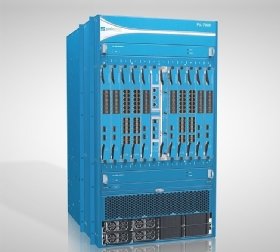
A typical NGFW combines packet inspection with stateful inspection and also includes some variety of deep packet inspection (DPI), as well as other network security systems, such as an IDS/IPS, malware filtering and antivirus.
While packet inspection in traditional firewalls looks exclusively at the protocol header of the packet, DPI looks at the actual data the packet is carrying. A DPI firewall tracks the progress of a web browsing session and can notice whether a packet payload, when assembled with other packets in an HTTP server reply, constitutes a legitimate HTML-formatted response.
NGFW advantages
- Combines DPI with malware filtering and other controls to provide an optimal level of filtering
- Tracks all traffic from Layer 2 to the application layer for more accurate insights than other methods
- Can be automatically updated to provide current context
NGFW disadvantages
- In order to derive the biggest benefit, organizations need to integrate NGFWs with other security systems, which can be a complex process
- Costlier than other firewall types
NGFWs are an essential safeguard for organizations in heavily regulated industries, such as healthcare or finance. These firewalls deliver multifunctional capability, which appeals to those with a strong grasp on just how virulent the threat environment is. NGFWs work best when integrated with other security systems, which, in many cases, requires a high degree of expertise.
Firewall delivery methods
As IT consumption models evolved, so too did security deployment options. Firewalls today can be deployed as a hardware appliance, be software-based or be delivered as a service.
Hardware-based firewalls
A hardware-based firewall is an appliance that acts as a secure gateway between devices inside the network perimeter and those outside it. Because they are self-contained appliances, hardware-based firewalls don't consume processing power or other resources of the host devices.
Sometimes called network-based firewalls, these appliances are ideal for medium and large organizations looking to protect many devices. Hardware-based firewalls require more knowledge to configure and manage than their host-based counterparts.
Software-based firewalls
A software-based firewall, or host firewall, runs on a server or other device. Host firewall software needs to be installed on each device requiring protection. As such, software-based firewalls consume some of the host device's CPU and RAM resources.
Software-based firewalls provide individual devices significant protection against viruses and other malicious content. They can discern different programs running on the host, while filtering inbound and outbound traffic. This provides a fine-grained level of control, making it possible to enable communications to/from one program but prevent it to/from another.
Cloud/hosted firewalls
Managed security service providers (MSSPs) offer cloud-based firewalls. This hosted service can be configured to track both internal network activity and third-party on-demand environments. Also known as firewall as a service, cloud-based firewalls can be entirely managed by an MSSP, making it a good option for large or highly distributed enterprises with gaps in security resources. Cloud-based firewalls can also be beneficial to smaller organizations with limited staff and expertise.
Which firewall is best for your enterprise?
Choosing the right type of firewall means answering questions about what the firewall is protecting, which resources the organization can afford and how the infrastructure is architected. The best firewall for one organization may not be a good fit for another.
Issues to consider include the following:
- What are the technical objectives for the firewall? Can a simpler product work better than a firewall with more features and capabilities that may not be necessary?
- How does the firewall itself fit into the organization's architecture? Consider whether the firewall is intended to protect a low-visibility service exposed on the internet or a web application.
- What kinds of traffic inspection are necessary? Some applications may require monitoring all packet contents, while others can simply sort packets based on source/destination addresses and ports.
Many firewall implementations incorporate features of different types of firewalls, so choosing a type of firewall is rarely a matter of finding one that fits neatly into any particular category. For example, an NGFW may incorporate new features, along with some of those from packet filtering firewalls, application-level gateways or stateful inspection firewalls.
Choosing the ideal firewall begins with understanding the architecture and functions of the private network being protected but also calls for understanding the different types of firewalls and firewall policies that are most effective for the organization.
Whichever type(s) of firewalls you choose, keep in mind that a misconfigured firewall can, in some ways, be worse than no firewall at all because it lends the dangerous false impression of security, while providing little to no protection.