firewall
What is a firewall?
A firewall is a network security device that prevents unauthorized access to a network. It inspects incoming and outgoing traffic using a set of security rules to identify and block threats.
A firewall can be physical hardware, digital software, software as a service (SaaS) or a virtual private cloud.
Firewalls are used in both personal and enterprise settings, and many devices, including Mac, Windows and Linux computers, come with a built-in firewall. They're widely considered an essential component of network security.
Why are firewalls important?
Firewalls serve as the first line of defense against external threats, such as hackers and malware attacks. In particular, firewalls combined with an intrusion prevention system (IPS) are crucial in preventing malware and certain application layer attacks.
Firewalls first emerged in the early days of the internet when networks needed new security methods that could handle increasing complexity. They've since become the foundation of network security in the client-server model -- the central architecture of modern computing.
Overall, firewalls play an important role in preventing cyber attacks, protecting sensitive data, and maintaining the privacy and security of computer systems and networks.
How does a firewall work?
A firewall establishes a border between an external network and the network it guards. It's inserted inline across a network connection and inspects all packets entering and leaving the guarded network. As it inspects, it uses a set of preconfigured rules to distinguish between benign and malicious traffic or packets.
The term packet refers to a piece of data that is formatted for internet transfer. Packets contain the data itself and information about the data, such as where it came from. Firewalls can use this packet information to determine whether a given packet abides by the rule set. If it doesn't, the packet is barred from entering the guarded network.
Rule sets can be based on several things indicated by packet data, including source, destination and content.
These characteristics can be represented differently at different levels of the network. As a packet travels through the network, it's reformatted several times to tell the protocol where to send it. Different types of firewalls exist to read packets at different network levels.
Uses
Firewalls are used in both corporate and consumer settings. Modern organizations incorporate them into a security information and event management strategy along with other cybersecurity devices.
Firewalls are often used alongside antivirus applications. Personal firewalls, unlike corporate ones, are usually a single product, as opposed to a collection of various products. They can be software or a device with firewall firmware embedded.
The following are some use cases of firewalls:
- Threat defense. Firewalls can be installed at an organization's network perimeter to guard against external threats, such as malware attacks or hacking attempts, or within the network to create segmentation and guard against insider threats.
- Logging and audit functions. Firewalls keep a record of events that administrators can use to identify patterns and improve rule sets. Rules should be updated regularly to keep up with ever-evolving cybersecurity threats. Vendors discover new threats and develop patches to cover them as soon as possible.
- Traffic filtering. In a single home network, a firewall can filter traffic and alert the user to intrusions. They're especially useful for always-on connections, such as Digital Subscriber Line or cable modems, because those connection types use static IP addresses. A firewall ensures that only intended and nondestructive content from the internet passes through.
- Controlling and blocking access. Firewalls can be used for controlling and blocking access to certain websites and online services to prevent unauthorized use. For example, an organization can use a firewall to block access to objectionable websites to ensure employees comply with company policies when browsing the internet.
- Secure remote access. Firewalls can be used to grant secure remote access to a network through a virtual private network (VPN) or other secure remote access technology.
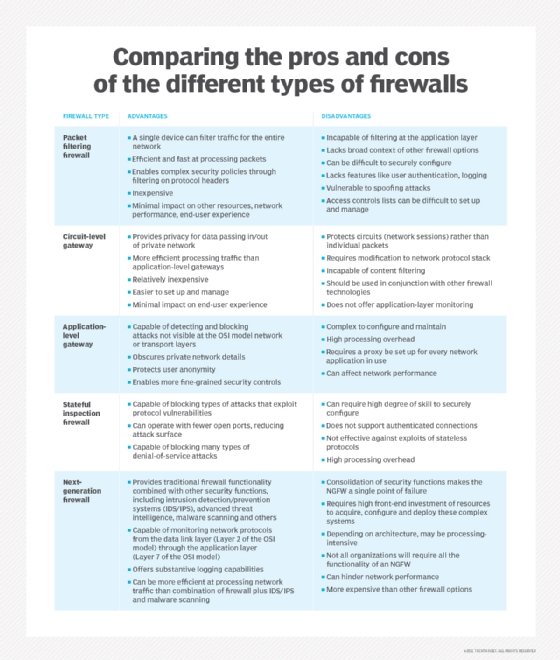
Types of firewalls
Firewalls are either categorized by the way they filter data or by the system they protect.
When categorized by what they protect, the two types are network-based and host-based. Network-based firewalls guard entire networks and are often hardware. Host-based firewalls guard individual devices -- known as hosts -- and are often software.
When categorizing by filtering method, the main types are as follows:
- Packet-filtering firewalls examine data packets in isolation and don't know the packet's context.
- Stateful inspection firewalls examine network traffic to determine whether one packet is related to another packet.
- Circuit-level gateway firewalls provide security by monitoring TCP handshaking between packets from trusted clients or servers to untrusted hosts and vice versa.
- Proxy firewalls, or application-level gateways, inspect packets at the application layer of the Open Systems Interconnection (OSI) reference model.
- Next-generation firewalls (NGFWs) use a multilayered approach to integrate enterprise firewall capabilities with an IPS and application control.
- Threat-focused NGFWs combine traditional firewall technology with enhanced functionality to thwart modern threats, including application layer and advanced malware attacks.
- Virtual firewalls, or cloud firewalls, provide traffic filtering and monitoring for virtual machines (VMs) in a virtualized environment.
- Cloud-native firewalls provide automated scaling features that enable networking and security operations teams to run at fast speeds.
Each type of firewall in the list above examines traffic with a higher level of context than the one before; for example, a stateful firewall has more context than a packet-filtering firewall.
Packet-filtering and network layer firewalls
When a packet passes through a packet-filtering firewall, its source and destination address, protocol and destination port number are checked. The packet is dropped, meaning it isn't forwarded to its destination if it doesn't comply with the firewall's rule set. For example, if a firewall is configured with a rule to block Telnet access, then the firewall drops packets destined for TCP port number 23, the port where a Telnet server application would be listening.
A packet-filtering firewall works mainly on the network layer of the OSI reference model, although the transport layer is used to obtain the source and destination port numbers. It examines each packet independently and doesn't know whether any given packet is part of an existing stream of traffic.
The packet-filtering firewall is effective, but because it processes each packet in isolation, it can be vulnerable to IP spoofing attacks and has largely been replaced by stateful inspection firewalls.
Stateful inspection firewalls
Stateful inspection firewalls -- also known as dynamic packet-filtering firewalls -- monitor communication packets over time and examine both incoming and outgoing packets.
This type of firewall maintains a table that keeps track of all open connections. When a new packet arrives, it compares information in the packet header to the state table -- its list of valid connections -- and determines whether the packet is part of an established connection. If it is, the packet is let through without further analysis. But, if the packet doesn't match an existing connection, it's evaluated according to the rule set for new connections.
Although stateful inspection firewalls are quite effective, they can be vulnerable to denial of service (DoS) attacks. DoS attacks take advantage of established connections that this type of firewall generally assumes are safe.
Circuit-level gateway firewalls
When a trusted client or server sends a packet to an untrusted host and vice versa, a circuit-level gateway firewall examines the TCP handshaking between the two packets. It controls network traffic at the session level and keeps track of the OSI model's session layer. Instead of examining the content of the packets, this firewall inspects the protocol headers of the packets to determine if a session is legitimate.
Whenever a circuit-level gateway firewall receives a request from a trusted client or server to connect to an untrusted host, it starts a three-way handshake with the destination host for establishing a session. It then forwards the packets between the two hosts without further inspecting the content of the packets.
This type of firewall can provide a higher level of security than packet-filtering firewalls because it can detect and prevent certain attacks, such as port scanning and DoS attacks. However, because it doesn't examine the packet content, a circuit-level gateway firewall can't offer the same level of security as an application layer firewall.
Application layer and proxy firewalls
This type of firewall is referred to as a proxy-based or reverse-proxy firewall. They provide application layer filtering and can examine the payload of a packet to distinguish valid requests from malicious code disguised as a valid request for data. As attacks against web servers became more prevalent, so did the need for firewalls to protect networks from attacks at the application layer. Packet-filtering and stateful inspection firewalls can't do this at the application layer.
Since this type of firewall examines the payload's content, it gives security engineers more granular control over network traffic. For example, it can allow or deny a specific incoming Telnet command from a particular user, whereas other types of firewalls can only control general incoming requests from a particular host.
When this type of firewall lives on a proxy server -- making it a proxy firewall -- it becomes harder for an attacker to discover where the network is and creates yet another layer of security. Both the client and the server are forced to conduct the session through an intermediary -- the proxy server that hosts an application layer firewall. Each time an external client requests a connection to an internal network server or vice versa, the client opens a connection with the proxy instead. If the connection request meets the criteria in the firewall rule base, the proxy firewall opens the connection.
The key benefit of application layer filtering is the ability to block specific content, such as known malware or certain websites, and recognize when certain applications and protocols, such as Hypertext Transfer Protocol, File Transfer Protocol and domain name system, are being misused. Application layer firewall rules can also be used to control the execution of files or the handling of data by specific applications.
Next-generation firewalls
This type of firewall is a combination of the other types with additional security software and devices bundled in. The benefit of an NGFW is that it combines the strengths of each type of firewall to cover each type's weaknesses. An NGFW is often a bundle of technologies under one name, as opposed to a single component.
Modern network perimeters have so many entry points and different types of users that stronger access control and security at the host are required. This need for a multilayer approach led to the emergence of NGFWs.
An NGFW integrates three key assets: traditional firewall capabilities, application awareness and an IPS. Similar to the introduction of stateful inspection to first-generation firewalls, NGFWs bring additional context to the firewall's decision-making process.
NGFWs combine the capabilities of traditional enterprise firewalls, including network address translation, URL blocking and VPNs, with quality of service functionality and features not traditionally found in first-generation products. NGFWs support intent-based networking by including Secure Sockets Layer and Secure Shell inspection and reputation-based malware detection. NGFWs also use deep packet inspection (DPI) to check the contents of packets and prevent malware.
When an NGFW, or any firewall, is used in conjunction with other devices, it's termed unified threat management.
Virtual firewalls
A virtual firewall runs entirely within a virtualized environment and provides the same security and inspection capabilities as a hardware firewall.
It monitors and inspects network traffic between VMs and between VMs and the outside world. The firewall is situated between the VMs and the hypervisor that provides the virtualization layer and inspects traffic at the network layer to determine whether to allow or block packets based on a set of predefined rules.
Virtual firewalls can filter traffic based on IP address, ports, protocols and other factors and provide the same security and inspection capabilities as physical firewalls. Some virtual firewalls also offer security capabilities, including application-level security, intrusion detection and intrusion prevention. SonicWall NSv Series and Juniper vSRX Virtual Firewall are examples of virtual firewalls.
Cloud-native firewalls
A cloud-native firewall is a type of virtual firewall that's specifically designed to operate within a cloud-based infrastructure. It's a network firewall security system that provides traffic filtering and monitoring for VMs and containers running in a cloud environment.
Cloud-native firewalls provide the same security and inspection capabilities as traditional virtual firewalls but are optimized for the dynamic and scalable nature of cloud-based environments. They're designed to integrate with cloud orchestration platforms, such as Kubernetes, and provide automated security policy enforcement across a large number of cloud resources.
Vulnerabilities
Less advanced firewalls -- packet-filtering firewalls, for example -- are vulnerable to higher-level attacks because they don't use DPI to fully examine packets. NGFWs were introduced to address that vulnerability. But NGFWs still face challenges and are vulnerable to evolving threats. For this reason, organizations should pair them with other security components, such as intrusion detection systems and intrusion prevention systems. Examples of modern threats that a firewall can be vulnerable to include the following:
- Insider attacks. Organizations can use an internal firewall on top of a perimeter firewall to segment the network and provide internal protection. If an attack is suspected, organizations can audit sensitive data using NGFW features. All the audits should measure up to baseline documentation within the organization that outlines best practices for using the organization's network. Examples of behavior that might indicate an insider threat include the following:
- Transmission of sensitive data in plain text.
- Resource access outside of business hours.
- Sensitive resource access failure by the user.
- Third-party users accessing network resources.
- Distributed DoS (DDoS) attacks. A DDoS attack is a malicious attempt to disrupt the normal traffic of a targeted network by overwhelming the target or its surrounding infrastructure with a flood of traffic. It uses multiple compromised computer systems as sources of attack traffic. Exploited machines can include computers and other networked resources, such as internet of things (IoT) devices. A DDoS attack is similar to a traffic jam preventing regular traffic from arriving at its destination. The key concern in mitigating a DDoS attack is differentiating between the attack and normal traffic. Many times, the traffic in this attack type can come from seemingly legitimate sources and requires cross-checking and auditing from several security components.
- Malware. Malware threats are varied, complex and constantly evolving alongside security technology and the networks it protects. As networks become more complex and dynamic with the rise of IoT, it becomes more difficult for firewalls to defend them.
- Patching and configuration. A poorly configured firewall or a missed vendor update can be detrimental to network security. IT admins should be proactive in maintaining their security components.
Firewall vendors
Enterprises looking to purchase a firewall should understand their needs and network architecture. There are many different types of firewalls, features and vendors, including the following NGFW vendors:
- Barracuda CloudGen Firewall provides advanced threat protection designed for hybrid cloud environments.
- Cisco Firepower Series offers malware detection, an IPS, URL filtering and other cloud-native firewall options built on Kubernetes.
- Fortinet FortiGate offers intrusion protection and other AI-powered services designed for smaller organizations, as well as enterprise data centers.
- Palo Alto Networks PA Series provides machine learning-based threat detection and intrusion. It offers options for small and medium-sized businesses, large enterprises and managed service providers.
- SonicWall Network Security appliance Series offers advanced threat protection, as well as URL filtering, malware detection and intrusion protection.
- Sophos XG Series offers threat intelligence, intrusion prevention and web application firewall protection for SaaS, software-defined wide area networks and cloud traffic.
Firewall best practices
The following are some common firewall best practices that most organizations should follow:
- Block all traffic by default, and only permit specific traffic.
- Follow the principle of least privilege, and grant users only the minimal level of access required to complete their duties.
- Perform regular security audits to check for any vulnerabilities.
- Administer firewall change control to manage and track changes to firewall rules.
- Keep the firewall software current to ensure it can detect and block any new threats.
- Optimize firewall rules to reduce unnecessary processing and boost performance.
Controversial uses of firewalls
By restricting access to particular websites or content based on political or ideological goals, as in the case of government censorship, firewalls can be used for control or other unethical ends. The Great Firewall of China is an example of how firewalls can be used for ethically questionable purposes. The Chinese government uses the Great Firewall to block access to specific websites and restrict access to content deemed politically or socially sensitive. The Great Firewall also monitors online activity and collects personal information, leading to concerns about privacy and individual freedoms.
Some companies have also come under scrutiny for using firewalls to restrict access to lawful websites for employees or to keep tabs on their online activities.
Typically, DPI features of firewalls can be used to monitor online activity and collect personal information to infringe on the privacy and personal freedom of internet users.
Future of network security
In the early days of the internet, when AT&T's Steven M. Bellovin first used the firewall metaphor, network traffic primarily flowed north-south. This simply means that most of the traffic in a data center flowed from client to server and server to client. In the past few years, however, virtualization and trends such as converged infrastructure have created more east-west traffic, which means that, sometimes, the largest volume of traffic in a data center is moving from server to server. To deal with this change, some enterprises have migrated from the traditional three-layer data center architecture to various forms of leaf-spine architecture. This change in architecture has caused some security experts to warn that, while firewalls still have an important role to play in keeping a network secure, they risk becoming less effective. Some experts even predict a departure from the client-server model altogether.
The following are some emerging trends in network security worth exploring:
- Software-defined perimeter (SDP). The use of an SDP is more aptly suited to virtual and cloud-based architectures because it has less latency than a firewall. It also works better within increasingly identity-centric security models because it focuses on securing user access rather than IP address-based access. An SDP is based on a zero-trust framework.
- Secure Access Service Edge (SASE). SASE is becoming increasingly important for protecting networks against new and evolving threats.
- Firewall as a service (FWaaS). NGFWs that reside in the cloud continue to gain popularity as they examine traffic for remote employees and servers, while using standard cloud service advantages, such as ready scalability and flexibility.
- Zero-trust policy. The zero-rust policy assumes that all access requests are potentially malicious and that access is only granted on an as-needed basis. The zero-trust approach is critical to network security going forward.
- Artificial intelligence (AI) and automation. AI and automation are likely to play a greater role in network security, both in terms of threat detection and response.
As the cybersecurity landscape continues to evolve, organizations need to stay proactive in adopting innovative services for mitigating threats and ensuring network security.
Given the wide variety of firewalls available on the market, it can be overwhelming to differentiate between them. Explore the distinctions and similarities between the five basic categories of firewalls.