ping

What is a ping?
A ping (Packet Internet or Inter-Network Groper) is a basic Internet program that allows a user to test and verify if a particular destination IP address exists and can accept requests in computer network administration. The acronym was contrived to match the submariners' term for the sound of a returned sonar pulse.
Ping is also used diagnostically to ensure that a host computer the user is trying to reach is operating. Any operating system (OS) with networking capability, including most embedded network administration software, can use ping.
For example, to find the dot address, such as 205.245.172.72, for any given domain name, Windows users can go to the command prompt screen (start/run/cmd) and enter ping xxxxx.yyy, where xxxxx is the second-level domain name, like "whatis," and yyy is the top-level domain name, like "com."
Ping on a speed test
The term is also used to test and determine how fast a data signal travels from one place, like a computer, to another, like a website. Ping is also used to troubleshoot and test connectivity and determine response time.
How does ping work?
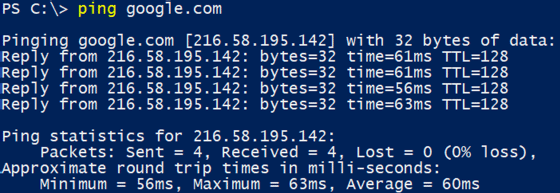
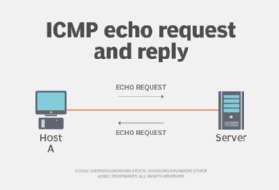
Ping works by sending an Internet Control Message Protocol (ICMP) Echo Request to a specified interface on the network and waiting for a reply. When a ping command is issued, a ping signal is sent to a specified address. When the target host receives the echo request, it responds by sending an echo reply packet.
This approach serves two specific purposes: verifying that the target host is available and determining round-trip time (RTT) or latency.
RTT is a measure of how long it took to receive a response. Measured in milliseconds (ms), the process starts when a browser sends a request to a server and is completed when a response from the server is received. RTT is a key performance metric of web applications.
By default, ping commands send multiple requests -- usually four or five -- and display the results. The echo ping results show whether a particular request received a successful response. It also includes the number of bytes received and the time it took to receive a reply or the time-to-live.
How to use ping in troubleshooting?
Echo requests and echo responses form the standard for troubleshooting ICMP messages. Virtually every OS with network support includes ping for troubleshooting purposes. However, the exact implementation varies slightly among manufacturers.
Ping is the cornerstone of standard network troubleshooting. For example, an IP address can be pinged by typing in 172.168.9.13. If the ping is successful, it means that it is on, and the two machines can talk to each other.
However, if the ping is successful but the response time is long, it indicates network congestion, routing or speed issues. Even pings that are unsuccessful offer valuable troubleshooting information. When it comes to network speed tests, ping is the standard.
At its most basic, ping can run with just a ping command and a destination, such as the name or address of a remote host. Since ping is used as a command-line utility, it is easy to use in a variety of scripts. An administrator can run multiple pings, record how they were used and place the output of ping commands into a text file for later review.
What is ping spoofing?
In network security, ping spoofing involves threat actors who send fake information to a server. When this happens, the false data appears, acts like the original data packets and is transmitted to the server.
The receiver gets fake data and responds to the data packet with a third-party user instead of the original sender. On the receiver side, the server may receive unrequested data from the different address.
This helps hide the actual third-party user's address. Ping spoofing is difficult to detect.
What is ping in gaming?
Ping is also useful for online gaming. It measures the time it takes for the signal to transmit from a computer or console to a server.
Measured in milliseconds, a ping rate over 150 ms generates noticeable lag that impacts gameplay. Professional gamers consider a ping rate under 50 ms to be ideal.
Ping in Discord
In Discord -- a chat and video app used mostly by gamers -- a ping is a notification, most often on a smartphone or personal computer. When someone sends a ping, it pops up on the phone screen or desktop application.