
animind - Fotolia
Bridge vs. switch comparison: What's the difference?
A network bridge connects two local area networks. A network switch, on the other hand, connects multiple clients to a network. Learn more about these two network components.

Network bridges and switches are distinctly different, serving separate functions. A bridge is a point-to-point connection joining two LANs using the same protocol, such as Ethernet. A switch is a multiport bridge that connects multiple clients and chooses the packet path on the network.
Every switch is a bridge, but bridges are not truly switches. For a deeper understanding of a network bridge vs. switch, here is a comparison of the two.
What is a bridge?
A bridge decides whether a message destination is in the LAN or on a connected network. A bridge examines each packet on a LAN, transmitting packets known to be within the same LAN and forwarding packets known to be on the other interconnected LAN, or LANs.
In a bridged network, computer or node addresses have no specific relationship to location, and messages are sent to every network address and accepted only by the intended destination node. Bridges learn which destination addresses are on which network, developing a learning table to forward subsequent messages to the right network.
Bridged networks are usually interconnected LANs since broadcasting every message to all possible destinations would flood a larger network with unnecessary traffic. For this reason, router networks -- such as the internet -- use a scheme that assigns addresses to nodes so a message or packet can be forwarded only in one general direction rather than forwarded in all directions.
What is a switch?
This video looks at the differences among a network
hub, bridge and switch.
A switch is a network device that selects a path or circuit for sending a packet to its next destination. Some switches have a router function that can determine the route and, specifically, to which adjacent network point the data should be sent. In general, a switch is a simpler and faster mechanism than a router, which requires knowledge about the network and how to determine the route.
The trip from one switch point to another in the network is called a hop, and latency is how long that hop takes. Switches are found at the backbone and gateway levels of a network, where one network connects with another, and at the subnetwork level, where data is forwarded close to its destination or origin.
Large networks tier their switches for efficiency with core switches in the center, aggregation switches at the end of server rows and access switches at the top of racks. Desktop switches are typically used in homes or smaller businesses.
As switch prices have fallen, Ethernet switches -- Layers 2 and 3 -- have mainly replaced the old Ethernet hubs, as hubs were essentially only Layer 1 repeaters.
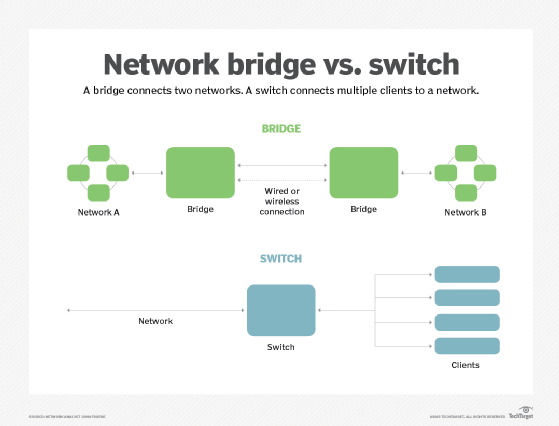
Bridge vs. switch comparison
Bridges connect two networks. Switches connect multiple clients to a network.
Bridges operate at Layer 2 of the OSI communication model. Switches operate at Layer 2, the data-link layer, or Layer 3, the network layer. Layer 3 switches are sometimes called IP switches or routing switches.
A wireless access point is a specialized bridge, creating a link between a wired and wireless network; often, these will incorporate switches for wired clients.