DHCP (Dynamic Host Configuration Protocol)

What is DHCP (Dynamic Host Configuration Protocol)?
DHCP (Dynamic Host Configuration Protocol) is a network management protocol used to dynamically assign an IP address to any device, or node, on a network so it can communicate using IP. DHCP automates and centrally manages these configurations rather than requiring network administrators to manually assign IP addresses to all network devices. DHCP can be implemented on small local networks, as well as large enterprise networks.
DHCP assigns new IP addresses in each location when devices are moved from place to place, which means network administrators do not have to manually configure each device with a valid IP address or reconfigure the device with a new IP address if it moves to a new location on the network.
Versions of DHCP are available for use in IP version 4 (IPv4) and IP version 6 (IPv6). IPv6 became an industry standard in 2017 -- nearly 20 years after its specifications were first published. While the adoption rate of IPv6 was slow, more than 29% of Google users were making inquiries using IPv6 by July 2019.
How DHCP works
DHCP runs at the application layer of the TCP/IP stack. It dynamically assigns IP addresses to DHCP clients and allocates TCP/IP configuration information to DHCP clients. This information includes subnet mask information, default gateway IP addresses and domain name system (DNS) addresses.
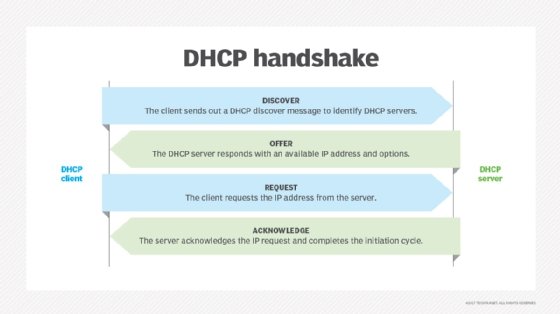
DHCP is a client-server protocol in which servers manage a pool of unique IP addresses, as well as information about client configuration parameters. The servers then assign addresses out of those address pools. DHCP-enabled clients send a request to the DHCP server whenever they connect to a network.
Clients configured with DHCP broadcast a request to the DHCP server and request network configuration information for the local network to which they're attached. A client typically broadcasts a query for this information immediately after booting up. The DHCP server responds to the client request by providing IP configuration information previously specified by a network administrator. This includes a specific IP address, as well as a time period -- also called a lease -- for which the allocation is valid.
When refreshing an address assignment, a DHCP client requests the same parameters, but the DHCP server may assign a new IP address based on policies set by administrators. DHCP clients can also be configured on an Ethernet interface.
A DHCP server manages a record of all the IP addresses it allocates to network nodes. If a node is relocated in the network, the server identifies it using its media access control (MAC) address, which prevents the accidental configuration of multiple devices with the same IP address. Configuring a DHCP server also requires the creation of a configuration file, which stores network information for clients.
DHCP is not a routable protocol, nor is it a secure one. DHCP is limited to a specific local area network, which means a single DHCP server per LAN is adequate -- or two servers for use in case of a failover. Larger networks might have a wide area network (WAN) that contains multiple individual locations. Depending on the connections between these points and the number of clients in each location, multiple DHCP servers can be set up to handle the distribution of addresses.
If network administrators want a DHCP server to provide addressing to multiple subnets on a given network, they must configure DHCP relay services located on interconnecting routers that DHCP requests have to cross. These agents relay messages between DHCP clients and servers located on different subnets.
DHCP lacks any built-in mechanism that enables clients and servers to authenticate each other. Both are vulnerable to deception -- one computer pretending to be another -- and to attack, where rogue clients can exhaust a DHCP server's IP address pool.
When managing many DHCP servers or DHCP servers in a WAN, users can work with a command line. Users should also be aware that starting, stopping and restarting affects the running of the daemon.
Components of DHCP
DHCP is made up of numerous components, such as the DHCP server, client and relay.
The DHCP server -- typically either a server or router -- is a networked device that runs on the DHCP service. The DHCP server holds IP addresses, as well as related information pertaining to configuration.
The DHCP client is a device -- such as a computer or phone -- that connects to a network and communicates with a DHCP server.
The DHCP relay manages requests between DHCP clients and servers. Typically, relays are used when an organization has to handle large or complex networks.
Other components include the IP address pool, subnet, lease and DHCP communications protocol.
Static vs. dynamic DHCP leases
With dynamic DHCP, a client does not own the IP address assigned to it but instead leases it for a period of time. Each time a device with a dynamic IP address is powered up, it must communicate with the DHCP server to lease another IP address. Wireless devices are examples of clients that are assigned dynamic IP addresses when they connect to a network.
On the other hand, static devices -- such as web servers and switches -- are assigned permanent IP addresses.
Under a dynamic DHCP setup, a client might also have to perform certain activities that lead to terminating its IP address and then reconnecting to the network using a different IP address. DHCP lease times can vary depending on how long a user is likely to need an internet connection at a particular location. Devices release their IP addresses when their DHCP leases expire and then request a renewal from the DHCP server if they are staying online. The DHCP server may assign a new address rather than renewing an old one.
The typical dynamic DHCP lease cycle is as follows:
- A client acquires an IP address lease through the allocation process of requesting one from the DHCP server.
- If a client already has an IP address from an existing lease, it needs to refresh its IP address when it reboots after being shut down and contact the DHCP server to have an IP address reallocated.
- Once a lease is active, the client is bound to the lease and to the address.
- Once the lease has expired, a client contacts the server that initially granted the lease to renew it so it can keep using its IP address.
- If a client is moving to a different network, its dynamic IP address is terminated, and it requests a new IP address from the DHCP server of the new network.
DHCP uses and functions
DHCP is used to distribute IP addresses within a network and to configure the proper subnet mask, default gateway and DNS server information on the device.
DHCP, including Request for Comments (RFC) 8415 -- the draft version released in November 2018 -- can also be used by ordinary electronic devices whose manufacturers want them to be part of the internet of things (IoT). DHCP is one method of connecting devices -- such as refrigerators and lawn sprinkler systems -- to the internet using a Manufacturer Usage Description (MUD), suggested by the Internet Engineering Task Force (IETF).
Pros and cons of DHCP
DHCP makes it easier for network administrators to add or move devices within a network, whether it be a LAN or WAN. But DHCP is not inherently secure, and if malicious actors access the DHCP server, they can wreak havoc. Also, if the DHCP server does not have a backup and the server fails, so do the devices served by it.
DHCP security
One of the key vulnerabilities of DHCP has been the use of so-called man in the middle (MitM) attacks, in which an attacker secretly intercepts and relays messages between two parties who believe they are communicating directly with each other.
DHCP servers have also been the subject of multiple memory corruption vulnerabilities. In these, attackers have targeted the Windows DHCP Server service. When successful, the attacks can lead to a full compromise of Microsoft Active Directory (AD). One such vulnerability, patched by Microsoft, was the Common Vulnerabilities and Exposures (CVE)-2019-0725 Windows DHCP Server Remote Code Execution (RCE) Vulnerability.
History of DHCP
DHCP is an extension of a 1985 network IP management protocol, Bootstrap Protocol (BOOTP). DHCP is more advanced, and DHCP servers can handle BOOTP client requests if any BOOTP clients exist on a network segment.
Using one central BOOTP server to serve hosts on many IP subnets, BOOTP introduced the concept of a relay agent that enabled BOOTP packets to be forwarded across networks. BOOTP required a manual process to add configuration information for each client, however, and did not provide a mechanism for reclaiming IP addresses no longer in use.
Editor's note: This definition was republished to improve reader experience.