
marrakeshh - Fotolia
How to calculate network bandwidth requirements
Figuring out how to calculate bandwidth requirements is vital to ensuring your network runs smoothly, and it's best to use the correct formula from the beginning.

Bandwidth requirements vary from one network to another, and understanding how to calculate bandwidth properly is vital to building and maintaining a fast, functional network.
As most network administrators can attest, bandwidth is one of the more important factors in the design and maintenance of a functional LAN, WAN or wireless network. Unlike a server, which can be configured and reconfigured throughout the life of the network, bandwidth is a network design element usually optimized by figuring out the correct formula for your network from the outset.
Wondering how to calculate bandwidth requirements when designing the network? What specific considerations apply? The answers to these important questions follow.
Understanding bandwidth
The term bandwidth refers to the data rate supported by the network connection or the interfaces that connect to the network. It represents both volume and time, representing the amount of data that can be transmitted between two points in a set period of time. Data coming into the network is known as ingress traffic, and data leaving the network is called egress traffic. Bandwidth is usually expressed in terms of bits per second or, sometimes, in bytes per second.
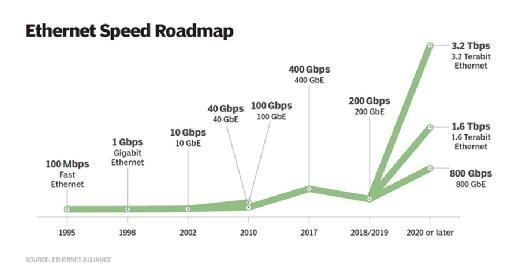
Network bandwidth represents the capacity of the network connection, though it's important to understand the distinction between theoretical throughput and real-world results when figuring out the right bandwidth formula for your network. For example, a 1000BASE-T -- which uses unshielded twisted pair cables -- Gigabit Ethernet (GbE) network can theoretically support 1,000 Mbps, but this level can never be achieved in practice due to hardware and systems software overhead.
Bandwidth vs. speed: 2 different measurements
One point to consider when thinking about how to calculate bandwidth needs on your network is this: Bandwidth should not be confused with throughput, which refers to speed. While high-bandwidth networks are often fast, that is not always the case.
A helpful metaphor when thinking about bandwidth is cars on a highway:
- A high-bandwidth network is like a six-lane highway that can fit hundreds of cars at any given moment.
- A low-bandwidth network is like a single-lane road in which one car drives directly behind another.
Although the large highway is likely to move vehicles faster, rush-hour traffic can easily bring cars and trucks to a standstill. Or, perhaps, cars can't get onto the highway quickly because it's clogged with large delivery trucks that take up a lot of space on the road. Similarly, even a high-bandwidth network can run slowly in the face of problems, such as congestion and bandwidth-hungry applications.
What happens if you miscalculate your bandwidth needs?
These points make calculating bandwidth allowances and requirements a challenge, yet the consequences of getting the bandwidth formula wrong are considerable. If you don't procure enough and hit your bandwidth limit, you all but guarantee the network will run slowly. Yet, significantly overprovisioning bandwidth can be cost-prohibitive for most enterprises.
So, how do you determine the right formula that will meet your bandwidth requirements? The process begins with asking the right questions: What applications are users running, and what is the performance service-level agreement for these applications? Some network managers are only concerned with how many users are on a virtual LAN. But, to determine actual bandwidth usage, what you need to know is what the users will be doing on the network.
It's possible that 200 users will cause less of a bottleneck than a group of three users who really beat the heck out of the network because of a funky client-server application or extensive use of a bandwidth-heavy service, like high-definition video conferencing.
Coming up with a formula for how to calculate bandwidth
Calculating bandwidth requirements has two basic steps:
- Determine the amount of available network bandwidth.
- Determine the average utilization required by the specific application.
Both of these figures should be expressed in bytes per second. Consider the following formula: A 1 GbE network has 125 million Bps of available bandwidth. This is computed by taking the amount of bits -- in a 1 GbE network, that would be 1 billion -- and dividing that by eight to determine the bytes:
1,000,000,000 bps / 8 = 125,000,000 Bps
After determining the network's bandwidth, assess how much bandwidth each application is using. You can use a network analyzer to detect the number of bytes per second the application sends across the network.
To do this, follow these steps:
- Enable the cumulative bytes column of your network analyzer.
- Capture traffic to and from a test workstation running the application.
- In the decode summary window, mark the packets at the beginning of the file transfer.
- Follow the timestamp down to one second later, and then look at the cumulative bytes field.
How to interpret the results of your bandwidth calculations
If you determine that your application is transferring data at 200,000 Bps, then you have the information to perform the calculation: 125,000,000 Bps / 200,000 Bps = 625 concurrent users. In this case, the network will be fine even with several hundred concurrent users.
Look what would happen, though, if you had a 100 Mbps network: 13,102,000 Bps / 200,000 Bps = 65.51 concurrent users. You would then have a network that couldn't support more than approximately 65 users running the application concurrently. Knowing the formula to calculate bandwidth is extremely important to network administrators.
Here are some final recommendations:
- Capture the data in 10-second spurts, and then do the division.
- Check multiple workstations to ensure the number is reflective of the general population.
- Determine how many concurrent users you will have.