wireless access point

What is a wireless access point?
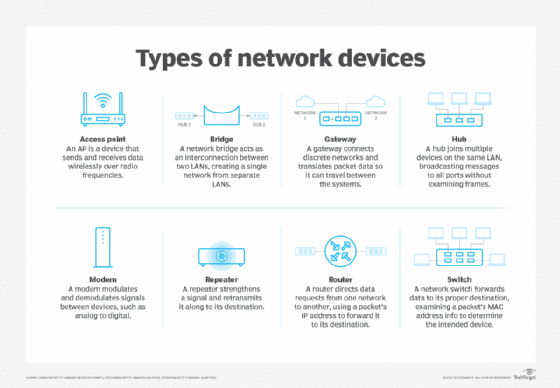
A wireless access point (wireless AP) is a network device that transmits and receives data over a wireless local area network (WLAN), serving as the interconnection point between the WLAN and a fixed wire network. Conceptually, an AP is like an Ethernet hub, but instead of relaying LAN frames only to other 802.3 stations, an AP relays 802.11 frames to all other 802.11 or 802.3 stations in the same subnet. When a wireless device moves beyond the range of one AP, it is handed over to the next AP.
Wireless access point vs. wireless router
Typically, wireless routers are used in homes and small businesses where all users can be supported by one combined AP and router to provide internet access to wireless capable devices. Wireless APs are traditionally used in larger businesses and venues where many APs are required to provide an internet connection to support thousands of users. The number of access points needed will increase depending on the number of network users and the physical size of the network.
Wireless access point vs. Wi-Fi extender
Wireless APs are traditionally used in larger businesses and venues where many APs are required to provide service to support thousands of users with devices connected to the network. Gone are the days of a wired router and Ethernet cable in the home office -- APs are entering the home office market for large homes, and some people use them to provide Wi-Fi to their outside property. A Wi-Fi extender repeats the signal from your router and expands internet coverage by creating a second network. An extender is a more common tool for extending home office networks, as it can only support a limited number of devices at a time.
What are wireless access points used for?
Use cases for APs have continued to grow in recent years. Developments such as the increasing popularity of remote work have led to the following use cases:
- Hybrid work is driving the demand for next-generation APs as organizations redesign their offices into more flexible collaborative workspaces. These spaces require Wi-Fi access that can scale up and down depending on how many employees are in the office on a given day.
- Restaurants and more public spaces can use APs to extend their wireless signal to reach more guests.
- Venues such as open-air shopping centers can add APs as an amenity to attract remote and hybrid workers to come there and work for the day and spend money in their stores.
- Remote workers who have large homes or even want to work outside in their backyard are now a new AP market.
- Condominium and apartment buildings can implement APs as part of a broadband internet access amenity to offer residents and visitors for free or as part of their fees or rent.
Common access point configurations
Vendors have made huge inroads to make AP configuration easier, such as through mobile app interfaces and APIs that enable integration with other network management platforms. Some common configurations that IT and users must set on their APs include security protocol, legacy device support and service set identifier (SSID) support.
Security protocol
Security protocol should be set to meet the requirements set by an organization's cybersecurity team for its facility networks and remote worker home offices. WPA2 is a common standard in use today on corporate and home APs. While WPA2 has vulnerabilities, it is a marked improvement over previous protocols such as WPA, WEP and EAP.
Legacy device support
IT professionals should be prepared to set their APs to support legacy devices if necessary, such as if their organization supports BYOD and some of the hybrid workforce may not be using the latest mobile devices.
SSID support
When configuring corporate and remote home office APs, users should limit SSID support to no more than five networks to conserve airtime utilization. The same rule applies to remote workers who want to use an AP to segment a network for work, home and smart home devices. Too many SSIDs consume more airtime, limiting the amount of data transmission over the networks that the AP supports and hindering capacity and scalability as hybrid teams meet in their offices.
Benefits of wireless access points
Hybrid work has helped illustrate the benefits of wireless APs over a wired LAN to even more enterprises and end users. These benefits include the following:
- They offer support for up to hundreds of wireless connections accessing the internet because of their much stronger ability to send, receive and manage signals. This makes wireless APs ideal for use cases with high usage rates. Such efficiency is a requirement for serving large areas such as office floors and outdoor areas that a wired LAN can't adequately support.
- APs can cover up to 300 meters of space, so they don't suffer from having traditional Wi-Fi coverage blind spots such as in basements and near elevators, where internet coverage typically drops.
- They enable outdoor Wi-Fi for office building courtyards, restaurants and places such as community pools to serve the work-from-anywhere crowd.
- They offer flexible networking modes including wireless client, wireless bridge and multipoint bridge to support a variety of wireless use cases for hybrid and remote work.
Limitations of wireless access points
As with any technology, wireless access points have limitations, including the following:
- AP pricing has been an often-mentioned limitation in recent years. However, as the technology matures, prices may come down, especially as the home office market becomes more demanding.
- Instability ranks as another AP limitation. When an AP connects to the internet, it uses air as a transmission medium -- not cables, which are seen as more manageable and easier to troubleshoot.
- Technical complexity in setting up and operating an AP can be a problem for small and medium-sized organizations that lack in-house networking expertise. Firmware updates on APs still require some technical chops, although this may improve in the future.
Purchasing a wireless access point
It's important to note that not all APs are alike, and not all products offer the same features and performance. Organizations should particularly consider the following features and capabilities:
- Nondisruptive scalability. APs should be supported transparently and be backward compatible.
- Dual Gigabit Ethernet ports. Every dual-radio AP should have two GbE ports.
- Support for dense deployments. Dense deployments require additional APs.
- Enhanced management functions. Management functions should improve productivity and total cost of ownership, as well as throughput and reliability.
History of wireless access points
The first 802.11 release was in 1997 and could only support data rates of up to 2 Mbps.
1999 saw the release of 802.11a and 802.11b APs, which took data rates to 11 Mbps and 54 Mbps, respectively. These advancements coincided with the growth of internet broadband in many U.S. markets, giving users the first taste of near-commercial-grade home office connectivity.
In 2003, 802.11g became available for APs with support for data rates up to 54 Mbps.
In 2009, 802.11n APs became available with support for a whopping 450 Mbps data rate. It also improved wireless network reliability and wireless transmissions.
In 2022, 802.11ax access points provide 802.11ac capabilities but can also tell an IoT client how long to sleep before reconnecting to the network. For example, it might tell a smart thermostat that doesn't generate a lot of traffic to shut off its radio for 23 hours, 59 minutes and 40 seconds, waking up just once daily to send a temperature and humidity update, before going back to sleep.
When comparing 802.11ax and 802.11ac, other significant developments include the following:
- the use of orthogonal frequency-division multiple access, which lets an AP service multiple wireless clients at different bandwidth requirements simultaneously;
- bidirectional improvements in multi-user MIMO radio processes; and
- a feature called basic service set (BSS) coloring, which deals with co-channel interference by adding a field to the wireless frame that overcomes issues associated with same-frequency cell coexistence.