bandwidth (network bandwidth)
What is network bandwidth?
Network bandwidth is a measurement indicating the maximum capacity of a wired or wireless communications link to transmit data over a network connection in a given amount of time. Typically, bandwidth is represented in the number of bits, kilobits, megabits or gigabits that can be transmitted in 1 second. Synonymous with capacity, bandwidth describes data transfer rate. Bandwidth is not a measure of network speed -- a common misconception.
How does bandwidth work?
The more bandwidth a data connection has, the more data it can send and receive at one time. In concept, bandwidth can be compared to the volume of water that can flow through a pipe. The wider the pipe's diameter, the more water can flow through it at one time. Bandwidth works on the same principle. The higher the capacity of the communication link, the more data can flow through it per second.
The cost of a network connection goes up as bandwidth increases. Thus, a 1 gigabit per second (Gbps) Dedicated Internet Access (DIA) link will be more expensive than one that can handle 250 megabits per second (Mbps) of throughput.
Bandwidth vs. speed
The terms bandwidth and speed are often used interchangeably but not correctly. The cause of the confusion may be due, in part, to advertisements by internet service providers (ISPs) that conflate the two by referring to greater speeds when they truly mean bandwidth.
Essentially, speed refers to the rate at which data can be transmitted, while the definition of bandwidth is the capacity for that speed. To use the water metaphor again, speed refers to how quickly water can be pushed through a pipe; bandwidth refers to the quantity of water that can be moved through the pipe over a set time frame.
Why bandwidth is important
Bandwidth is not an unlimited resource. In any given deployment location, such as a home or business, there is only so much capacity available. Sometimes, this is due to physical limitations of the network device, such as the router or modem, cabling or wireless frequencies being used. Other times, bandwidth is intentionally rate-limited by a network administrator or internet or wide area network (WAN) carrier.
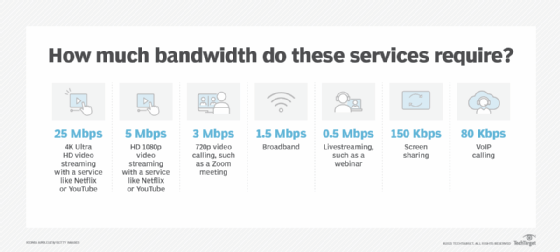
Multiple devices using the same connection must share bandwidth. Some devices, such as TVs that stream 4K video, are bandwidth hogs. In comparison, a webinar typically uses far less bandwidth. Although speed and bandwidth are not interchangeable, greater bandwidth is essential to maintain tolerable speeds on multiple devices. To help illustrate this, here's the average bandwidth consumed for various services:
How to measure bandwidth
While bandwidth is traditionally expressed in bits per second (bps), modern network links now have far greater capacity, which is why bandwidth is now more often expressed as Mbps or Gbps.
Bandwidth connections can be symmetrical, which means the data capacity is the same in both directions -- upload and download -- or asymmetrical, which means download and upload capacity are not equal. In asymmetrical connections, upload capacity is typically smaller than download capacity; this is common in consumer-grade internet broadband connections. Enterprise-grade WAN and DIA links more commonly have symmetrical bandwidth.
Considerations for calculating bandwidth
Technology advances have made some bandwidth calculations more complex, and they can depend on the type of network link being used. For example, optical fiber using different types of light waves and time-division multiplexing can transmit more data through a connection at one time compared to copper Ethernet alternatives, which effectively increases its bandwidth.
In mobile data networks, such as Long-Term Evolution, or LTE, and 5G, bandwidth is defined as the spectrum of frequencies that operators can license from the Federal Communications Commission and the National Telecommunications and Information Administration for use in the U.S. This spectrum cannot be legally used by anyone other than the business that owns the license to it. The carrier can then use wireless technologies to transport data across that spectrum to achieve the greatest bandwidth the hardware can provide.
Wi-Fi spectrum, on the other hand, is considered to be unlicensed. Thus, anyone with a Wi-Fi access point (AP) or Wi-Fi router can create a wireless network. The caveat is that the spectrum is not guaranteed to be available. Thus, Wi-Fi bandwidth can suffer when there are other Wi-Fi APs attempting to use some or all of the same frequencies.
Effective bandwidth -- which is the highest reliable transmission rate a link can provide on any given transport technology -- can be measured using a bandwidth test. During a bandwidth test, the link's capacity is determined by repeatedly measuring the time required for a specific file to leave its point of origin and successfully download at its destination.
After determining bandwidth consumption across the network, it is then necessary to see where applications and data reside and calculate their average bandwidth needs for each user and session.
To understand how much bandwidth a network uplink or internet broadband requires, follow these four steps:
- Determine which applications will be in use.
- Determine the bandwidth requirements of each application.
- Multiply the application requirements of each application by the number of expected simultaneous users.
- Add all application bandwidth numbers together.
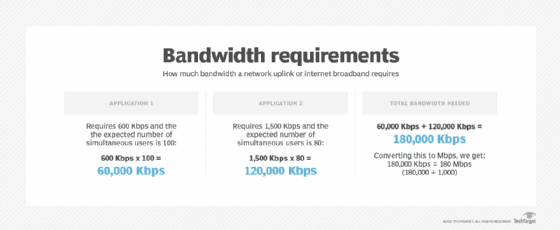
To determine bandwidth needs for public or private clouds across internet or WAN links, the same calculation applies. The difference, however, is that available bandwidth on a local area network or wireless LAN is typically far greater compared to WAN or DIA connections. Thus, accurately assessing bandwidth requirements is critical, as is monitoring link utilization over time. Monitoring the amount of bandwidth used throughout the day, week, month or year can help network engineers determine whether a WAN/DIA link has sufficient bandwidth -- or if a bandwidth upgrade is needed.
When there is insufficient bandwidth on a network, applications and services perform poorly.
Factors affecting network performance
The maximum capacity of a network connection is only one factor that affects network performance. Packet loss, latency and jitter can all degrade network throughput and make a high-capacity link perform like one with less available bandwidth.
An end-to-end network path usually consists of multiple connections, each with different bandwidth capacity. As a result, the link with the lowest bandwidth is often described as the bottleneck because it can limit the overall capacity of all connections in the path.
Many enterprise-grade networks are deployed with multiple aggregated links acting as a single logical connection. If, for example, a switch uplink uses four aggregated 1 Gbps connections, it has an effective throughput capacity of 4 Gbps. However, if two of those links were to fail, the bandwidth limit would drop to 2 Gbps.
Bandwidth on demand
Bandwidth for internet or WAN links is typically sold at a set price per month. However, bandwidth on demand -- also called dynamic bandwidth allocation or burstable bandwidth -- is an alternative model that enables subscribers to increase the amount of available bandwidth at specific times or for specific purposes. Bandwidth on demand is a technique that can provide additional capacity on a communications link to accommodate bursts in data traffic that temporarily require more bandwidth.
Rather than overprovisioning the network with expensive dedicated links year-round, bandwidth on demand is frequently used in WANs to increase capacity as needed for a special event or time of day when traffic is expected to spike. An online flower retailer, for example, may only need to increase its capacity in the weeks leading up to Mother's Day. Bandwidth on demand enables enterprises to only pay for the additional bandwidth they consume over a shorter period of time.
Bandwidth on demand is available through many internet and WAN service providers. Depending on the network link a customer currently has in use, a provider may be able to provision additional capacity on demand using the existing connection. For example, a 100 Mbps link might be able to burst up to 1 Gb because the service provider's connection has available capacity. If a customer needed more than the absolute maximum bandwidth available on that link, another physical connection would be required.
Occasionally, a service provider will enable customers to burst above their subscribed bandwidth cap without charging additional fees. However, if customers were to regularly sustain more than 100 Mbps using the burst feature, they are commonly billed by the service provider using 95th percentile calculations.
SD-WAN eases dedicated bandwidth capacity planning processes
Software-defined WAN (SD-WAN) technology can provide customers with extra capacity by balancing traffic across multiple WAN and DIA connections rather than a single connection. SD-WAN deployments often use a Multiprotocol Label Switching, or MPLS, connection or other types of dedicated transport links in combination with a lower-cost broadband internet or cellular connection.
How do you optimize and monitor bandwidth use?
Network engineers have several options available when a network link becomes congested. The most frequent choice is to increase bandwidth. This can be achieved by upgrading the physical throughput capabilities of the link or through port aggregation and load balancing to logically split traffic across multiple links. However, sometimes these techniques are not possible.
ISPs or network administrators may also intentionally adjust the speed -- up or down -- of data traveling over the network, a measure known as bandwidth throttling. There are different reasons for bandwidth throttling, including limiting network congestion, particularly on public access networks. ISPs may use throttling to reduce bandwidth use by a particular user or class of users. For example, with tiered pricing, a service provider can offer a menu of upload and download bandwidth. ISPs can also throttle bandwidth to even out usage across all users on the network.
The use of bandwidth throttling on the internet has been criticized by net neutrality advocates, who say that the practice can be misused for political or economic reasons and that it unfairly targets segments of the population.
A speed test can be run to see if an ISP is throttling bandwidth. Speed tests measure the speed between a device and a test server using a device's internet connection. ISPs offer speed tests on their own websites, and independent tests are also available from services such as Speedtest. Because many factors can affect the results of a speed test, it is generally recommended to perform multiple tests at different times of the day and engage different servers available through the speed test site. It is also recommended to conduct a speed test over a wired connection.
data transfer throttling intentionally restricts the amount of data sent or received over a network, particularly for the purposes of preventing spam or bulk email transmission through a server. It can be considered another form of bandwidth throttling. If it is implemented on a large enough scale, data transfer throttling can control the spread of computer viruses, worms or other malware through the internet.
Network bandwidth monitoring tools are available to help identify performance issues, such as a faulty router or a malware-infected computer that is participating in a distributed denial-of-service attack. As noted earlier, bandwidth monitoring can also help network administrators better plan for future network growth -- seeing where in the network bandwidth is most needed. Monitoring tools can also help administrators see if their ISP is fulfilling the service-level agreement in their contract.
Learn what network capacity planning best practices organizations are putting in place now as pandemic concerns begin to subside and more employees are returning to the office.
Continue Reading About bandwidth (network bandwidth)
Dig Deeper on Cloud and data center networking
-
![]()
5G and SD-WAN bring benefits to branch locations and beyond
By: Andrew Froehlich
-
![]()
Open Seas: Common file synchronisation issues in today’s hybrid world
By: Adrian Bridgwater
-
![]()
5G for WWAN interest grows as enterprises go wireless-first
By: Deanna Darah
-
![]()
How enterprise networks use WAN virtualization
By: John Burke