wireless ad hoc network (WANET)
What is a wireless ad hoc network (WANET)?
A wireless ad hoc network (WANET) is a type of local area network (LAN) that is built spontaneously to enable two or more wireless devices to be connected to each other without requiring typical network infrastructure equipment, such as a wireless router or access point.
In most cases, a PC, laptop or smartphone Wi-Fi interface is used to build an ad hoc network (Figure 1). In other situations, devices such as wireless sensors are designed to work primarily in an ad hoc mode.
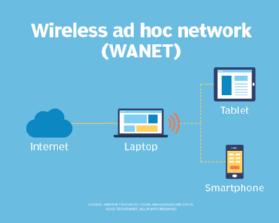
Because the devices in the ad hoc network can access each other's resources directly through basic peer-to-peer (P2P) or point-to-multipoint modes, central servers are unnecessary for functions such as file sharing or printing. In a WANET, a collection of devices, or nodes -- such as a wireless-capable PC or smartphone -- is responsible for network operations, such as routing, security, addressing and key management.
How does an ad hoc network work?
Devices configured for ad hoc functionality require a wireless network adapter or chip, and they need to be able to act as a wireless router when connected. When setting up a wireless ad hoc network, each wireless adapter must be configured for ad hoc mode instead of infrastructure mode. All wireless devices connecting to an ad hoc device need to use the same service set identifier (SSID) and wireless frequency channel number.
Instead of relying on a wireless base station, such as a wireless access point (WAP) or Wi-Fi router, an ad hoc device takes on this role and coordinates the flow of messages to each node in the network. The individual wireless endpoints connected to an ad hoc network forward packets to and from each other. Makeshift by nature, ad hoc wireless networks are most useful when wireless infrastructure isn't available -- for example, if there aren't any access points or routers within range and cabling cannot extend to reach the location where additional wireless communication is needed.
It's important to note that not all ad hoc networks are built using a PC or smartphone. In fact, Wi-Fi access points can be configured to work in either ad hoc or infrastructure mode as well. Typically, Wi-Fi networks configured for infrastructure mode are created and managed using equipment such as Wi-Fi routers or a combination of WAPs and wireless controllers that provide the necessary network intelligence. Ad hoc networks are also commonly set up to provide temporary wireless network access created by a computer or smartphone. The use of more sophisticated network protocols and network services found on infrastructure-based wireless networks, such as IEEE 802.1x authentication, usually are not suitable or necessary for short-lived ad hoc networks.
When should you use an ad hoc wireless network?
Deciding when to employ ad hoc versus infrastructure mode depends on the use. For example, users who want a WAP to act as a permanent access point should choose infrastructure mode with an on-site or cloud-based wireless LAN (WLAN) controller. But ad hoc mode might be a good option for a user setting up a temporary wireless network between a small number of devices. A perfect example of this is to use a cellular-connected smartphone that is configured in Wi-Fi ad hoc mode so that Wi-Fi capable laptops can connect to the Wi-Fi ad hoc network to gain internet access over the smartphone's cellular internet link. This method bypasses any need for a WAP or WLAN controller.
Ad hoc networks require minimal configuration and can be deployed quickly, which makes them suitable for emergencies, such as natural disasters, military conflicts or when traveling. Thanks to the presence of dynamic and adaptive routing protocols, these networks can be configured quickly. These impromptu, on-demand networks are useful for putting together a small, inexpensive all-wireless LAN without the need for wireless infrastructure equipment. They also work well as temporary access to the internet if wireless access points or routers fail.
Types of ad hoc wireless networks
Types of WANETs vary by application need and use. Choosing a wireless ad hoc network type depends on the wireless equipment capabilities, physical environment and purpose of the communication.
MANET
A mobile ad hoc network involves mobile devices communicating directly with one another. A MANET is a network of wireless mobile devices without an infrastructure that are self-organizing and self-configuring. A MANET is sometimes referred to as an "on-the-fly" or "spontaneous network." Examples of MANETs include smart home lighting, ad hoc streetlight networks, ad hoc networks of robots, disaster rescue ad hoc networks and hospital ad hoc networks. In many cases, these networks use proprietary or non-TCP/IP networking standards for communication.
IMANET
Internet-based mobile ad hoc networks support internet protocols, such as TCP/IP (Transmission Control Protocol/Internet Protocol) and User Datagram Protocol (UDP). The iMANET employs a TCP/IP network-layer routing protocol on each connected device to link mobile nodes and set up distributed routes automatically. IMANETs may also be used in the collection of sensor data for data mining for a variety of use cases, such as air pollution monitoring.
SPAN
Smartphone ad hoc networks employ existing hardware, such as Wi-Fi and Bluetooth, and software protocols built into a smartphone operating system (OS) to create P2P networks without relying on cellular carrier networks, wireless access points or other traditional network infrastructure equipment. Different from traditional hub-and-spoke networks, such as Wi-Fi Direct, SPANs support multi-hop relays. Multi-hop relay is the process of sending traffic from device A to device C using intermediary device B. Therefore, device A and C do not need to have a direct P2P connection established for traffic to reach its destination. Because SPANs are fully dynamic in nature, there is no group leader in this type of application and, thus, peers can join or leave without harming the network.
Vehicular ad hoc network
This network type involves devices in vehicles that are used for communicating between them and roadside equipment. An example is the in-vehicle safety and security system OnStar.
WMN
Wireless mesh networks are comprised of radio networks set up in a mesh topology and frequently consist of mesh clients, mesh routers and gateways. In mesh networking, the devices -- or nodes -- are connected so at least some, if not all, have many paths to other nodes. This creates many routes for information between pairs of users, increasing the resilience of the network if a node or connection fails. WMNs are useful in situations where a temporary wireless network is required or in more permanent scenarios where network cabling cannot be run to create an infrastructure-based wireless network.
Advantages of an ad hoc network
Ad hoc mode can be easier to set up than infrastructure mode when just connecting a handful of devices without requiring a centralized access point. For example, if a user has two laptops and is in a hotel room without Wi-Fi, they can be connected directly in ad hoc mode to create a temporary Wi-Fi network without a router. The Wi-Fi Direct standard -- a specification that allows devices certified for Wi-Fi Direct to exchange data without an internet connection or a wireless router -- also builds on ad hoc mode. It enables devices to communicate directly over Wi-Fi signals.
Other benefits of wireless ad hoc networks include the following:
- Because ad hoc networks do not require infrastructure hardware such as access points or wireless routers, they provide a low-cost way of direct client-to-client or client-to-internet communication.
- Ad hoc networks are easy to configure and offer an effective way to communicate with devices nearby when time is of the essence and running cabling is not feasible.
- The temporary, often impromptu qualities of ad hoc networks can make them less vulnerable to security threats.
- An ad hoc network linking a small number of devices might be more practical than a traditional infrastructure-based network that can connect many more devices.
Disadvantages of ad hoc networks
One major drawback of wireless ad hoc networking is that some Wi-Fi-enabled technology, including certain Android devices, wireless printers and custom IoT sensors, don't support ad hoc mode because of its limitations and will only connect to networks in infrastructure mode by default. In some cases, third-party software can be installed on endpoint devices to enable ad hoc communications.
Infrastructure mode is a better option than ad hoc mode for setting up a larger and more permanent network that can support far more endpoints. Wireless routers that serve as access points typically have higher-power wireless radios and antennas that provide coverage of a wider area. Ad hoc networks often suffer from poor wireless communication range issues, because antennas built into endpoints were not designed to be as powerful as purpose-built WAPs.
Ad hoc networks also do not scale well. As the number of devices in an ad hoc network increases, it becomes harder to manage because often there is not a central device through which all traffic flows. For example, when several devices are connected via a P2P MANET ad hoc network, more wireless interference can occur, as each device must establish a direct P2P connection to each of the other devices, instead of going through a single access point in a hub-and-spoke architecture. When a device is too far from a device it needs to connect to, it will pass the data through other devices on the way; this is slower than passing it through a single access point acting as a centralized wireless bridge.
Other disadvantages of ad hoc wireless networks include the following:
- Devices in an ad hoc network cannot disable SSID broadcasting like devices in infrastructure mode can. As a result, attackers can find and connect to an ad hoc device if they are within signal range.
- Security options are limited due to a lack of network infrastructure services, such as access to a RADIUS (remote authentication dial-in user service) server for 802.1x authentication purposes.
- Some wireless ad hoc networks cannot bridge wired LANs or connect to the internet without installing a special-purpose network gateway.
Devices can only use the internet if one of them is connected to and sharing it with the others, such as a cellular-connected smartphone operating in "hotspot" mode, which is a variation of an ad hoc network. When internet sharing is enabled, the client performing this function may face performance problems, especially if there are many interconnected devices. Ad hoc mode requires the use of more endpoint system resources, as the physical network layout changes when devices are moved around; in contrast, an access point in infrastructure mode typically remains stationary from an endpoint perspective.
Ad hoc network security
As mentioned, many ad hoc networks suffer from the fact that they were built to be temporary and thus lack many of the advanced security features often found in stationary, infrastructure WLANs. As such, many types of ad hoc networks can only be configured with basic security functionality.
A great example of this is the use of a smartphone operating in ad hoc mode. In this case, an ad hoc-capable smartphone device can be configured to broadcast a Wi-Fi SSID so others can join. However, this SSID cannot be hidden from others. Additionally, the smartphone device cannot operate using more secure authentication standards such as WPA-Enterprise, which uses 802.1x authentication to a RADIUS server. Instead, only WPA-Personal is available, which requires the use and exchange of a static private key to protect against unauthorized access.
That said, because this type of ad hoc network is used temporarily, covers a smaller area and often moves, the likelihood of an attacker gaining access to it is far lower compared to a wireless infrastructure that is stationary and operational at all times.
How to set up an ad hoc network
Perhaps the most basic and widely used ad hoc network today is to allow Wi-Fi-equipped devices to connect to a smartphone with the purpose of sharing the smartphone's cellular internet access. This is often referred to as tethering or hotspot access.
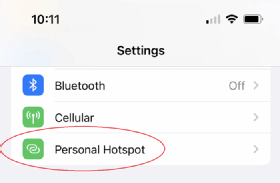
Setting up a hotspot
To access hotspot functionality on an Apple iPhone, navigate to Settings and choose Personal Hotspot (Figure 2).
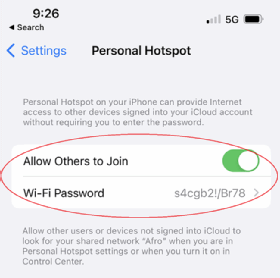
Next, toggle the Allow Others to Join switch on, and establish a shared key. Be sure to use a shared key that is not easy to guess, because this is the only way to prevent unauthorized users and devices from joining (Figure 3).
Using a hotspot
Once complete, the iPhone will begin broadcasting an SSID over 802.11 Wi-Fi signal spectrum. The SSID is the name of the iPhone itself. Devices that a user wishes to connect to the phone can see the SSID being broadcast and will be prompted to enter the shared key (Wi-Fi password). When the user enters this key correctly, the iPhone will provide the ad hoc-connected device with a private IP address, subnet mask, default gateway of the iPhone and DNS. When the connected Wi-Fi receives this information, it can access the iPhone's cellular internet connectivity.
Is an ad hoc network the right choice for you?
Despite the disadvantages over infrastructure-based wireless networks, wireless ad hoc networks remain a viable option for many personal and enterprise use cases. As long as network administrators understand the communication capabilities of a WANET -- and if those capabilities can fulfill a specific need -- building an ad hoc network is a quick and fairly painless way to connect two or more devices.