network switch
What is a network switch?
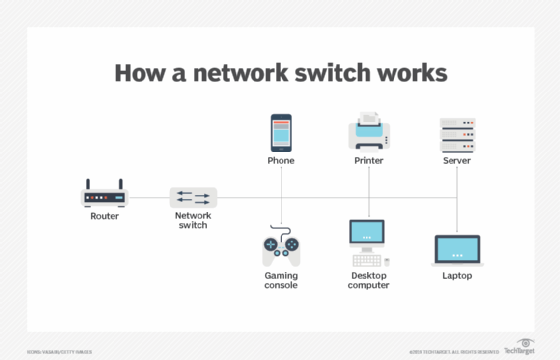
A network switch connects devices in a network to each other, enabling them to talk by exchanging data packets. Switches can be hardware devices that manage physical networks or software-based virtual devices.
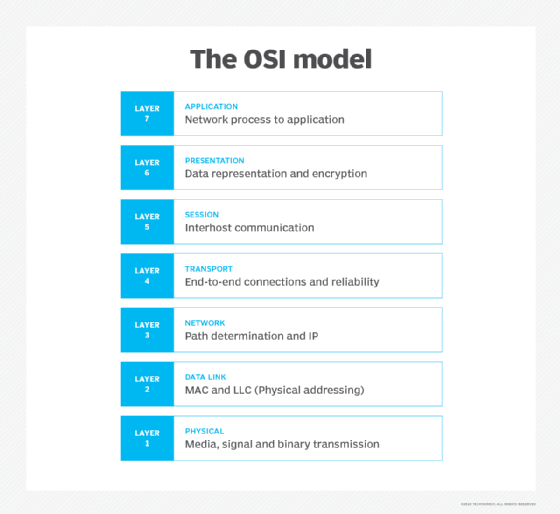
A network switch operates on the data-link layer, or Layer 2, of the Open Systems Interconnection (OSI) model. In a local area network (LAN) using Ethernet, a network switch determines where to send each incoming message frame by looking at the media access control (MAC) address. Switches maintain tables that match each MAC address to the port receiving the MAC address.
Why are network switches valuable?
Switches are responsible for relaying information between different endpoints and offer a plethora of benefits:
- Switches form the majority of network devices in modern data networks and carry huge amounts of traffic in telecommunications provider networks.
- They offer full-duplex communication, connect network segments, boost network performance and make effective use of available bandwidth.
- Switches provide the wired connections to desktop computers, wireless access points (APs), printers, industrial machinery and some internet of things (IoT) devices, such as card entry systems.
- They connect the computers that host virtual machines (VMs) in data centers, as well as physical servers and much of the storage infrastructure.
- Most modern switches employ the Power over Ethernet technology, which can deliver up to 100 watts of power to support the connectivity of network devices. This enables businesses to set up equipment like outdoor lighting, security cameras, voice over IP phones and various kinds of sensors for monitoring remote areas in locations where a separate power source is not necessary.
- Data from IoT devices can be collected by a network switch and used by artificial intelligence and machine learning algorithms to optimize smarter surroundings.
How does a network switch work?
All switches transmit data from one location to another, but their hardware and software configurations can vary greatly. A network switch can be deployed in the following ways:
- Edge, or access, switches. These switches manage traffic either coming into or exiting the network. Devices like computers and APs connect to edge switches.
- Aggregation, or distribution, switches. These switches are placed within an optional middle layer in a network topology. Edge switches connect into these and send traffic from switch to switch or send it up to core switches.
- Core switches. These network switches form the backbone of the network. Core switches connect aggregation or edge switches, users or device edge networks to data center networks and enterprise LANs to routers.
A data frame is flooded to all ports in the switching domain if it is forwarded to a MAC address that the switch infrastructure is not familiar with. Data frames for multicast and broadcast are also flooded. This is known as broadcast, unknown unicast and multicast flooding. This capability makes a switch a Layer 2 device in the OSI communications model.
Many data centers adopt a spine-leaf architecture, which eliminates the aggregation layer. In this design, servers and storage connect to leaf switches (edge switches). Every leaf switch connects into two or more spine (core) switches. This reduces the number of hops data takes to get from source to destination, therefore reducing latency.
Some data centers establish a fabric or mesh network design that makes every device appear to be on a single, large switch. This approach reduces latency to its minimum. High-demanding applications that use high-performance computing (HPC) often use this approach.
For small business and home networking, network switches provide the benefit of additional Ethernet ports for connecting to Gigabit Ethernet.
Not all networks use switches, however. A network might be organized in a token ring or connected via a bus, hub or repeater. In these networks, every network-connected device sees all traffic and reads the traffic addressed to it. A network can also be established by directly connecting computers to one another without a separate layer of network devices. This approach is mostly for HPC, which requires sub-5-microsecond latencies and is quite complex to design, wire and manage.
What are the types of switches?
There are several types of switches in networking:
- Virtual switches are software-only switches instantiated inside VM hosting environments.
- Routing switches connect LANs. In addition to doing MAC-based Layer 2 switching, they perform routing functions at OSI Layer 3 (network layer), directing traffic based on the IP address in each packet.
- Managed switches let a user adjust each port on the switch. This enables monitoring and configuration changes.
- Unmanaged switches enable Ethernet devices to pass data automatically using autonegotiation, which determines parameters such as data rate. The configuration is fixed and cannot be edited.
- Smart switches can be configured to enable more control over data transmissions, but they have more limitations compared to managed switches. Smart switches are also known as partially managed switches.
- Stackable switches are fixed switches that may be connected to one another via a backplane cable interface to form a single logical switch from two or more physical switches.
- Modular switches are switch cards for modular or chassis-based switches and can be inserted into a sizable, fixed-form factor chassis that can accommodate two or more cards. Since switch interfaces can be changed as needed, this kind of switch gives the greatest flexibility and upgradeability.
How to set up a network switch
Depending on the type of network, different types of switches can be used. For a small office LAN or a home network, a network switch is typically plugged into one of the ports on a router. A switch expands the number of wired internet-connected devices in a small network, including desktops, laptops and printers.
The typical steps involved in setting up a network switch are the following:
- The switch is purchased based on the needs and requirements of the network.
- The port on the switch is connected to the router using a straight-through cable. Most switches contain uplink ports, which are used for connecting to devices such as routers. However, if an uplink port is not present on a switch, any port can be used to connect to the router.
- Once the switch is physically connected to the router, the IP addresses of the devices are configured.
What are different uses of network switches?
A switch plays a crucial role in delivering internet connectivity and network communication across a network.
The following are the various use cases of network switches:
- By automating link connections, which removes manual and time-consuming settings, network switches provide effective connectivity, speed and ease of use among network devices.
- Switches help with building a more reliable and secure network as they provide some level of control over how data is transferred.
- Network switches are required when separate network devices need to be connected using a physical connection as they have several ports in the front. Usually, those ports are RJ-45 ports for Ethernet cables; however, the number of ports can vary.
- Switches can also operate in full-duplex mode, which enables simultaneous data transmission and reception across the network. Compared to hubs, which only enable half-duplex mode, switches practically quadruple the network's speed.
- Network switches are helpful for home networks and scenarios where high-powered streaming services are used regularly. They are especially beneficial if one needs a reliable way to stream or play 4K video.
- Since network switches maintain a list of the distinct MAC addresses of every device connected to them, most of the network communication is only routed to the intended destination and not broadcast to all connected devices. This reduces collisions and eliminates broadcast domains in a network.
Network switch vs. router
Network switches can be easily confused with routers. However, they have different functions and operate on separate layers.
Here are the main differences between a switch and a router:
- A network switch is a Layer 2 device on the OSI model. A router is primarily a Layer 3 device.
- A router moves data between two or more computer networks, while a switch facilitates the sharing of resources by connecting multiple devices on a single LAN.
- To determine the route and destination of a packet, a router examines the IP addresses of packets. A switch looks at the MAC address of each device to transfer data to the correct destination.
- Routers use data packets, whereas switches, which are part of the data-link layer, typically work with data frames.
- A switch is less sophisticated than a router because, unlike a router, a switch doesn't use routing algorithms to direct data around large networks.
- Routers can work within both wired and Wi-Fi networks, but a switch is restricted to wired network connections.
- A router offers network address translation, NetFlow and quality of service, while a switch offers none of these services.
Network switch vs. hub
Here are the main differences between a switch and a hub:
- While a network switch is a Layer 2 device on the OSI model, a hub is a Layer 1 physical device.
- A hub is relatively simple compared to a network switch because, unlike a switch, it doesn't keep track of the addresses of the computers it transfers traffic to.
- The goal of a hub is to connect all the nodes in a network, whereas an Ethernet switch connects all the network devices together and transfers data packets between those devices.
- Because a hub can't manage data going in and out of it as a network switch can, there are a lot of communication collisions.
- Switches prevent collisions by buffering Ethernet frames, but hubs cannot prevent collisions as the devices are connected on a single transmission stream.
Network components, such as switches, routers and hubs, all send data in different ways. Learn about the primary characteristics and distinctions of each of the three devices.